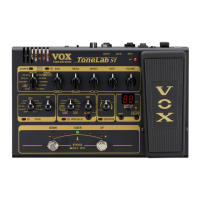
b 、CABINET ON/OFF switch and LED
This turns the cabinet model on/off. The LED will be lit if the
cabinet model is on.
By entering OPTION parameter setting mode you can set parameters for the
cabinet model.
b、CABINET 切换开关和 LED 指示灯
该按钮可以控制音箱模型的开关。LED 指示灯会在音箱模型开启时被点亮。
通过进入 OPTION 参数设置你就可以为音箱模型设置参数。
OPTION parameter setting mode
To enter OPTION parameter setting mode, hold down the CABINET
ON/OFF switch for about one second. You’ll be in OPTION parameter setting
mode, and the LED will blink.
OPTION parameter setting mode lets you make the following settings.
. GAIN control: cabinet model (CABINET)
. TREBLE control: presence (PRESENCE)
. MIDDLE control: noise reduction (NR)
When you return to the previous operation, press the CABINET ON/OFF switch
or the EXIT/TUNE switch.
NOTE: In OPTION parameter setting mode, the BASS and VOLUME controls are
disabled in this mode.
OPTION 参数设置模式
如需进入 OPTION 参数设置模式,按住 CABINET 开关大约一秒钟。你就会进入
OPTION 参数设置模式,同时 LED 指示灯会闪亮。
OPTION 参数设置模式让你进行下列设置。
·增益控制器[GAIN]:音箱模型(CABINET)
·高音控制器[TREBLE]:现场(PRESENCE)
·中音控制器[MIDDLE]:降低噪音(NR)
当你需要返回上一步操作,点击 CABINET 切换开关或者 EXIT/TUNE 按钮。
注意:在 OPTION 参数设置模式下,BASS 和 VOLUME 控制器是无效的。
c. AMP selector
This selects the amp model.
The amp model you select will determine the response of the gain circuit
and tone controls, and the order in which they are located in the circuit.
If the amp model is turned off, turning this selector will turn the amp
model on.
c、AMP 选择器
这是用来选择放大器模型的。
你所选择的放大器模型将决定增益电路和音调控制器的反应,以及它们位于该电

 To Next Page
 Loading...