4.2.3 Cameras with MPE Garry Micro-T Connector
Note
The following instructions apply to cameras equipped with a MPE Garry Micro-T
connector only. These are
• all single-sensor cameras in PRO design VRm(F)C-X.
It is assumed that you have ordered the optional “VRmC-X PRO Interface Cable”
( 2.3 on page 13).
Connecting the camera:
1. Connect the supplied cable with the MPE Garry Micro-T plug to the camera’s
receptacle ( Fig. 6 on page11).
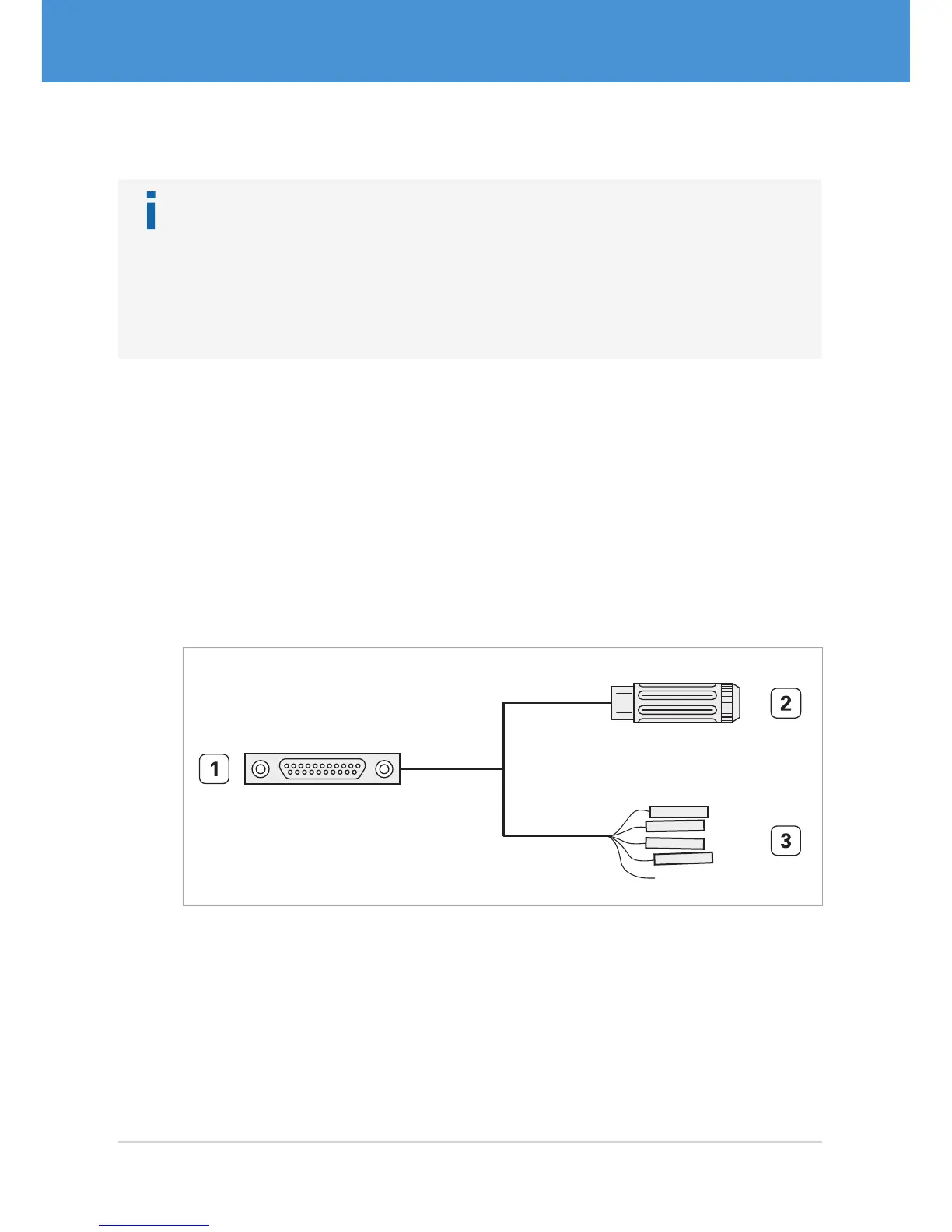
2. The other end of the cable splits into 0.1” receptacles for trigger and strobe and a
receptacle for an external power supply. Connect trigger and strobe, if required.
f View the cable plan for a detailed description ( 7.3 on page 36).
3. Connect the USB cable to the camera’s USB port.
4. Continue with 4.3 on page 23 and read the information on power supply.
1 11
12 21
...
Fig. 14: VRmC-X PRO interface cable for PRO cameras
1 MPE Garry Micro-T 387-1-021-ZS0, to be plugged into camera receptacle
2 Switchcraft PC722A receptacle for 5 V power supply
3 Receptacles for 0.1” connector (7 pieces)
USB Cameras – User Guide22



 To Next Page