4 Hardware Installation
4.1 Connecting External Sensor Boards
Note
This section only applies to remote-sensor cameras and multi-sensor cameras.
Caution
Possible malfunction of camera
Observe the correct orientation of the flex-foil cable contacts as indicated in the
instructions and the drawings. Otherwise the device will not function.
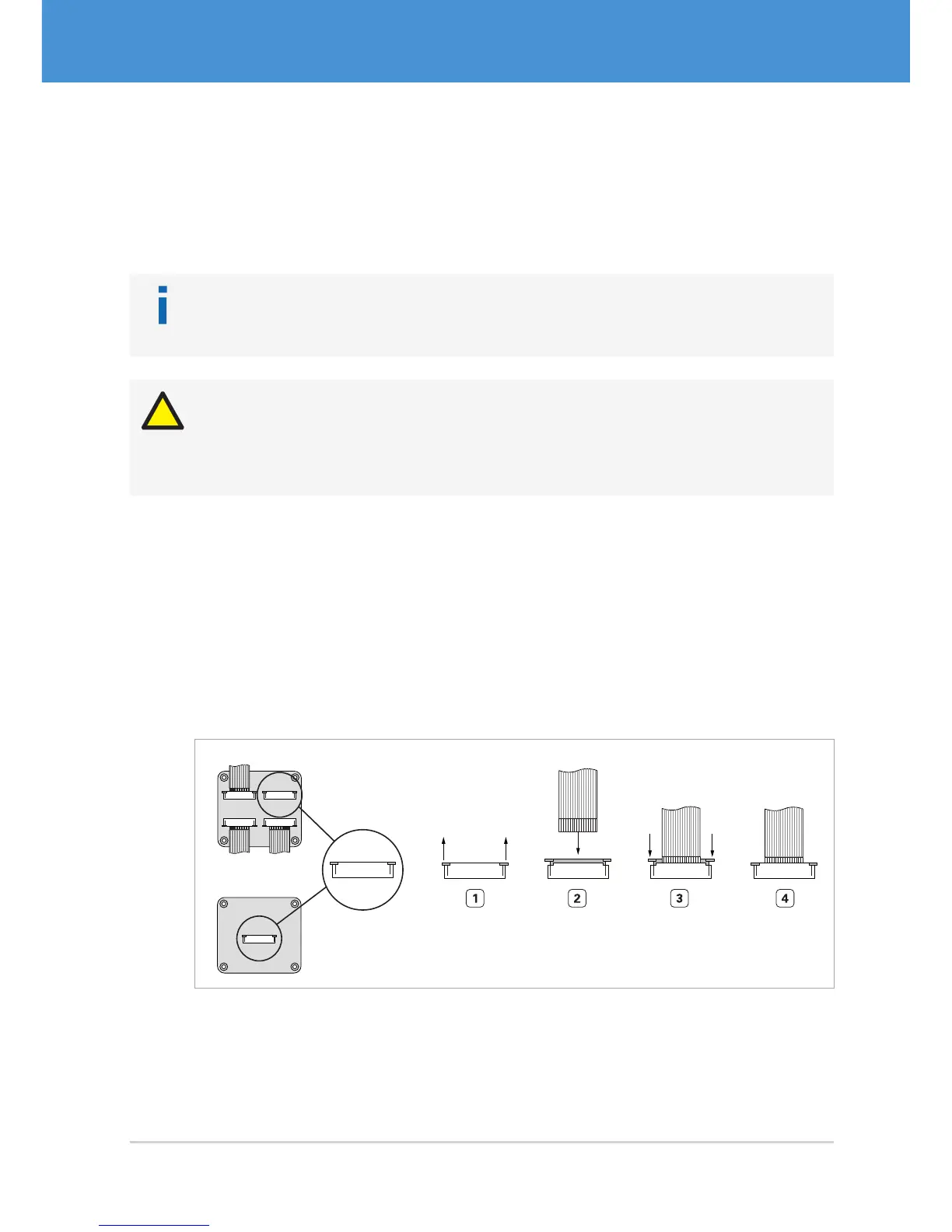
Connecting the flex-foil cable(s) to the base unit:
1. Pull out the lock of the connector on the base unit ( Fig. 9 on page17).
2. Insert the flex-foil cable with the blue marker facing the board and the open con-
tacts facing you.
3. Secure the cable by pushing the lock back in.
4. Repeat steps 1 to 3 for further external sensor boards.
Multi-Sensor Base Unit
Remote-Sensor Base Unit
Fig. 9: Connecting the flex-foil cable to the base unit: contacts visible, blue marker not visible
17USB Cameras – User Guide
Hardware Installation



 To Next Page