VuStream 150 – User Guide
© 2019 VuWall Technology, Inc. 6
Connecting to the device via point-to-point
Use this alternative way if there is no DHCP server in place at the time of setup, or if a very limited
number of devices need to be configured.
The VuStream150 device can be configured over a Web GUI with a browser. To configure the device via
point-to-point connection, make sure to have the following components:
✓ PC with available network port
✓ Network cable
✓ 1x VuStream150 12v power adapter
For the initial configuration, follow the steps below to configure the device in point-to point method.
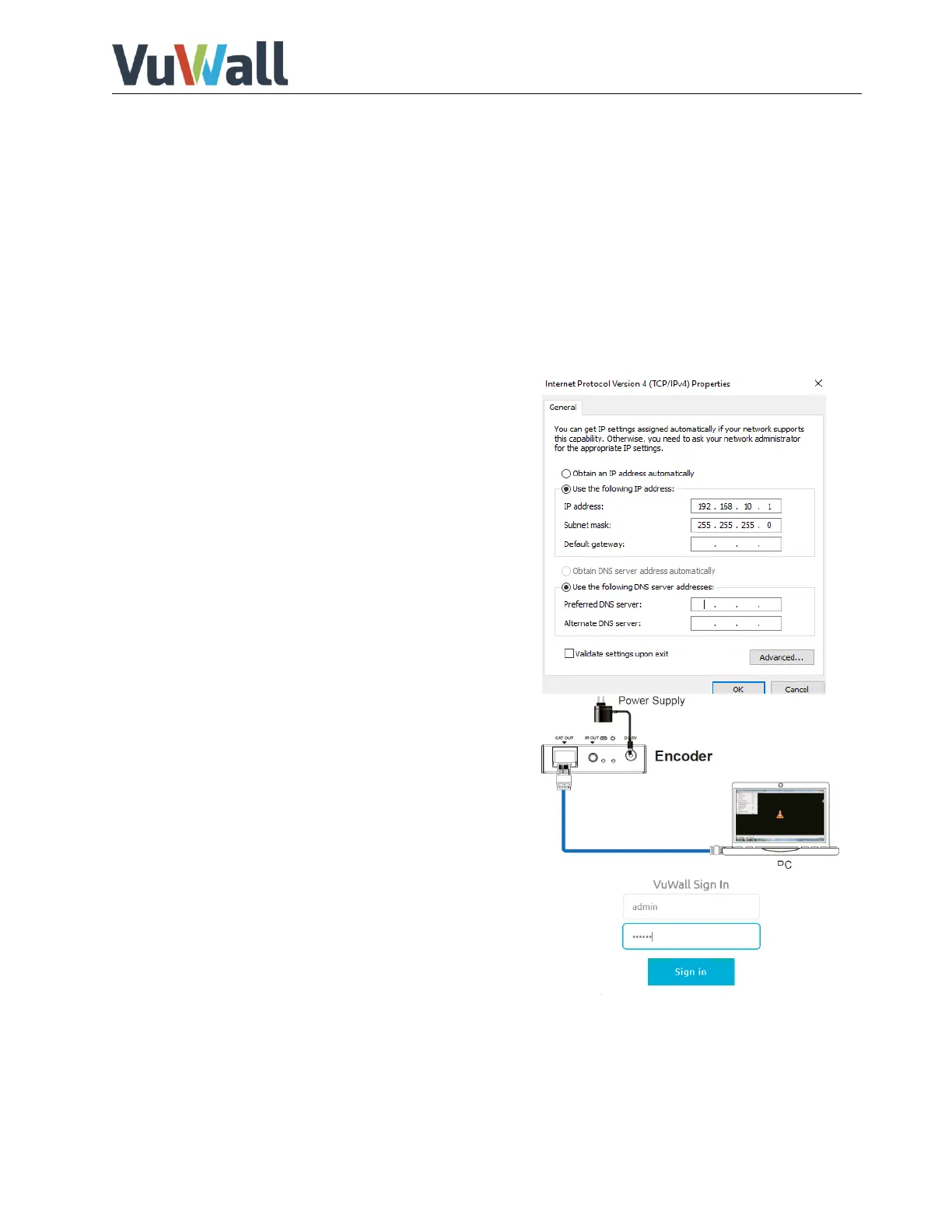
5) On the PC, configure the available network port IP
address to an address of the same subnet as the
factory setting of the device. (example:
192.168.10.1 subnet mask 255.255.255.0)
6) Connect a straight network cable from the PC to the
CAT OUT port of the device and connect power.
7) On the PC, launch a browser and enter the IP
address of the device to
connect to the WebGUI page of the
device (Default factory
address is 192.168.10.150).
8) Enter the credentials to log in to manage
the device. Default login credentials are:
Username: admin
Password: vuwall
If you intend to use this encoder on your network, you will need to set a permanent IP address for the
device (Network section, User Guide page 6).


 To Next Page