VuStream 150 – User Guide
© 2019 VuWall Technology, Inc. 7
Network
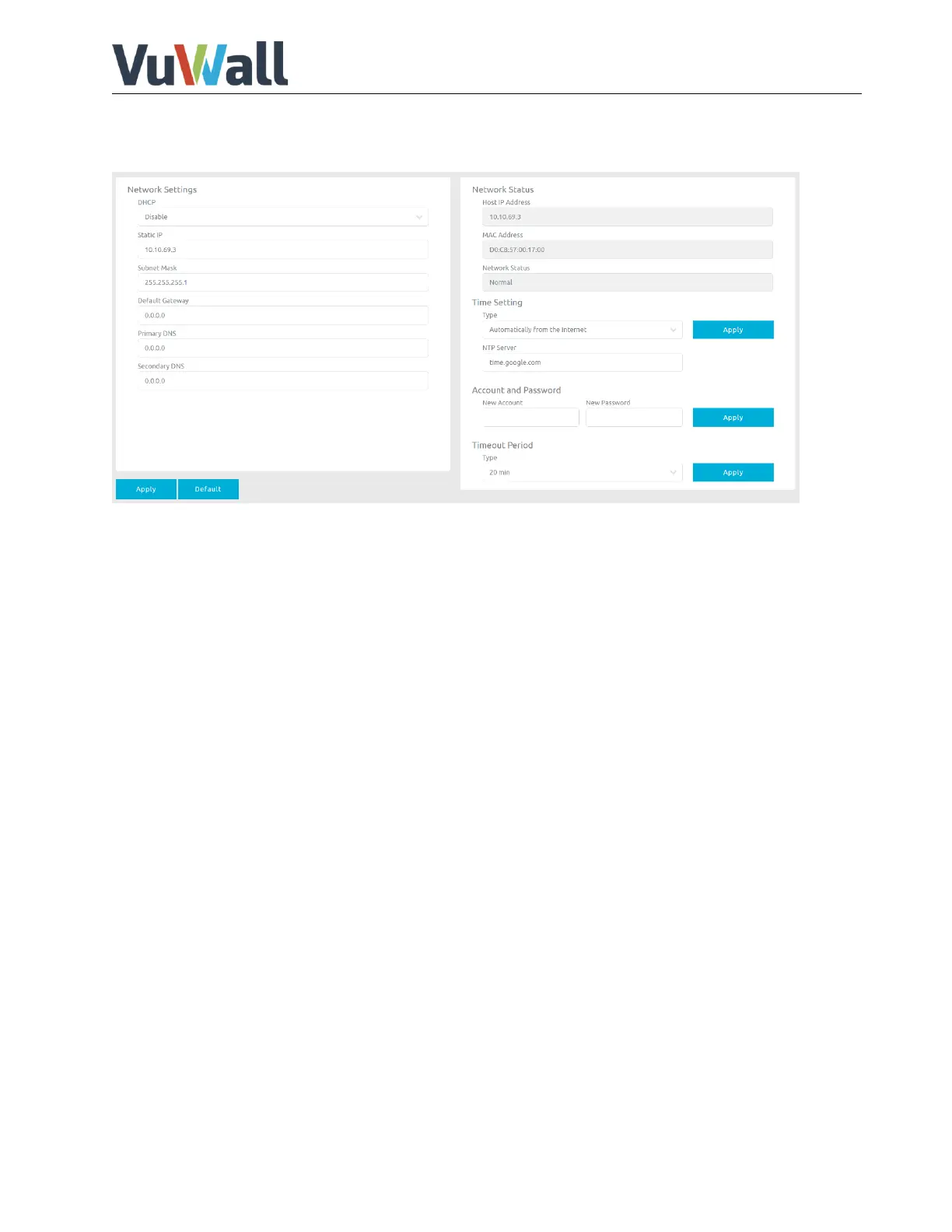
Here you can adjust the network settings for the device.
DHCP: Enable/disable DHCP
Static IP: Setting static IP
Subnet Mask: Setting subnet mask
Default Gateway: Setting default gateway
Primary DNS: Setting primary DNS
Secondary DNS: Setting secondary DNS
Network Status: Current IP address and network status
Time Setting: Set time server and sync type.
Account/Password: User can assign new account and password here.
Timeout Periods: Set automatically user logout time
When set to DHCP, IP address, Subnet Mask and Gateway will be provided from the DHCP server on the
network.
When set to Static you will need to set IP Address, Subnet Mask and Gateway. Make sure that the
entered gateway address is in the same subnet as the IP address.


 To Next Page