26
PXM
P_02591
P_02592
P_02593
OPERATING AND ASSEMBLY MANUAL
VERSION 08/2015 ORDER NUMBER DOC2350372
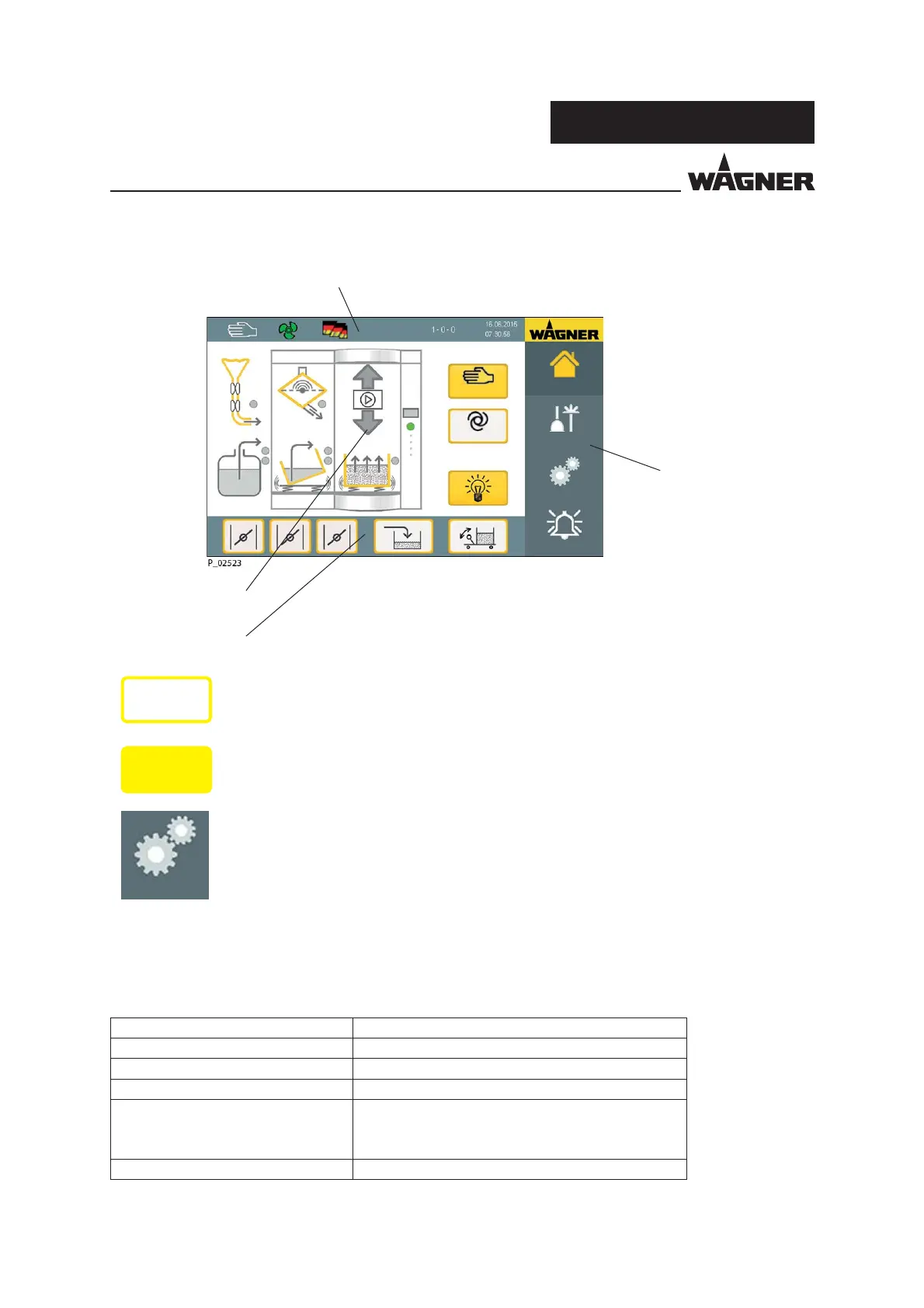
5.7 SCREEN LAYOUT OF THE TOUCH SCREEN
Information bar
Function graphic
Function bar 1
Menu bar
Home page
Auto
Cleaning
Settings
Alarm
Manual
Tap on the respective component/function on the touch screen to switch things on and o .
The status of the individual components is depicted on the screen by di erent colors of the
points on the respective components:
Status Display Description
Gray Not active
Green Ready
Flashes yellow Warning
Lights up yellow During fresh powder feed in automatic mode:
The fresh powder conveyor is ready to feed powder,
but enough powder is available
Flashes red Malfunction
Released functions and components are marked by a yellow frame.
Activated functions and components are depicted by yellow highlighted
icons or buttons.
Non-activatable functions are depicted by a gray font for each function
button and a gray frame.
On
On
Settings
Service


 To Next Page
 Loading...