EasyManua.ls Logo

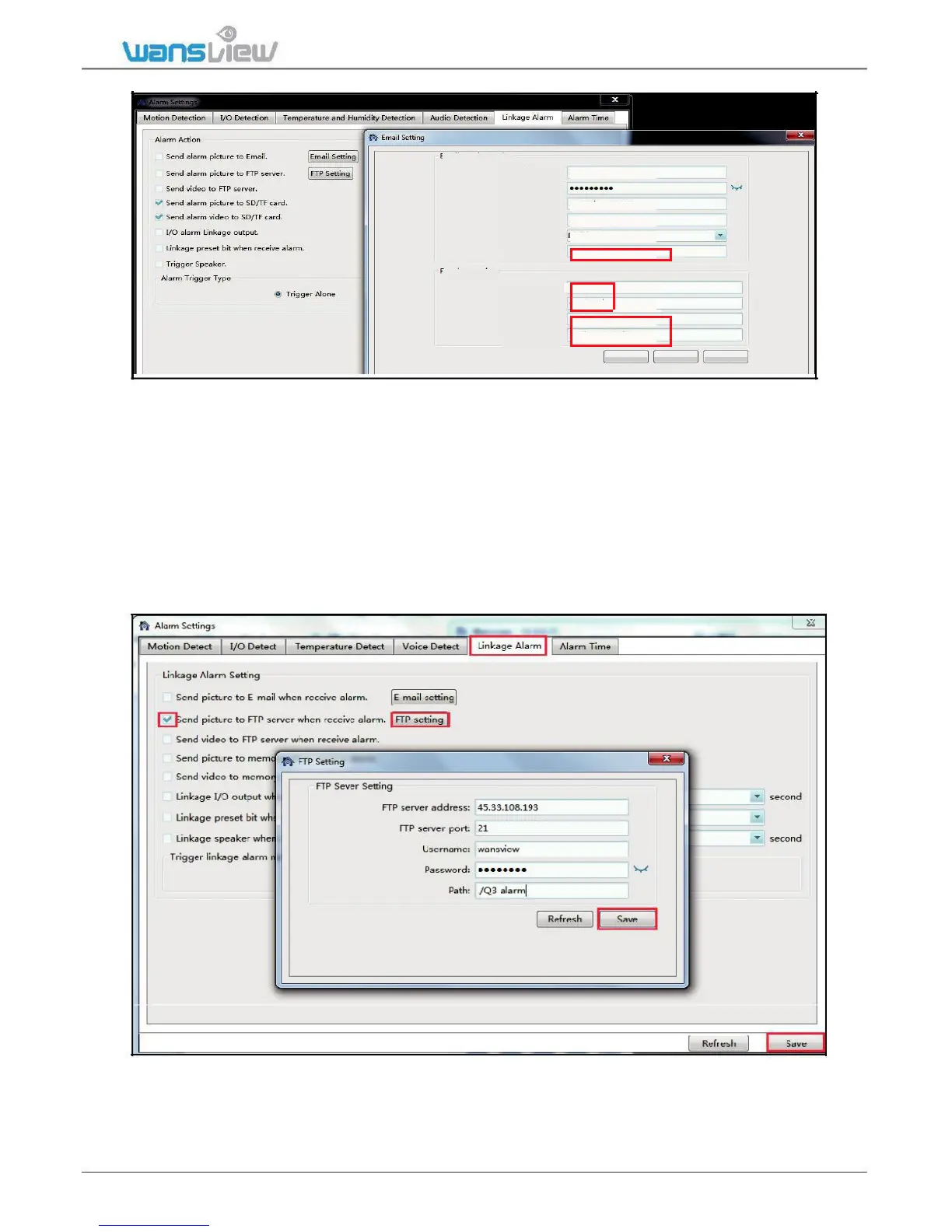
Wansview K2 - 2)FTP Setting

Wansview K2
66 pages
Print Icon
To Next Page IconTo Next Page
To Previous Page IconTo Previous Page
Loading...
Email Sender setting
Email address:
service2@wansview.com
Email Password:
SMTP Server:
smtp.qiye.163.com
SMTP Port:
25
Security Type:
NONE
email, it should be the same
Sender:
service2@wansview.com
with "Email address"
Receiver Setting
E-mail subject:
alarm
any information
E-mail content:
Q3 alarm
Receiver 1:
service@wansview.com
any email
Receiver 2:
service2@wansview.com
Test
Refresh
Save
2)FTP Setting
FTP Server Address: This field allows the user to designate an IP address or DDNS
address for the FTP server.
Server Port: This field allows the user to designate the port number for the FTP server.
User Name: Input FTP user name.
Password: Input FTP password.
Path: Specify a folder for storing video and pictures, for example: ./Q3 alarm
Note: If you want to save the alarm picture and video to FTP, you must build an FTP
sever, then create an FTP account with a password (not an anonymous account) on your
FTP server and FTP account must have create and delete file rights.

www.wansview.com 40

Table of Contents

Other manuals for Wansview K2

Related product manuals