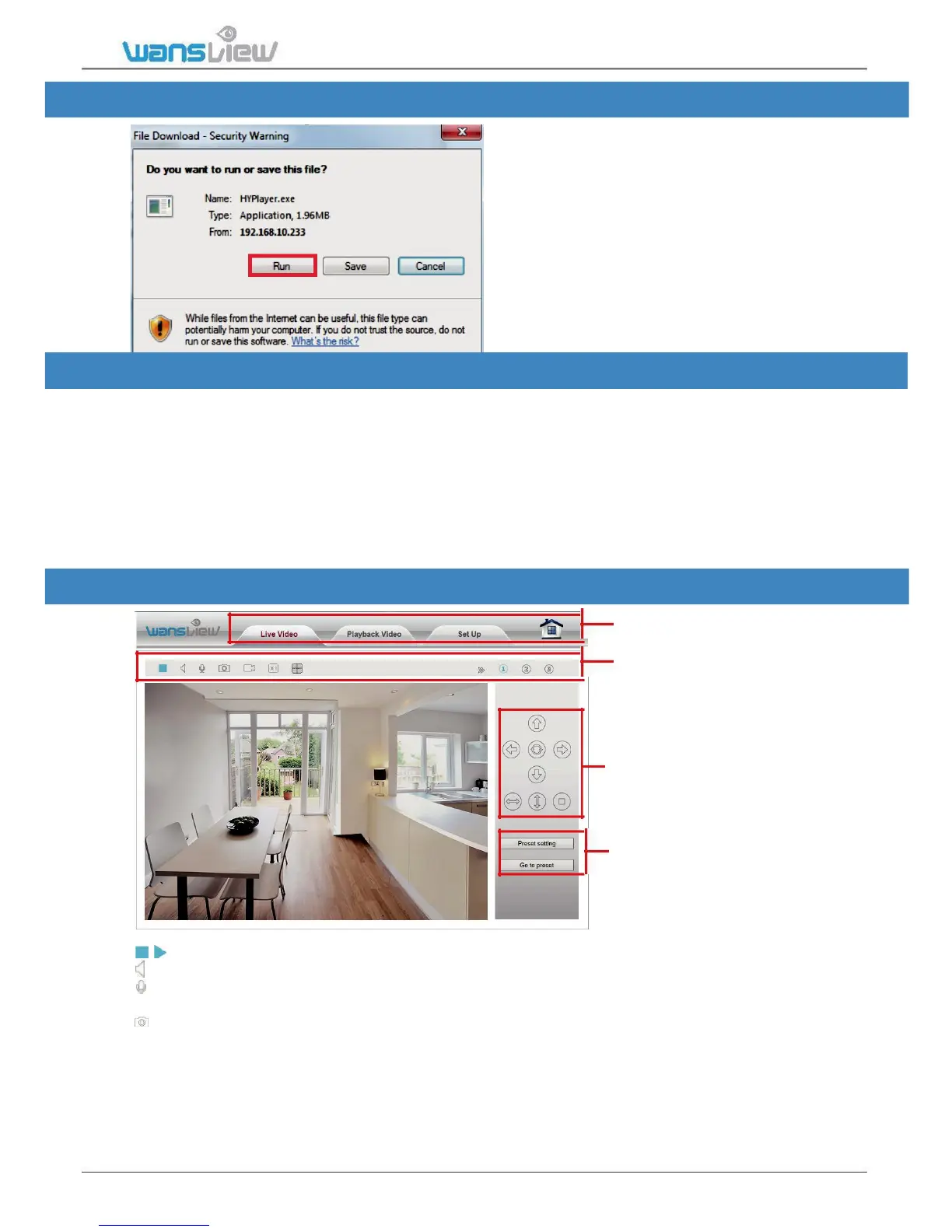
5.1.2 View Video-Mode 1 - Complete Camera Management
Click on Download Plugin to
download and install the OCX
Plugin-HYPlayer plugin.
Note: If you use Google Chrome or
Firefox, they don’t support Mode 1,
please chooose mode 2.
5.1.3 View Video- Mode 2 – Limited Camera Management
This view is supported by the Adobe Flash Player plugin and if is not installed, the
browser will prompt to download and install the plugin.
In the Flash Player mode, users have less functions. Microsoft Edge is not supported.
If you use Chrome and it shows “no playable sources found”, please tap Chrome setting -
-- Advanced setting --- Content --- Flash --- add camera’s LAN IP address and port
number --- refresh the camera web page.
5.2 Live Streaming and Recording on PC
Menu Bar
Video Menu Bar
Pan/Tilt Control(disabled on
this model)
Preset(disabled on this
model)
/ Play/ Stop: Play and stop video.
Listen: If your PC is equipped with speakers, click here to listen from your camera.
Talk: Activate the Talk function. A microphone is needed in your PC. Adjust volume under Set
up > Video&Audio >Audio.
Snapshot: Capture live images and save to PC. Set folder for the snapshots in Setup >
Local Configuration.
Snapshots format is JPG.
IP Camera K2(720P)/K3(1080P)



 To Next Page