2.2 Live Streaming
Each camera can be accessed by up to 4 users at the same time.
The administrator can setup 3 different levels of access: administrator, operator and
viewer.Please refer to Page 22.
Viewing Camera on a Single Window
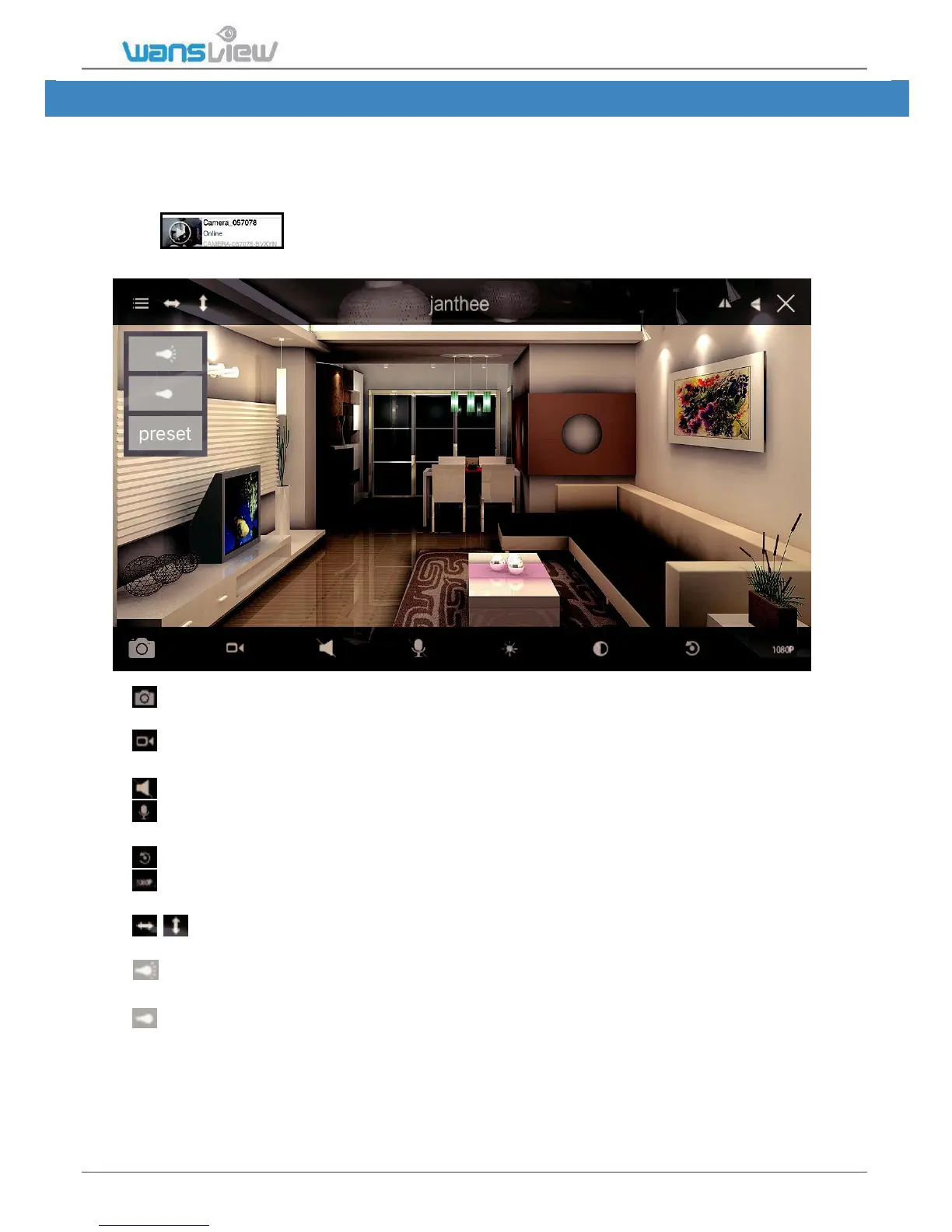
Tap the monitoring screen to see the video menu.
Snapshot: User can save snapshot picture to the mobile phone storage, and can check
the snapshot from More-Pictures or from Local Picture/Record.
Record: User can record video to the mobile phone, and check it from More-Records
or Local Picture/Record.The record will stop if you leave the live video screen.
Listen: When the Listen is on, user can listen what happening on the camera end.
Talk: When enabled the Talk, user can hold the “Hold Talk” to communicate with
the people/pets on the camera end.
Restore: To restore the Contrast and Brightness to default value.
1080P Resolution:Switch 1080P/480P (K3) and 720P/480P/240P (K2). When the
network is not good, try lower down the resolution to get a smooth video feed.
Cruise Vertically/Horizontally : Max 10 cruise, default 1 cruise, user can set up
from camera’s web page: Set Up-System-Pan & Tilt.
IR Auto: IR Led switches on at night when the luminosity is under 5 lux, if the
camera has no night vision, tap here to enable the IR led.
IR OFF: Tap here to turn on the IR light, if disabled, camera has no night vision.



 To Next Page