Section 4 Auto-Zone Plus
4-18 Start-Up and Troubleshooting
1.3.8 Checking the Zone Manager Local Loop Driver
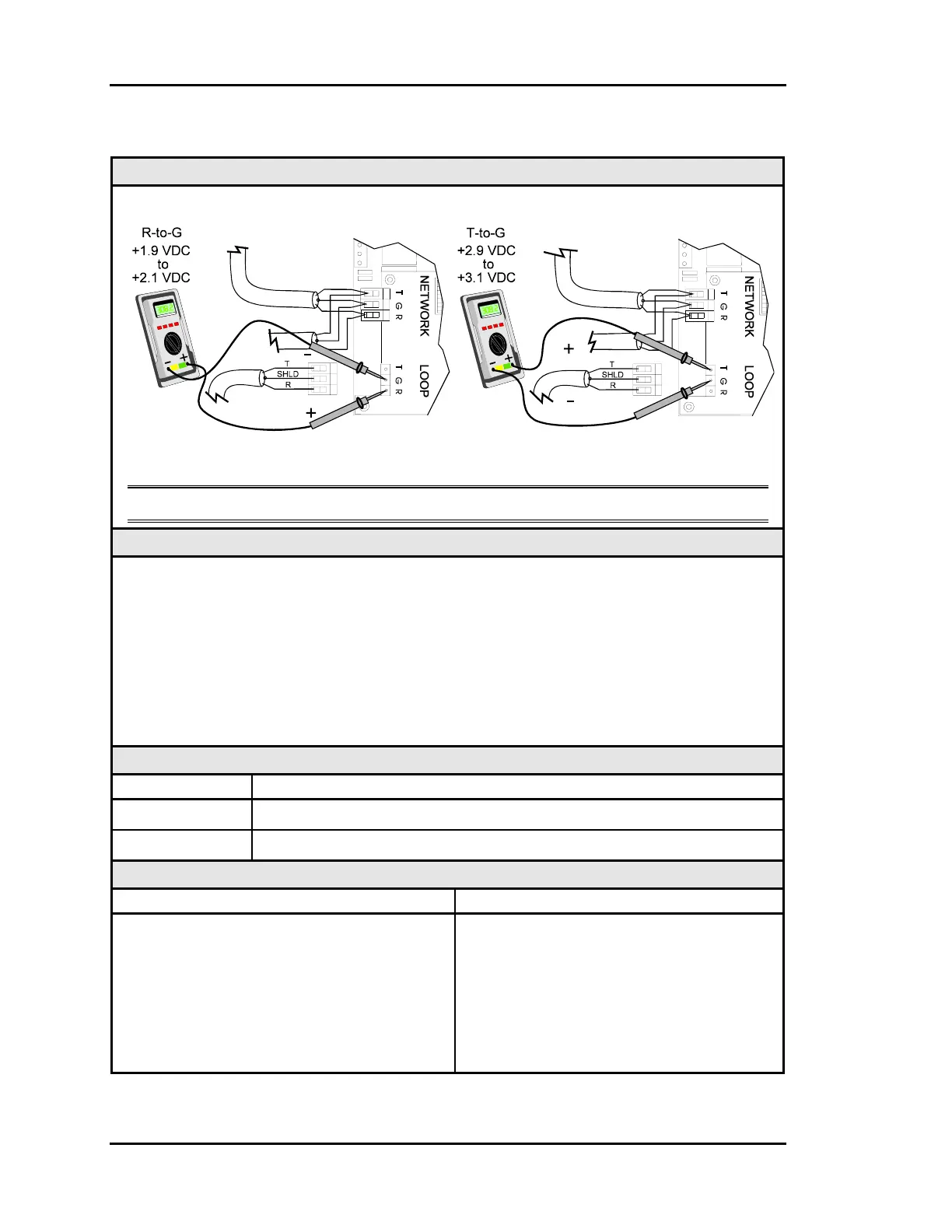
Diagram
Meter Set To Read DC Volts
The indicated values are typical of a normal operating system. Actual readings may deviate
slightly.
Note: These tests assume that the zone manager is powered up.
Overvie
This test checks for proper Local Loop voltages coming from the Zone Manager.
Tip The Local Loop LED (located near the connector) should “flicker” when the Zone
Manager is operating and when first powered up. If the LED is not flickering, the unit
is not functioning.
Proper loop voltages are essential for reliable communications. It is normal to see
fluctuations at this point on the Zone Manager. The average value should be close to the
acceptable range described below. Values will vary upon initial powerup for about 10-15
seconds. The voltage will fluctuate as the unit attempts to communicate.
Measurements
Local Loop Acceptable Range
T – G (SHLD) 2.9 - 3.1 Volts DC
R – G (SHLD) 1.9 - 2.1 Volts DC
Action
Condition Action
If voltages are too high or too low on either
side
1. The Zone Manager has a damaged
Comm Driver chip on either the
MiniLink or the Zone Manager main
board. Locate and replace the driver
chip(s). See "1.3.11Comm Driver Chip
Replacement”.
2. The Zone Manager is not functioning.



 To Next Page