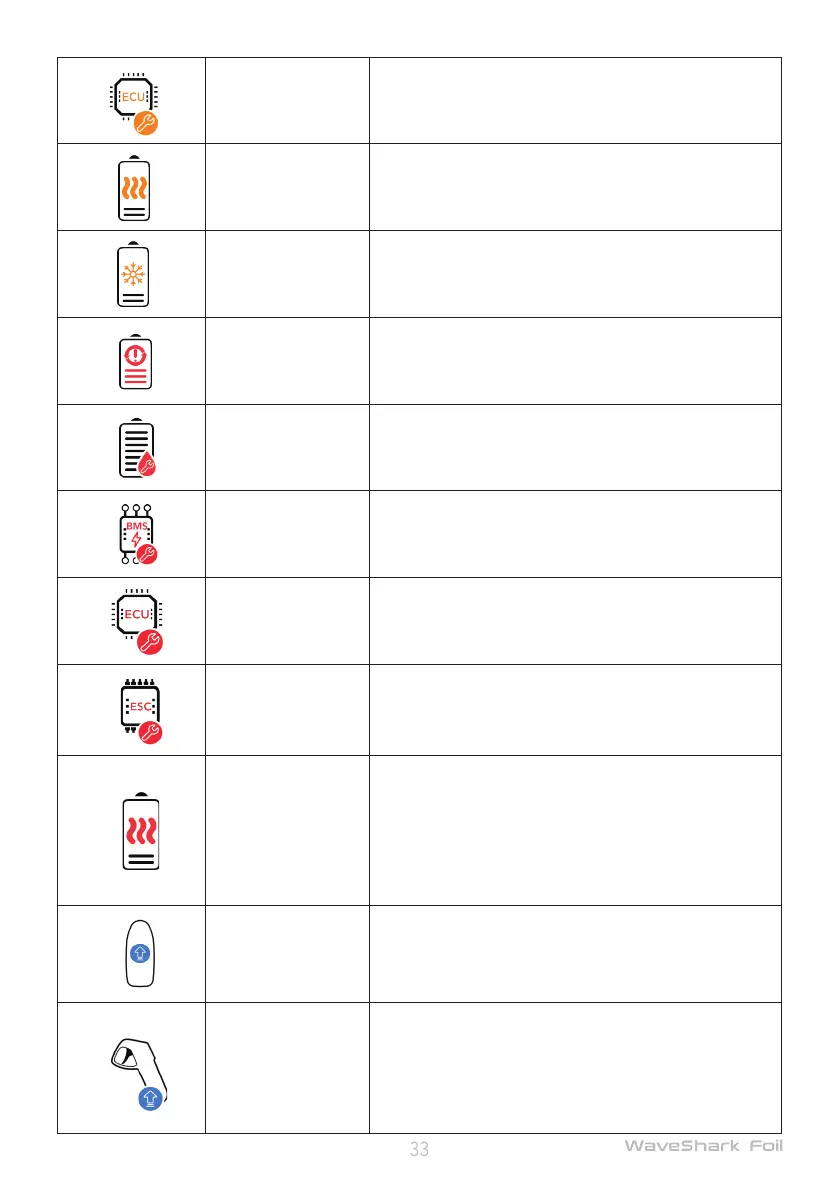
ECU error
Please return to the shore immediately and take note of
the error code and consult after-sales technical support.
Overtemperature
error
Please return to the shore immediately and wait until the
battery temperature returns to normal. If the problem
persists, please take note of the error code and consult
after-sales technical support.
Too low battery tem-
perature error
Please return to the shore immediately and wait until the
battery temperature returns to normal. If the problem
persists, please take note of the error code and consult
after-sales technical support.
Severe battery life
error
Please connect the app to check the life cycle of the bat-
tery. Please consult the after-sales technical support.
Battery exposed to
water
Please turn the battery immediately off and move it to a
safe and open area. Keep clear of the battery and consult
the after-sales technical support.
BMS severe error
Please try to power on/off again. If the problem persists,
please take note of the error code and consult after-sales
technical support.
ECU severe error
Please try to power on/off again. If the problem persists,
please take note of the error code and consult after-sales
technical support.
ESC severe error
Please try to power on/off again. If the problem persists,
please take note of the error code and consult after-sales
technical support.
Severe battery over-
temperature error
When a too high temperature level is detected on the
battery, the board will power off automatically. Please
return to the shore immediately, and contimue to use the
board after the battery temperature is restored to a nor-
mal level. If the problem persists, please record the error
code, and consult after-sales technical support.
Outdated board rm-
ware
Power off the remote controller and power on the board,
connect the app to the board, and upgrade the rmware
of the board as indicated by the app, until the board is
available.
Outdated remote con-
troller rmware
Power off the board and power on the remote controller,
press and hold both the Upshift and Downshift buttons
on the remote controller to go into slave mode, connect
the app to the remote controller, and upgrade the rm-
ware of the remote controller as indicated by the app,
until the board is available.


 To Next Page