23
WAS.handling Windows – Program
4.3.4 Ethernet configuration
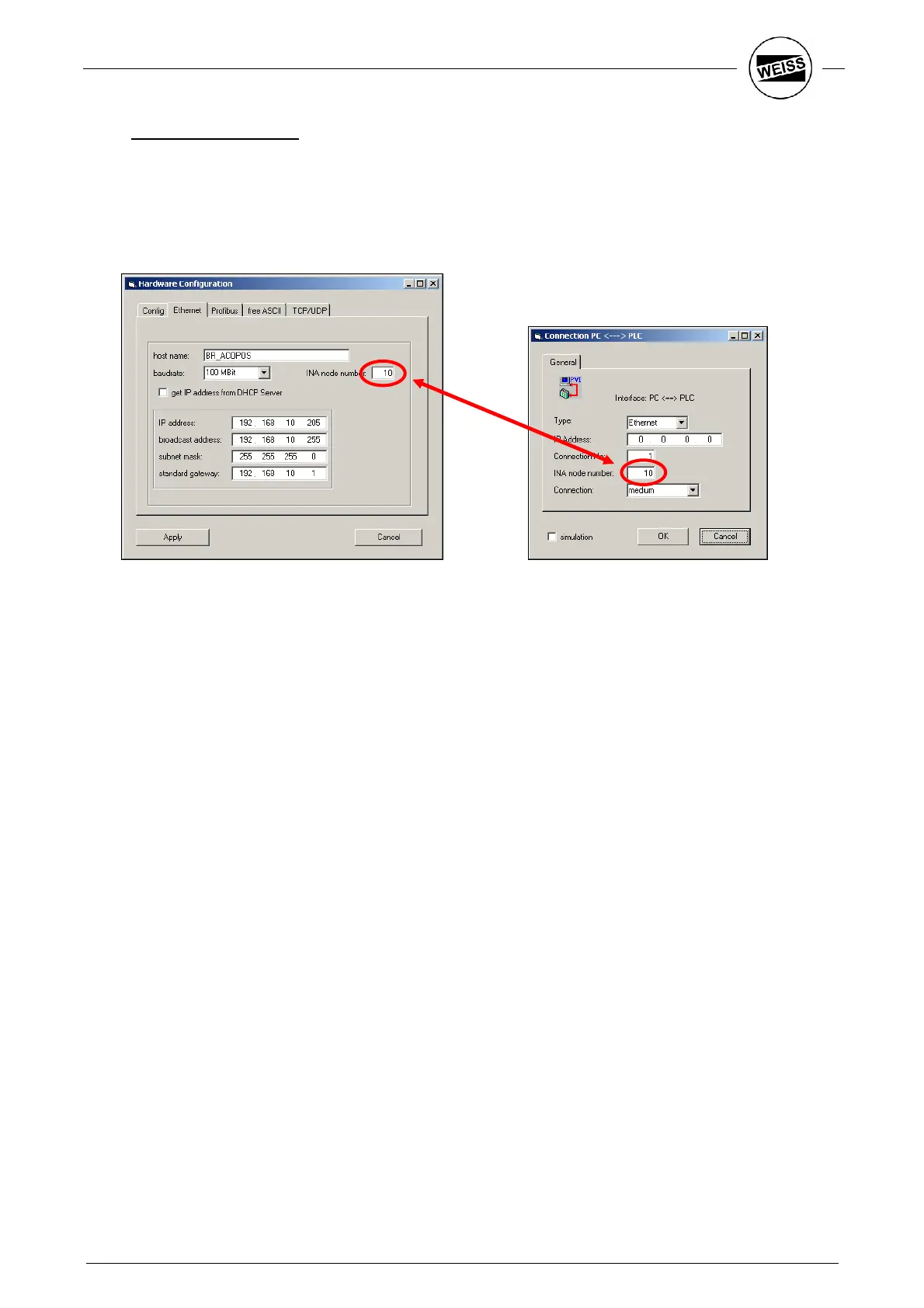
Tools -> HW_Config menu opens the dialog for the configuration of the Ethernet interface of the slot CPU on
the Ethernet tab.
The Ethernet interface is necessary to establish a connection to the WAS Windows program via Ethernet
instead of RS232. Furthermore, Ethernet must be parameterized if the interface is to be used for controlling
the system via Ethernet (TCP/UDP).
Host Name:
The device name in the network.
Baud rate:
The interface’s bit rate can be 10Mbit, 100Mbit or automatic.
Hint: With a slow connection (e.g. WLAN router) it can be advantageous to fix the
baud rate at 10Mbit.
INA node number:
Denotes the station number of the HP140. The B&R PVI driver needs this number
(cf. chapter 4.1.1).
Get IP address from
DHCP server:
By selecting this option, the IP address is automatically assigned by a DHCP server.
Manual input is not necessary.
IP address,
Broadcast address,
Subnet mask:
Use these parameters to address the device unambiguously in a network.
Standard Gateway:
The IP address of the server that can be used to communicate with other networks
outside the subnet. Input here is optional.


 To Next Page