WAS.handling Windows Program
16
4.3 Options menu
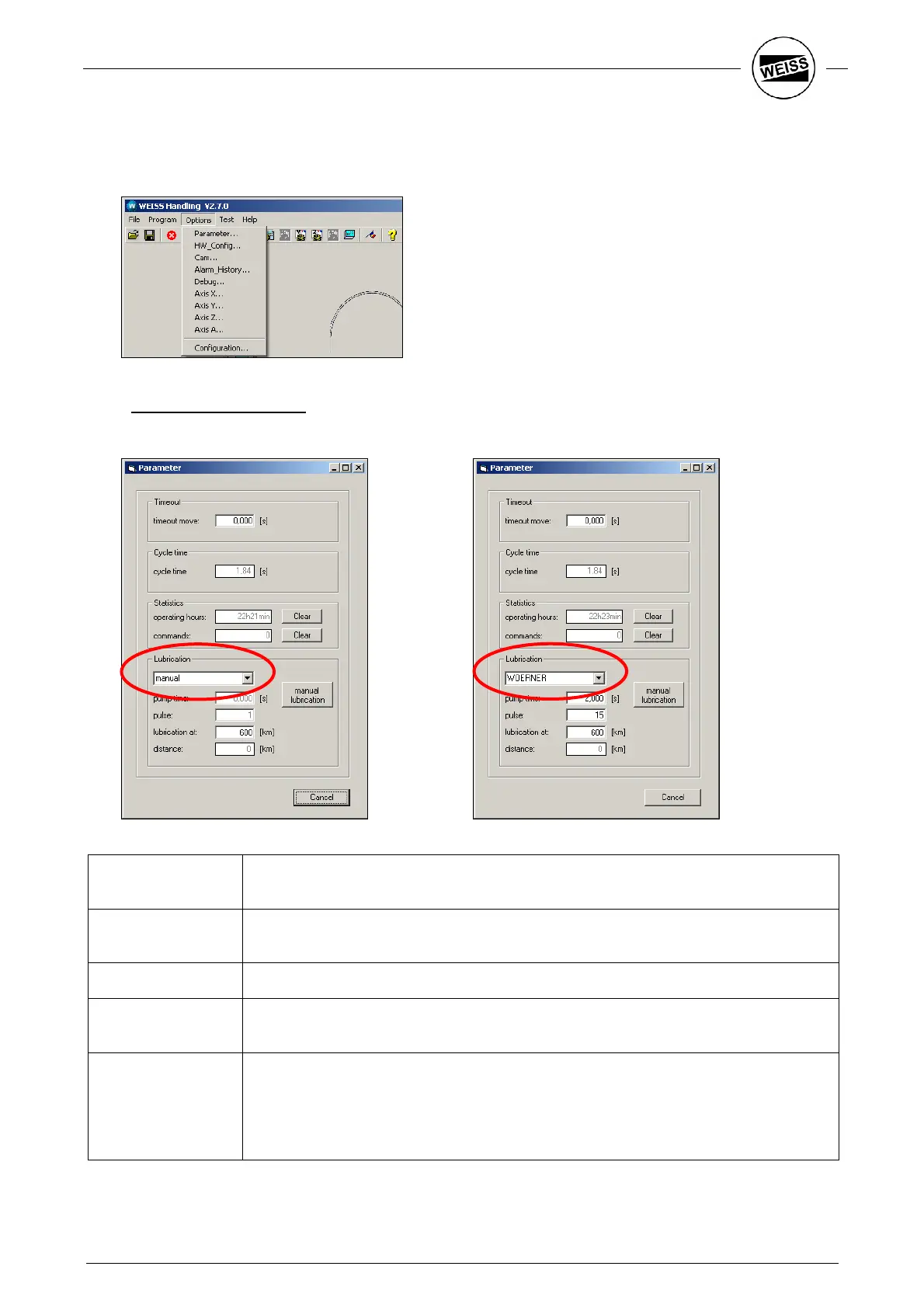
Use the Options menu to access all functions for parameterizing the axes and to configure the interface to
customer PLC.
4.3.1 “Parameter” dialog box
This dialog box shows all important parameters for the operation of the HP140.
timeout move: Maximum allowed time for a single motion (Move to Pos...)
If “0” is entered, the time is calculated automatically (default).
cycle time: The cycle time is displayed if the stopwatch function of the sequences is active.
Otherwise the last measured value will be displayed.
operating hours: Operating hours counter
commands: If the command „part counter + 1“ is called up in the sequences, the counter is
displayed here.
Lubrication: - When selecting "manual“ for Lubrication, parameters can only be read. When the
given operation time is reached, a signal may be sent to the supervisory control. To
reset the operation time, press the “Manual lubrication” button or set an appropriate
input signal.
- If a central lubrication system is selected, appropriate inputs and outputs must be
wired. The exact wiring can be seen from the corresponding documentation.


 To Next Page