WAS.handling Windows Program
38
5 Example project
In the following example project, the procedure for starting up the HP140 is described. The hints for creating
a drive sequence are especially interesting.
5.1 Establish connection between PC and drive
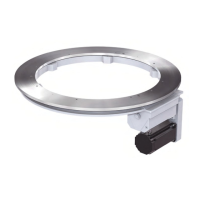
• Insert serial cable for connecting PC and drive.
• Switch on the control system and wait for the RUN LED of the CPU to show a continuous green light.
• Start Windows program WAS.handling and parameterize PC interface using the File – Connection
menu. Select the interface used, COM1...8, and confirm with OK.
• This needs to be done only once. The settings are saved and the next time you start WAS.handling the
connection is immediately established.
• In the bottom right of the status bar the display changes from “OFFLINE” to “…”. Wait until it displays
“ONLINE”.
X1:
RS232
LED:
RUN


 To Next Page