27
WAS.handling Windows – Program
4.3.8 Axis X..A
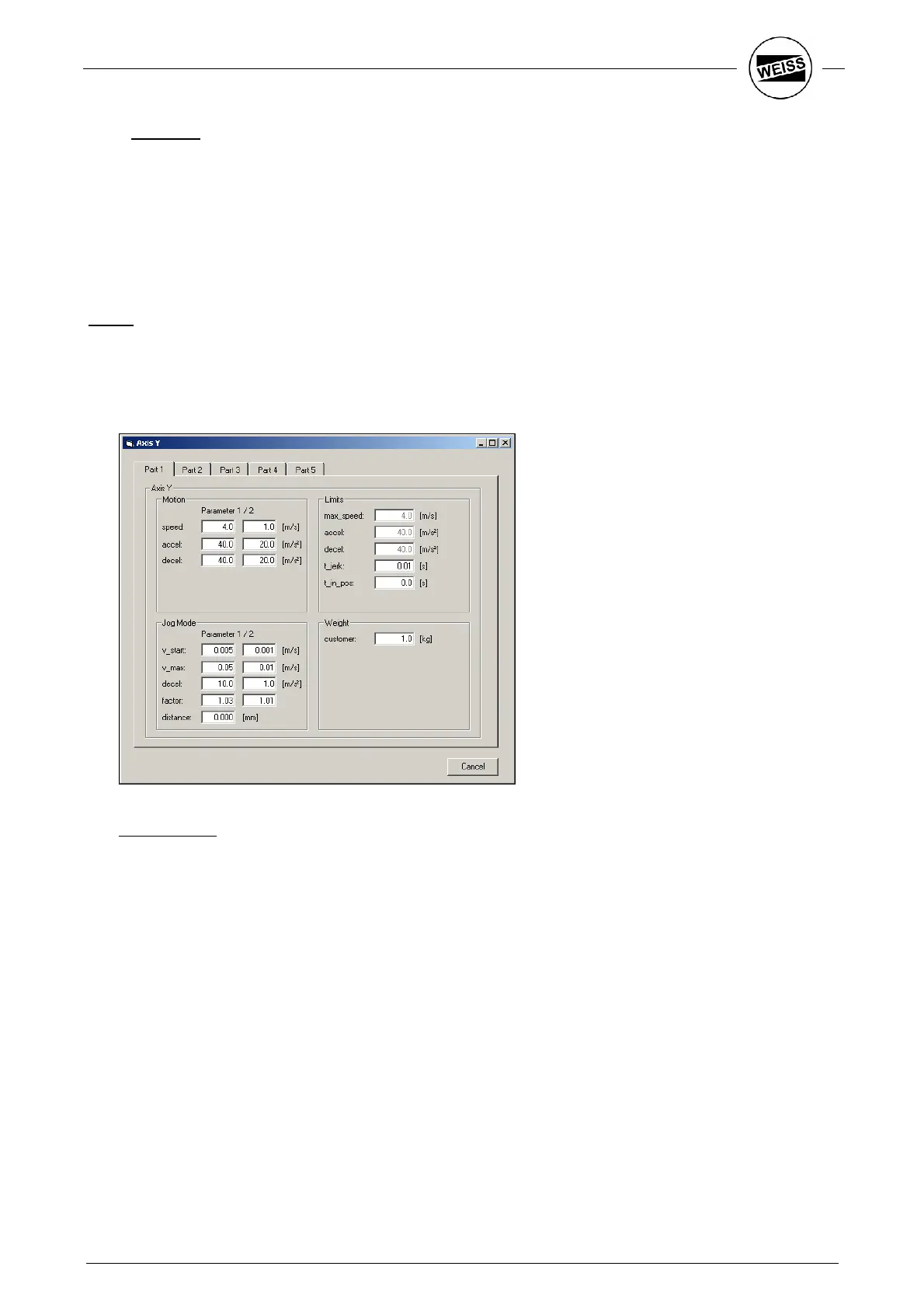
Use the menu item “Tools->Axis“ to change important axis settings. Because of the large number of settings,
this dialog box is divided into 5 parts. Parts one and four are important for customer-specific parameterizing.
Part 1: Sets the maximum acceleration and speed
Part 2: Control parameters
Part 3: Reference drive parameters
Part 4: Device-specific parameters
Part 5: Live display of position, speed and power consumption.
Part 1:
To operate the HP140, two different sets of parameters are available that can be pre-selected using the
various interfaces. The respective values are entered into the fields Motion and Step mode.
Upon entering the customer-specific load in the Load field, the maximum possible acceleration is
calculated and entered in the field Limits. The parameters in the field Motion are adjusted as well.
Group motion:
speed: Maximum speed of the linear motor.
accel: Starting ramp
decel: Stop ramp. Usually equal to start ramp


 To Next Page