WAS.handling Windows Program
46
5.5.3 Create sequences
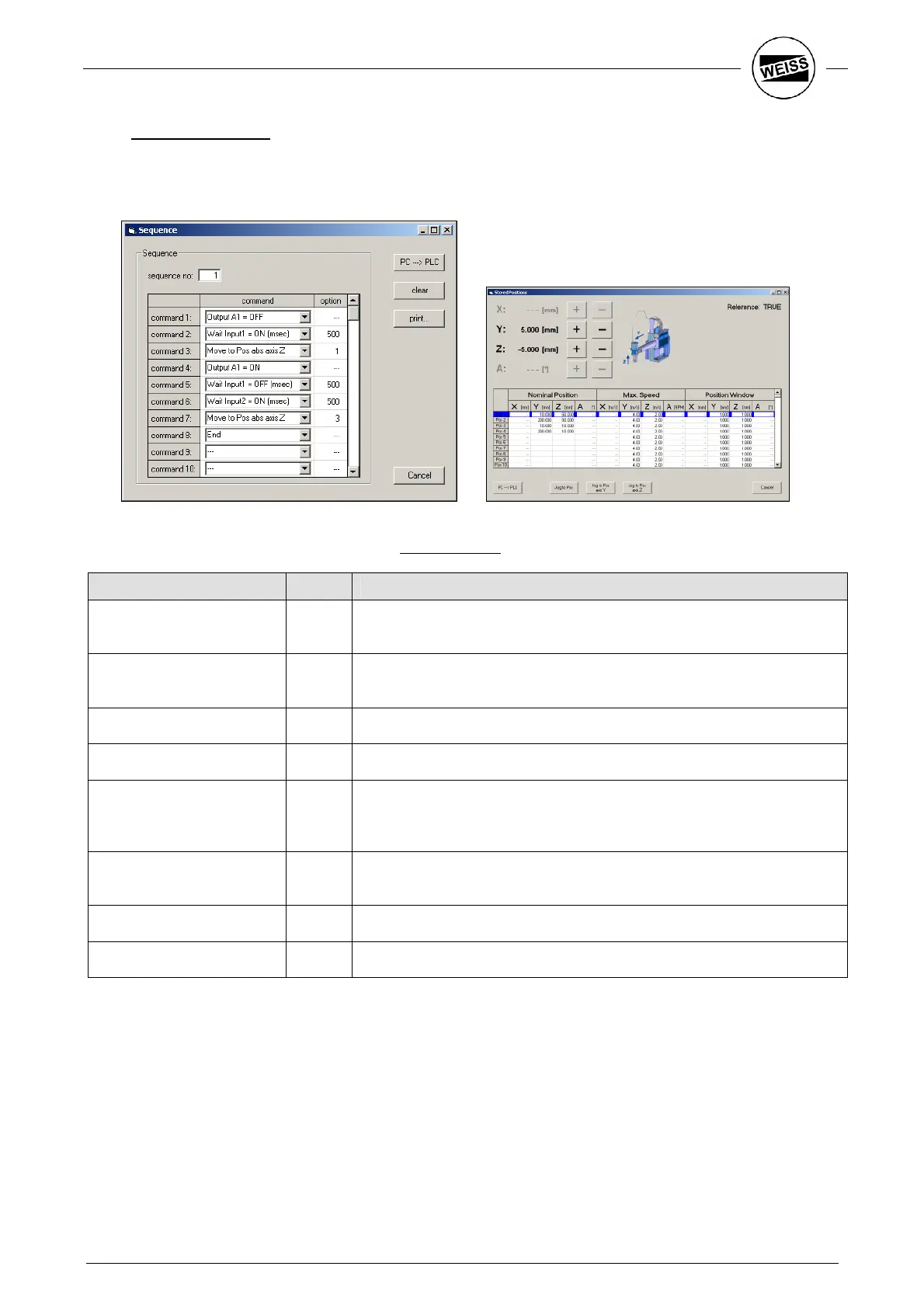
Create the drive sequences using the Program – Sequences dialog.
To enter the positions after the drive commands, the positions table can be opened right next to it.
For the example program the structure of the Pick sequence looks as follows:
Command Option
Description
Output A1 = OFF --- First, the gripper is opened resp. it is made sure that it is open.
way a crash is avoided when picking up the work piece.
Wait Input1 = ON (msec) 500 Wait for input “Gripper open“. After 500ms the sequence is
and an error message generated.
Move to Pos abs axis Z 1 Drive Z axis to position 1.
Output A1 = ON --- Close gripper.
Wait Input1 = OFF (msec) 500
Input “Gripper open“ must switch to LOW. As soon as the signal falls
off, the system jumps to
the next command. Only in case of a
malfunction will the waiting time run completely.
Wait Input2 = ON (msec) 500
Wait for input “Gripper closed“. After 500ms the sequence is aborted
and an error message generated.
Move to Pos abs axis Z 3 Drive Z axis to position 3.
END --- Terminate sequence.


 To Next Page