CMP201D User Guide
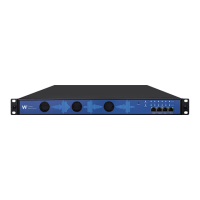
Batch Setting is where you can input the modulation parameters in batch. See the image below for
reference.
IP Output-Parameter Setting> On this page, there are three tabs where you can modify the
multicast IP, port and parameter of IP Output. There are Port 1, Port 2 and Batch Setting. The
output can accept Multicast or Unicast and support MPTS and SPTS.
Port 1 shows the 16 channels. Check the box under Enable to enable a channel. Input the correct
Multicast/Unicast IP address, IP port and appropriate output bitrate, and select the correct Protocol
for the output IP. Once done, click Apply for the changes to take effect. See the image below for
reference.


 To Next Page