Need help?
Do you have a question about the Wellav CMP201D and is the answer not in the manual?
Explains DANGER, CAUTION, NOTE, and TIP symbols used in the guide.
Explains the meaning of Red, Blue, and Thick Arrows, and Bold Italic text.
Covers avoiding water, heat sources, blocking ventilation, and handling power cords.
Details conditions that require unplugging and professional servicing.
Emphasizes using manufacturer-specified replacement parts to avoid hazards.
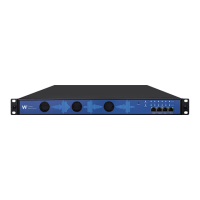
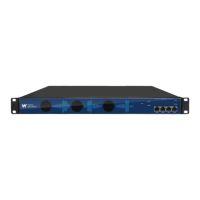
Details the front panel components like air intake, network ports, and indicators.
Details the back panel components like hot-swappable modules, power supply, and ground.
Provides step-by-step instructions for mounting the unit in a 19-inch rack.
Explains how to connect the AC power, emphasizing grounding and safety.
Details the baseboard's basic function and specifications.
Lists and describes various DVB receiver modules available for the platform.
Lists and describes various HDMI/SDI encoder modules.
Continues listing and describing various encoder modules.
Lists and describes various QAM/OFDM/ISDBT modulator modules.
Lists and describes function modules like EAS and CAM.
Introduces the Web GUI and its purpose for system management.
Explains how to connect to the device via its management port.
Details the process of logging into the Web GUI using default credentials.
Describes the device status overview and module list display.
Explains where to view firmware, software, and hardware versions.
Introduces the system settings area for network, time, and security.
Details how to assign a static IP address to the baseboard.
Explains how to configure system time, time zone, and NTP settings.
Covers module upgrade, configuration, license management, and rebooting.
Explains how to reset the login password for the device.
Describes how to check channel bit rates, TS analysis, and service lists.
Details parameters for configuring IP input, including source IP, port, and protocol.
Explains batch setting for IP input parameters.
Describes how to configure destinations for input streams and route services.
Explains stream output destination and channel scanning.
Describes how to check IP output status, TS analysis, and service lists.
Details parameters for IP output, including multicast/unicast settings and batch configuration.
Explains unicast output, destination MAC, and constant rate settings.
Describes how to configure output services and TS.
Details TS and NIT settings for IP output.
Explains how to set password or log out from the system.
Introduces the section on configuring receiver modules.
Details the CR2-DVBC-00 module's capabilities.
Describes how to view status and TS analysis for the CR2-DVBC-00 module.
Explains the CI slot usage for decryption and CAM module settings.
Details basic settings for the CR2-DVBC-00 module, like frequency and symbol rate.
Explains how to route services and configure descrambling settings.
Covers system-level operations for the CR2-DVBC-00 module.
Details the CR2-DVBS2CI-00 module's capabilities.
Details basic settings for the CR2-DVBS2CI-00 module.
Details the CR2-DVBS2FTA-00/00A module's capabilities.
Details the CR2-DVBS2FTA-01 module's capabilities.
Describes status and TS analysis for the CR2-DVBS2FTA-01 module.
Details parameter settings for the CR2-DVBS2FTA-01 module.
Explains how to create Biss IDs for services.
Details how to configure output services for the CR2-DVBS2FTA-01 module.
Explains how to output S2 services directly.
Describes status and TS analysis for IP output.
Details IP output settings, including multicast/unicast and batch configuration.
Explains how to configure output services and TS for IP output.
Covers license, reboot, and log management for the module.
Explains how to manage and filter logs for troubleshooting.
Details the CR2-8VSB-00 module's capabilities.
Describes status and TS analysis for the CR2-8VSB-00 module.
Details basic settings for the CR2-8VSB-R01/R01A module.
Details the CR2-DVBT2-00 module's capabilities.
Details basic settings for the CR2-DVBT2-00 module.
Introduces the section on encoder modules.
Details the CE2-HDMI-00/R01 module's capabilities.
Describes status for the CE2-HDMI-00/R01 module.
Details basic settings and advanced parameters for the CE2-HDMI-00/R01 encoder.
Lists detailed setting ranges for video and audio encoding parameters.
Explains advanced settings and parameter ranges for CE2-HDMI-R01.
Details direct IP output and multiplexing settings for the encoder module.
Explains destination IP/port, MAC settings, and advanced output options.
Describes program insertion settings, including logo preview.
Details logo setting parameters for image insertion.
Details OSD and QR Code setting parameters.
Details the CE2-HDMI-02 module's capabilities.
Describes status for the CE2-HDMI-02 module.
Details basic settings and advanced parameters for the CE2-HDMI-02 encoder.
Lists detailed setting ranges for video and audio encoding parameters.
Details direct IP output, multiplexing, and dual audio encoding options.
Explains EAS settings and integration with EAS modules.
Details the CE2-HDMI-02C module's capabilities.
Describes status for the CE2-HDMI-02C module.
Details basic settings and advanced parameters for the CE2-HDMI-02C encoder.
Lists detailed setting ranges for video and audio encoding parameters.
Details direct IP output and multiplexing settings for the encoder module.
Explains EAS settings and integration with EAS modules.
Details the CE2-SDI-00 module's capabilities.
Describes status for the CE2-SDI-00 module.
Details basic settings and advanced parameters for the CE2-SDI-00 encoder.
Lists detailed setting ranges for video and audio encoding parameters.
Details direct IP output and VLAN output options.
Details the CE2-CVBS modules' capabilities.
Details settings and advanced parameters for the CE2-CVBS-00 encoder.
Details settings and parameter ranges for CE2-CVBS-R01/R01A.
Refers to CE2-HDMI-R01 for output and insertion details.
Refers to CR2-DVBC module for system details.
Details the CE2-HDMI-05/05A module's capabilities.
Describes status for the CE2-HDMI-05A module.
Details basic settings and advanced parameters for the CE2-HDMI-05A encoder.
Lists detailed setting ranges for video and audio encoding.
Details direct IP output settings for the encoder module.
Describes program insertion settings, including logo preview.
Details logo setting parameters for image insertion.
Details OSD and QR Code setting parameters.
Refers to CR2-DVBC module for output configuration.
Details the CE2-HDMI-06 module's capabilities.
Describes status for the CE2-HDMI-06 module.
Details basic settings and advanced parameters for the CE2-HDMI-06 encoder.
Details direct IP output and multiplexing settings for the encoder module.
Describes program insertion settings, including logo preview.
Details logo setting parameters for image insertion.
Details OSD and QR Code setting parameters.
Covers license, reboot, and log management for the module.
Details the CM2-QAMA-R00/R01/R01A module's capabilities.
Details basic settings for RF modulation, frequency, and channels.
Explains TS setting and LCN setting for QAM output.
Details CM2-QAMA-R01/R01A capabilities and basic settings.
Explains TS setting and LCN setting for QAM output.
Details LCN setting operations for QAM output.
Details the CM2-8VSB-R01/R01A module's capabilities.
Details basic settings for 8VSB modulation.
Explains TS setting and ATSC standard configuration.
Details the CM2-QAMB modules' capabilities.
Details basic settings for QAM modulation, frequency, and channels.
Explains TS setting for QAM output.
Details CM2-QAMB-R01/R01A capabilities and basic settings.
Details LCN setting operations for QAM output.
Details LCN setting operations for QAM output.
Details the CM2-OFDM modules' capabilities.
Details basic settings for OFDM modulation.
Explains TS setting and LCN setting for OFDM output.
Details the CM2-ISDBT modules' capabilities.
Details basic settings for ISDBT modulation.
Explains TS setting and LCN setting for ISDBT output.
Details the CM2-MOD-02 module's capabilities.
Describes status for IP input and modulation output.
Details TS analysis and service list functions for IP input.
Describes status for modulation output and IP output.
Describes status for IP output, TS analysis, and service lists.
Details IP input parameter settings, including multicast/unicast.
Details modulation output parameter settings and batch configuration.
Lists parameter ranges for modulation settings.
Details IP output parameter settings and batch configuration.
Introduces multiplexing options for services.
Explains how to select sources for multiplexing output.
Details service configuration for multiplexing.
Explains how to edit service IDs and PIDs for multiplexing.
Details editing Original Network ID, TS ID, and creating NIT.
Explains how to insert/generate SI tables.
Explains how to transmit PIDs for output.
Details how to encrypt services using CA parameters.
Explains how to encrypt services and select CA IDs.
Covers network and license management for the module.
Explains how to manage and filter logs for troubleshooting.
Details the CP2-EAS-00 module's capabilities for alert systems.
Details basic settings for EAS signal, program input, and encoder.
Explains IP output settings and integration with other modules.
Details the CP2-CAM-00 module's scrambling and descrambling functions.
Describes status, TS analysis, and service list for the CAM module.
Explains CAM card information, CA system ID, and bitrate settings.
Details output destination settings for scrambled or descrambled services.
Covers license, reboot, and log management for the CAM module.
Explains log management and filtering for the CAM module.
Details the CP2-EIT-00 module's EIT multiplexing capabilities.
Describes the status page for EIT enabled services.
Details EIT enabled configuration and service list generation.
Covers license, reboot, and log management for the EIT module.
Explains log management and filtering for the EIT module.
Provides a list of abbreviations used in the manual.
Continues the list of abbreviations.
Continues and concludes the list of abbreviations.
Outlines the warranty terms and conditions for the instrument.
Provides information on contacting support and returning products for service.
 General
| Model | CMP201D |
|---|---|
| Category | Media Player |
| SD Card Slot | Yes |
| Video Decoding | H.264 |
| Audio Decoding | MP3, WMA, AAC, OGG, FLAC, APE, AC3 |
| Supported Formats | MP4, AVI, MKV, TS, MPG, DAT, VOB, WMV, RMVB |
| Audio Formats | MP3, WMA, AAC, OGG, FLAC, APE, AC3 |
| Video Output | HDMI |
| Audio Output | HDMI |
| Network Interface | 10/100M Ethernet |
| USB | USB 2.0 |
| Management | Web UI |

 To Next Page