i12 Manual Page 13 - Revision: 6-13-2023
OPERATING INSTRUCTIONS
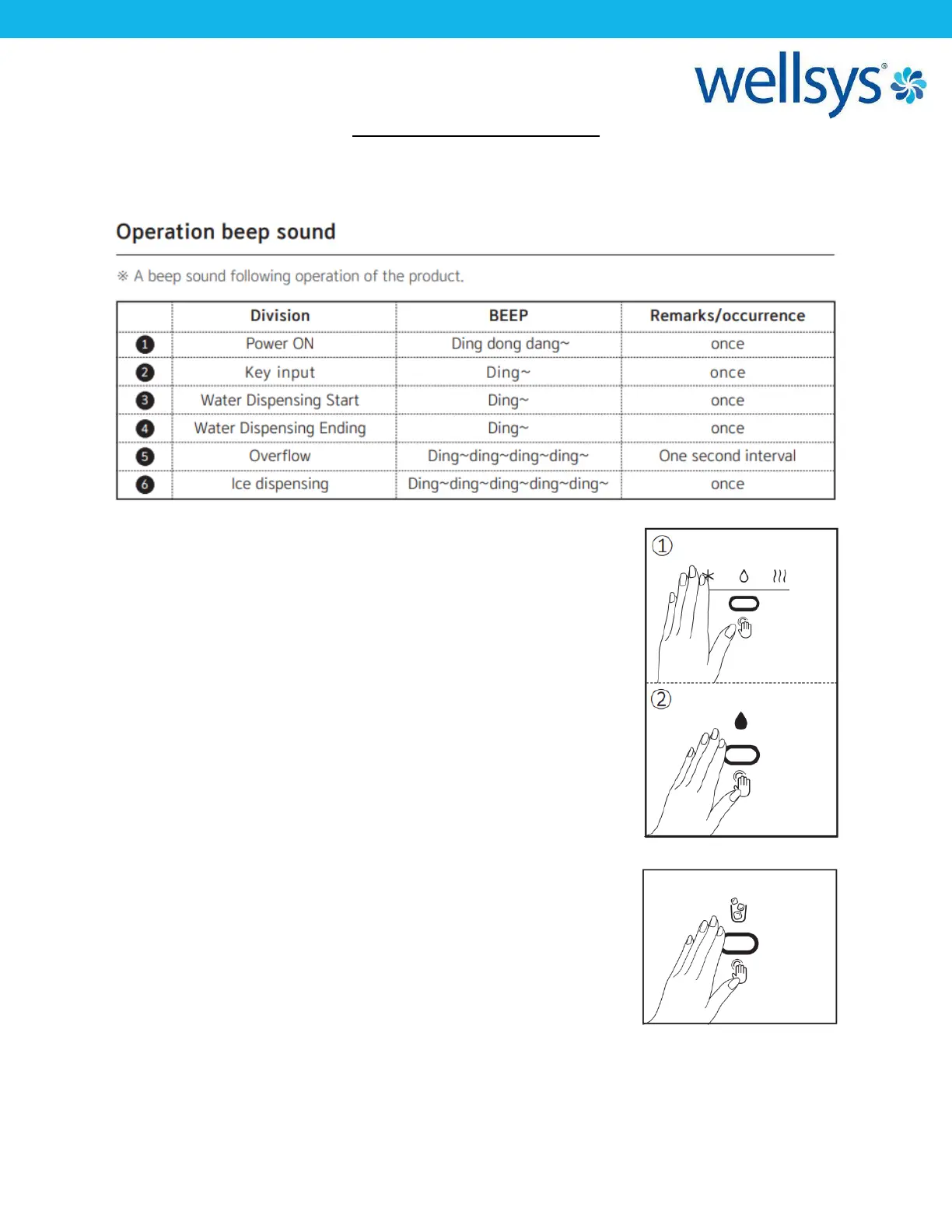
The below pictures show the front user interface (UI) and control panel for the i12 Ice and
Water Dispenser, as well as the Beep Operation Signal table.
To Select Water:
Place your hand close to the WATER SELECT IR SENSOR. Move your
hand away and back to the sensor to select the next option. Cold
Water → Ambient Water → Hot Water is the selection order.
*Your hand should be 3-4cm away from the sensor to activate.
*Move your hand back and forth to cycle.
*If the sensor does not detect motion for more than 5 seconds, it
will switch to the default mode (Cold Water).
To Dispense Water:
Place your hand close to the DISPENSE IR SENSOR (Right
Sensor) and hold there to dispense. Remove your hand to stop.
*If both sensors (SELECT & DISPENSE detect any motions
simultaneously, then the unit will recognize this as an error and will
not operate.
To Dispense Ice:
Place your hand close to the ICE DISPENSE IR SENSOR (Left Sensor).
Hold your hand in place to dispense ice, remove to your hand to
stop.


 To Next Page