ATA Web user guide
25 / 114 2015/1/8
Item Decription
Auto PSTN
backup
Default is Disable. Provide PSTN auto backup function. When SIP
account register to SIP Server fail, FXS port was switched to
PSTN line automatically if ATA was set to enable. In the
meantime, the FXS port’s dial tone was generated from PSTN
line.
* Please make sure the PSTN line connect to ATA correctly if you
want to enable this function.
PSTN feature
Code
Default is 0*. This code is to switch the route to PSTN port
manually. When you dial 0* you will hear dial tone from PSTN
line and the call will dial out through PSTN line. Maximum length
is 7 digits. It only allows to enter number, * and # digits.
Submit Save the configuration.
6.2.3 Operate Instruction
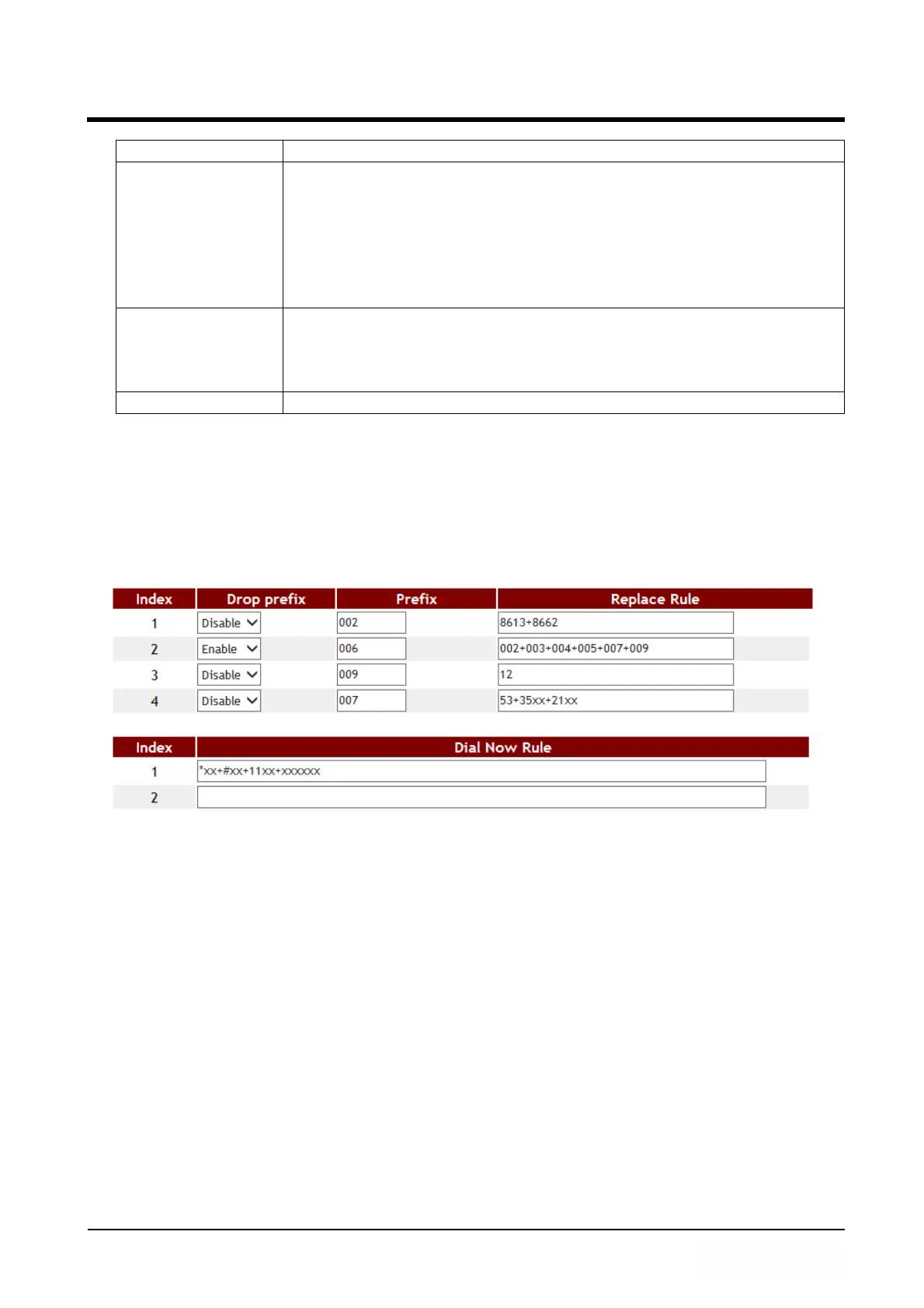
Example 1: Drop Prefix and Dial Now function.
Step 1: In [Dial Plan Setting] page, the configuration is [Index: 1, Drop prefix: Disable,
Prefix: 002, Rule: 8613+8662; Index: 2, Drop prefix: Enable, Prefix: 006, Rule:
002+003+004+005+007+009; Index: 3, Drop prefix: Disable, Prefix: Replace:
009, Rule: 12; Index: 4, Drop prefix: Disable, Prefix: 007, Rule: 53+35xx +21xx;
Index: 1, Dial Now Rule: *xx +#xx+11x +xxxxxxxx] (figure1)。
(Figure 1)
Instruction 1:
When the dialing number is like [8613xxxx], it matched [Rule] -> [8613],
so ATA will add [prefix] [002] in front of [8613]. The actual dialing number
will be [002+8613+xxx].
When the dialing number is like [8662xxxx], it matched [Rule] -> [8662],
so ATA will add [prefix] [002] in front of [8662]. The actual dialing number
will be [002+8662+xxx].
Instruction 2:
When the dialing number is like [002+86xxxx], it matched [Rule] ->
[002], so ATA will replace [002] with [Prefix] [006]. The actual dialing
number will be [006+86xxxx].
When the dialing number is like [003+77xxxx], it matched [Rule] -> [003],
so ATA will replace [003] with [Prefix] [006]. The actual dialing number will
be [006+77xxxx].
Instruction 3:



 To Next Page