ATA Web user guide
34 / 114 2015/1/8
(Figure 6)
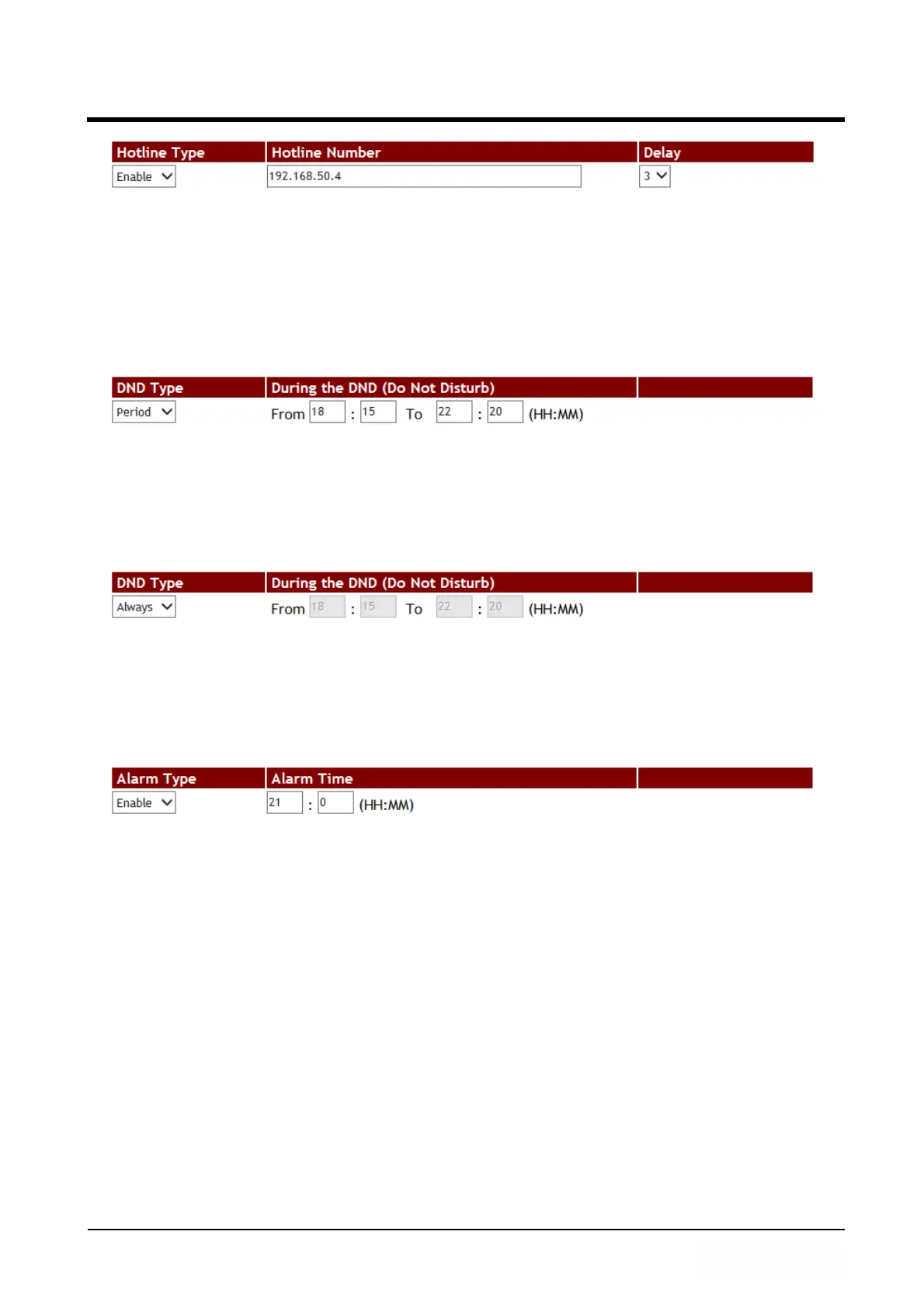
Step 2: When picking up LP399 phone and wait for 3 seconds delay time, it will dial to
[Hot Line number: 192.168.50.4] automatically.
Example 3: DND Feature
Period
Step 1: In [Call Service Setting] web page, Setup [DND Type: Period, During the DND
From: 18:15, To: 22:20] (See Figure 7).
(Figure 7)
Step 2: When receiving a new call during DND time period, the caller will hear “busy
tone”.
Always
Step 1: In [Call Service Setting] web page, Setup [DND Type: Always] (See Figure 8).
(Figure 8)
Step 2: When receiving a new call, the caller will hear “busy tone”.
Example 4: Alarm Feature
Step 1: In [Call Service Setting] web page, Setup [Alarm Type: Enable, Alarm Time:
21:00] (See Figure 9).
(Figure 9)
Step 2: At 21:00 everyday, the alarm will start to work and last for 1 minute. After 1
minute, the alarm will stop. During ringing and pick up the phone, the alarm will stop
automatically.



 To Next Page