ATA Web user guide
49 / 114 2015/1/8
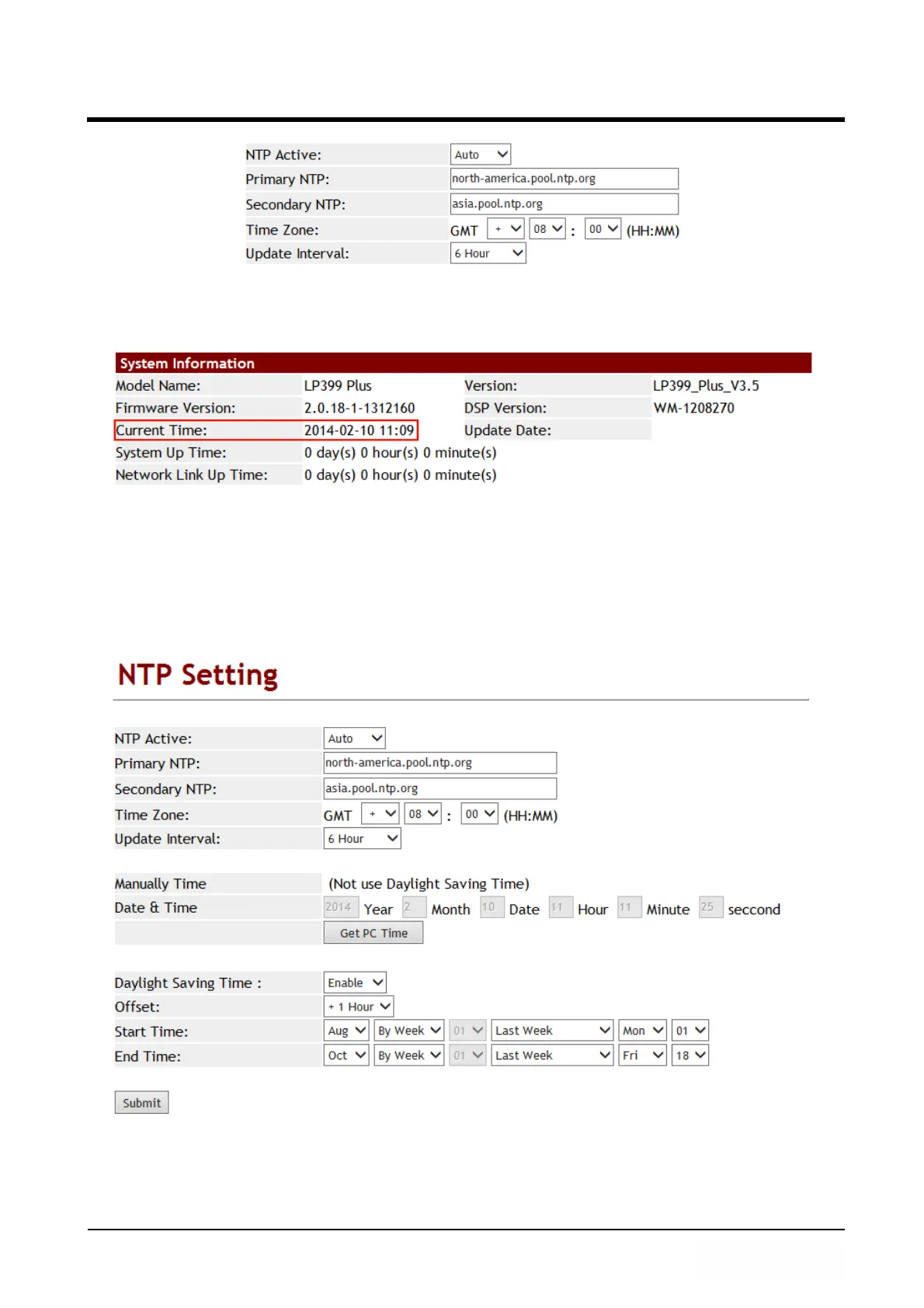
(Figure 1)
Step 2: In [System Status] web page, View the [Current Time] field, The field show time
information now (See Figure 2).
(Figure 2)
Example 2: DST Setting (Daylight Saving Time)
Step 1: In [NTP Setting] web page, Setup [NTP Active: Auto, Primary NTP:
north-america.pool.ntp.org, Secondsondary NTP: asia.pool.ntp.org, Time Zone:
GMT+ 08:00, Update Interval: 6 Hour, Daylight Saving Time: Enable, OffSet up:
+1 Hour, Start Time: Aug, By Week, Last Week, Mon, 01, End Time: Oct, By Week,
Last Week, Fri, 18] (See Figure 3).
(Figure 3)
Step 2: In [System Status] web page, View the [Current Time] field, The field show
[Daylight Saving Time] time information.



 To Next Page