ATA Web user guide
84 / 114 2015/1/8
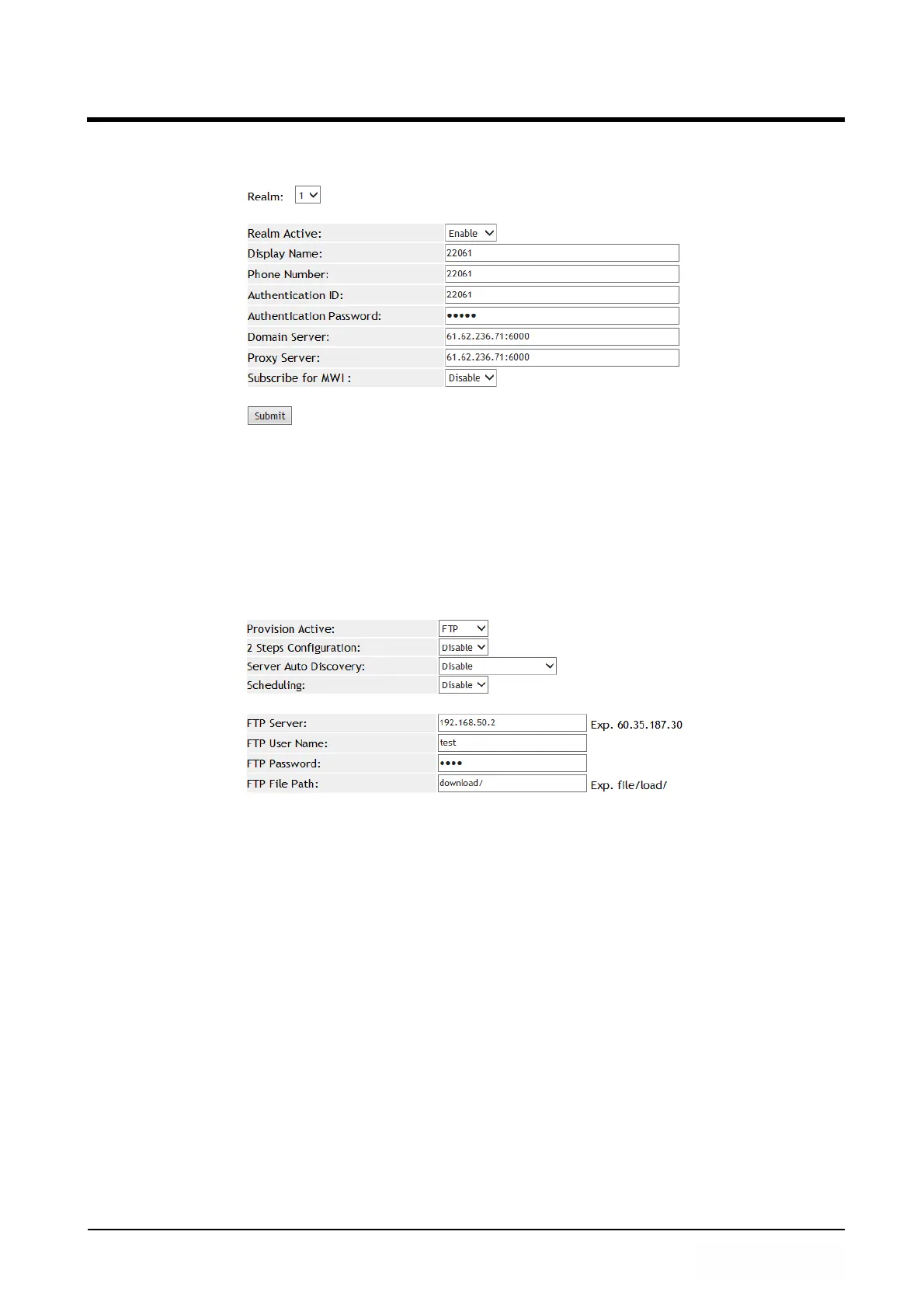
Step 3: In [Service Domain Setting] web page, Check [Realm: 1] Settings, Use
[MACID.dat] file to load configuration (See Figure 2).
(Figure 2)
Example 2: Configuration by FTP
Step 1: Please complete MACID.dat first, and place it at the path of the designated
Server.
Step 2: In [Auto Provision Setting] web page, Set up [Provision Active: FTP, FTP Server:
192.168.50.2, FTP User Name: test, FTP Password: test, FTP File Path: download/]
(See Figure 3).
(Figure 3)
Step 3: In [Service Domain Setting] web page, Check [Realm: 1] Settings, Use
[MACID.dat] file to load configuration.
Example 3: Set up 2 Steps configuration (not encryption)
Step 1: Build a common MAC file with name [000000000000.dat], the file does not
contain [$Service Domain Setting] data, (See Figure 4).



 To Next Page