EasyManua.ls Logo

White 970 - Stitch Selector and Indicator; Stitch Length;Super (Stretch) Stitch Control

Default Icon
44 pages
Print Icon
To Next Page IconTo Next Page
To Previous Page IconTo Previous Page
Loading...
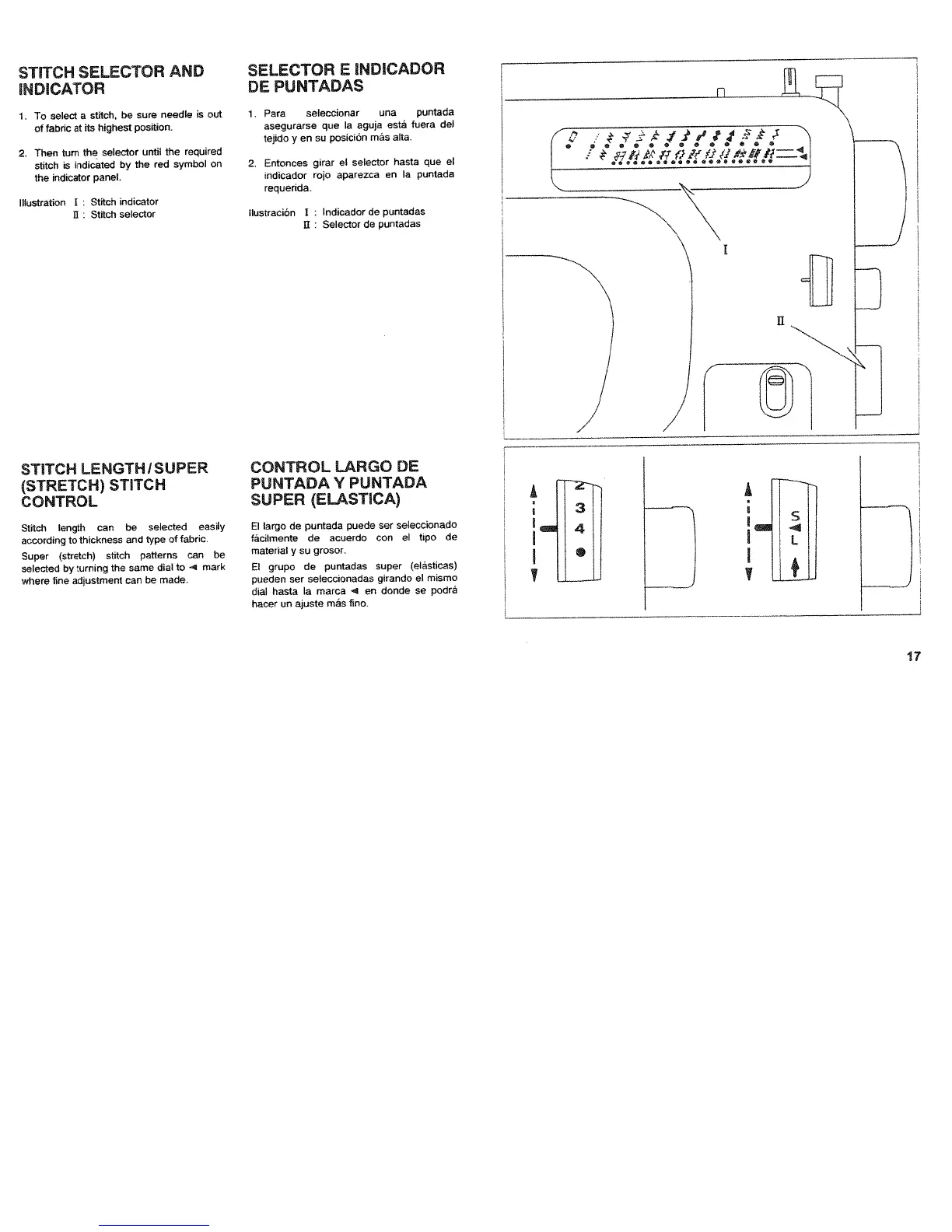
STITCH
SELECTOR
AND
NDCATOR
1
To
select
a
stitch,
be
sure
needle
is
out
of
fabric
at
its
highest
position
2.
Then
turn
the
selector
until
the
required
stitch
is
indicated
by
the
red
symbol
on
the
indicator
panel.
Illustration
Stitch
indicator
U:
Stitch
selector
SELECTOR
E
NDCADOR
DE
PUNTADAS
1.
Pars
seleccionar
una
puntada
asegurarse
que
Ia
aguja
està
fuera
del
tejido
y
en
so
posición
más
alta.
2.
Entonces
girar
el
selector
hasta
que
el
indicador
rojo
aparezca
en
a
puntada
requerida.
llustración
I
Indicador
de
puntadas
U
:
Selector
de
puntadas
)
STITCH
LENGTH
ISUPER
(STRETCH)
STECH
CONTROL
Stitch
length
can
be
selected
easily
according
to
thickness
and
type
of
fabric.
Super
(stretch)
stitch
patterns
can
be
selected
by
turning
the
same
dial
to
e
mark
where
tine
adjustment
can
be
made.
CONTROL
LARGO
DE
PUNTADA
V
PUNTADA
SUPER
(ELASTCA)
El
largo
de
puntada
puede
ser
seleccionado
fticilmente
do
acuercio
con
el
tipo
de
material
y
su
grosor.
El
grupo
do
puntadas
super
(eláslicas)
pueden
ser
seleccionadas
girando
el
mismo
dial
hasta
a
marca
4
en
donde
so
podrti
hacer
on
ajuste
mtis
fino.
4
S
•S
•e0•
S
S
S
S
/
J
I
HLZU

Table of Contents

Related product manuals