EasyManua.ls Logo

White 970 - Setting Up Your Machine; Foot Control; Safety Feature of Electronic Model; Power;Light Switch

Default Icon
44 pages
Print Icon
To Next Page IconTo Next Page
To Previous Page IconTo Previous Page
Loading...
SETflNG
UP
YOUR
MACHINE
Be
sure
to
wipe
off
any
surplus
oil
from
needle
plate
area
before
using
your
machine
the
first
time.
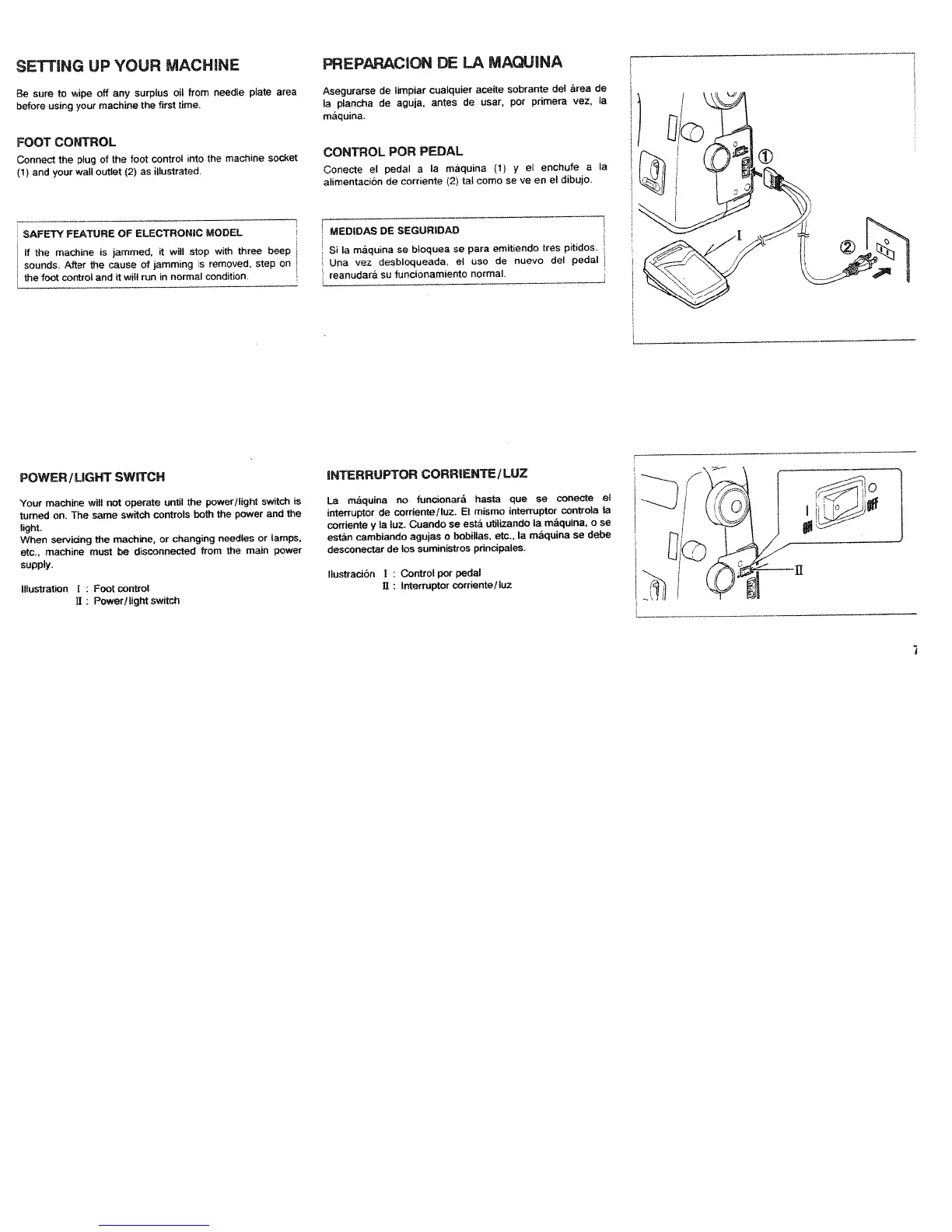
FOOT
CONTROL
Connect
the
plug
of
the
foot
control
into
the
machine
socket
(1)
and
your
wall
outlet
(2)
as
illustrated.
SAFETY
FEATURE
OF
ELECTRONIC
MODEL
If
the
machine
is
jammed,
it
will
stop
with
three
beep
sounds.
After
the
cause
of
jamming
is
removed,
step
on
Lthe
foot
control
and
it
will
run
in
normal
condition
PREPARACION
DE
LA
MAQUINA
Asegurarse
de
limpiar
cualquier
aceite
sobrante
del
area
de
Ia
plancha
de
aguja,
antes
de
user,
por
primers
vez,
Ia
máquina.
CONTROL
POR
PEDAL
Conecte
el
pedal
a
a
máquina
(1)
y
el
enchufe
a
Ia
alimentaciOn
de
corriente
(2)
tal
como
Se
ye
en
el
dibujo.
MEDIDAS
DE
SEGURIDAD
Si
Ia
máquina
se
bloquea
se
para
emitiendo
tres
pitidos.
Una
vez
desbloqueada,
el
uso
de
nuevo
del
pedal
reanudará
su
funcionarniento
normal.
POWER/UGHT
SWITCH
Your
machine
will
not
operate
until
the
power/light
switch
is
turned
on.
The
same
switch
controls
both
the
power
and
the
light.
When
servicing
the
machine,
or
changing
needles
or
lamps,
etc.,
machine
must
be
disconnected
from
the
main
power
supply.
Illustration
I
:
Foot
control
II:
Power/light
switch
NTERRUPTOR
CORRENTE/
LLJZ
La
máquina
no
funcionará
hasta
que
se
conecte
el
interruptor
de
corriente/luz.
El
rnismo
intorruptor
controls
Ia
corriente
y
Ia
luz.
Cuando
se
está
utilizando
Is
máquina,
o
se
estãn
cambiando
agujas
o
bobillas,
etc.,
Ia
máquina
se
debe
desconectar
de
los
suministros
principales,
llustración
I
Control
per
pedal
Ii:
lnterruptor
corriente/luz

Table of Contents

Related product manuals