EasyManua.ls Logo

White 970 - Straight Stitch; Starting to Sew

Default Icon
44 pages
Print Icon
To Next Page IconTo Next Page
To Previous Page IconTo Previous Page
Loading...
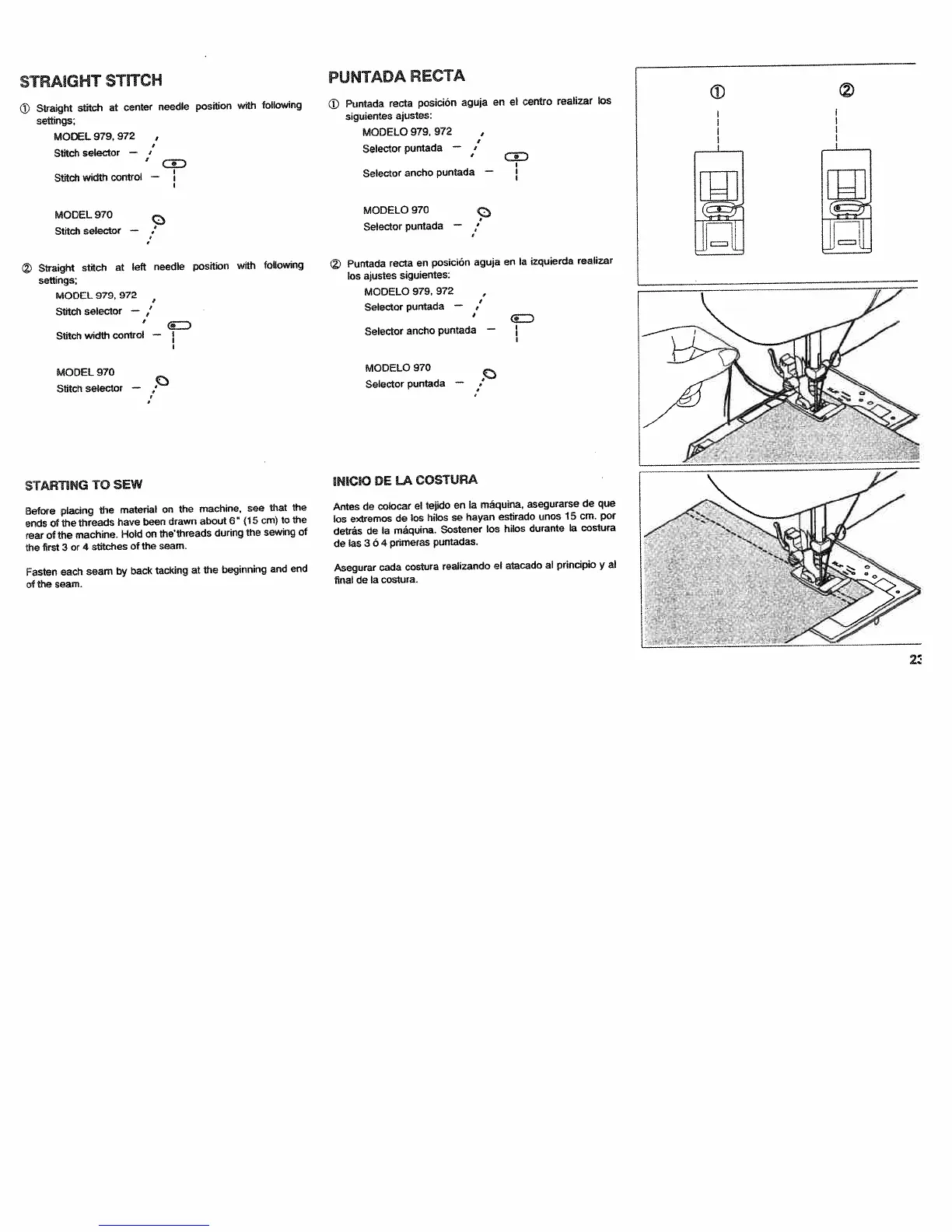
STRAIGHT
STfCH
MODEL
970
C)
Stitch
selector
/
Stitch
width
control
MODEL
970
Stitch
selector
STARliNG
TO
SEW
Before
placing
the
material
on
the
machine,
see
that
the
ends
of
the
threads
have
been
drawn
about
6
(15
cm)
to
the
rear
of
the
machine
Hold
on
thethreads
during
the
sewing
of
the
first
3
or
4
stitches
of
the
seam.
Fasten
each
seam
by
back
tacking
at
the
beginning
and
end
of
the
seam.
PUNTADA
RECTA
c)
Puntada
recta
en
posición
aguja
en
Ia
izquierda
realizar
los
ajustes
siguientes:
MODELO
979,
972
Selector
puntada
Selector
ancito
puntsda
MODELO
970
Selector
puntada
—‘
INICIO
DE
LA
COSTURA
Antes
de
colocar
el
telido
en
Ia
mãquina,
asegurarse
de
que
los
extremos
de
los
hilos
Se
hayan
estirado
unos
IS
cm.
por
detrás
de
Ia
máquina.
Sostener
los
hilos
durante
Ia
costura
de
las
3
6
4
primeras
puntadas.
Asegurar
cada
costura
realizando
el
atacado
at
principlo
y
al
final
de
Ia
costura.
‘aD
Stitch
width
control
(I)
Straight
stitch
at
center
needle
position
with
following
(0
Puntada
recta
posición
aguja
en
el
centro
realizar
los
settings;
siguientes
ajustes:
MODEL
979,
972
,
MODELO
979,
972
Stitch
solector
Selector
puntada
aD
Selector
ancho
puntads
Straight
stitch
at
left
needle
position
with
following
settings;
MODEL
979,
972
Stitch
selector
MODELO
970
Selector
puritada

Table of Contents

Related product manuals