WiDRIVE DX-325 User’s Guide
Copyright © 2010 EDSLAB Tech. Inc.
23
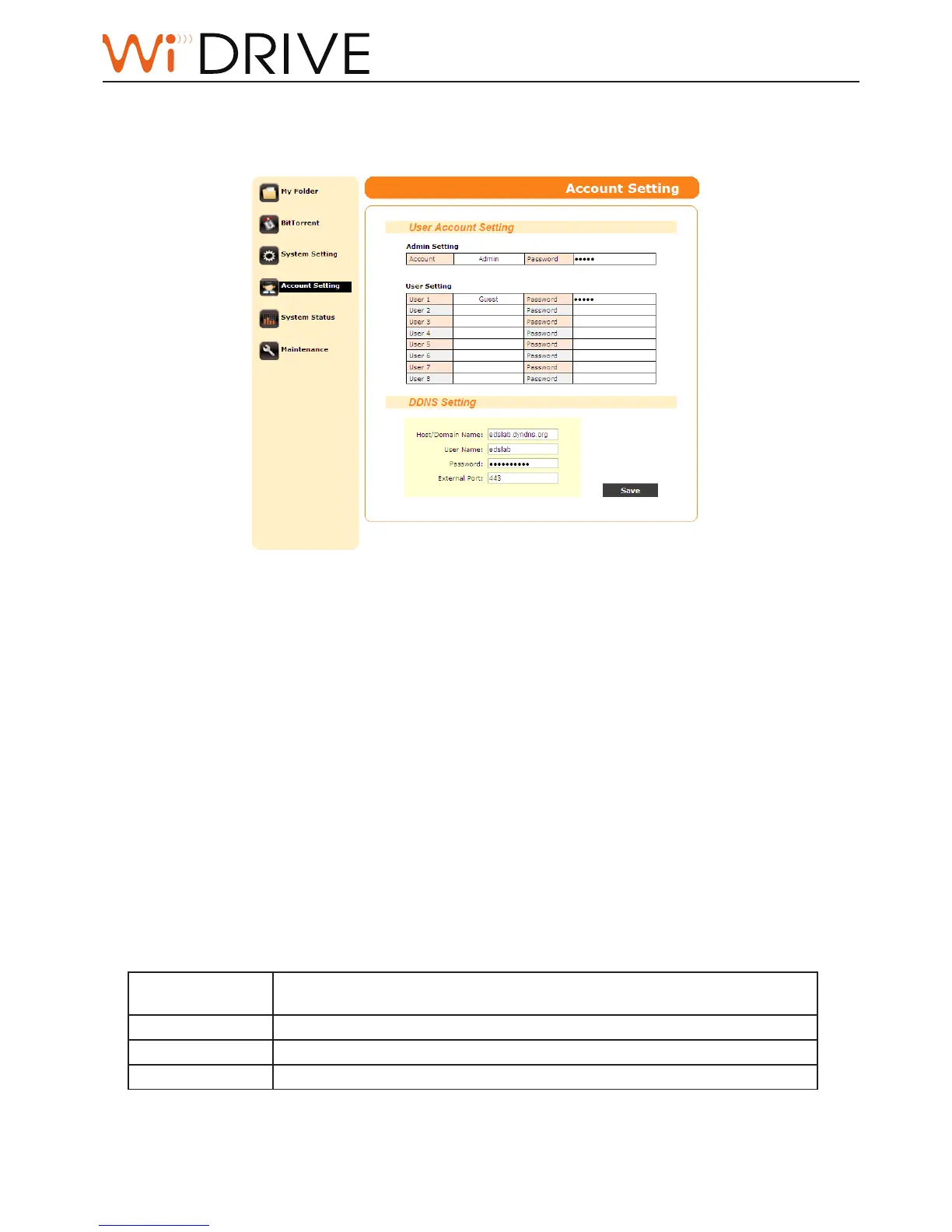
Account Setting
In the Account Seng page you can manage accounts and setup DDNS. Click on Save buon to save
the changes.
User Account Sengs
Admin account:
• 1 account
• Password can be modied.
• Has the access right to all funcon pages and folders in your WiDRIVE.
User account:
• 8 accounts
• Account and password can be modied.
• Has limited access right. Can only access My Folder page; and cannot see folders except “\Public”
and “\Account”.
DDNS Sengs
You can register a DDNS account from hp://www.dyndns.com so that you can connect and access
les in your WiDRIVE no maer where you are.
Host/Domain Name
Type the host/domain name that you have registered with hp://www.
dyndns.com.
User Name
Type the user name of your DDNS account.
Password
Type the password of your DDNS account.
External Port
Type the port of your DDNS service.



 To Next Page