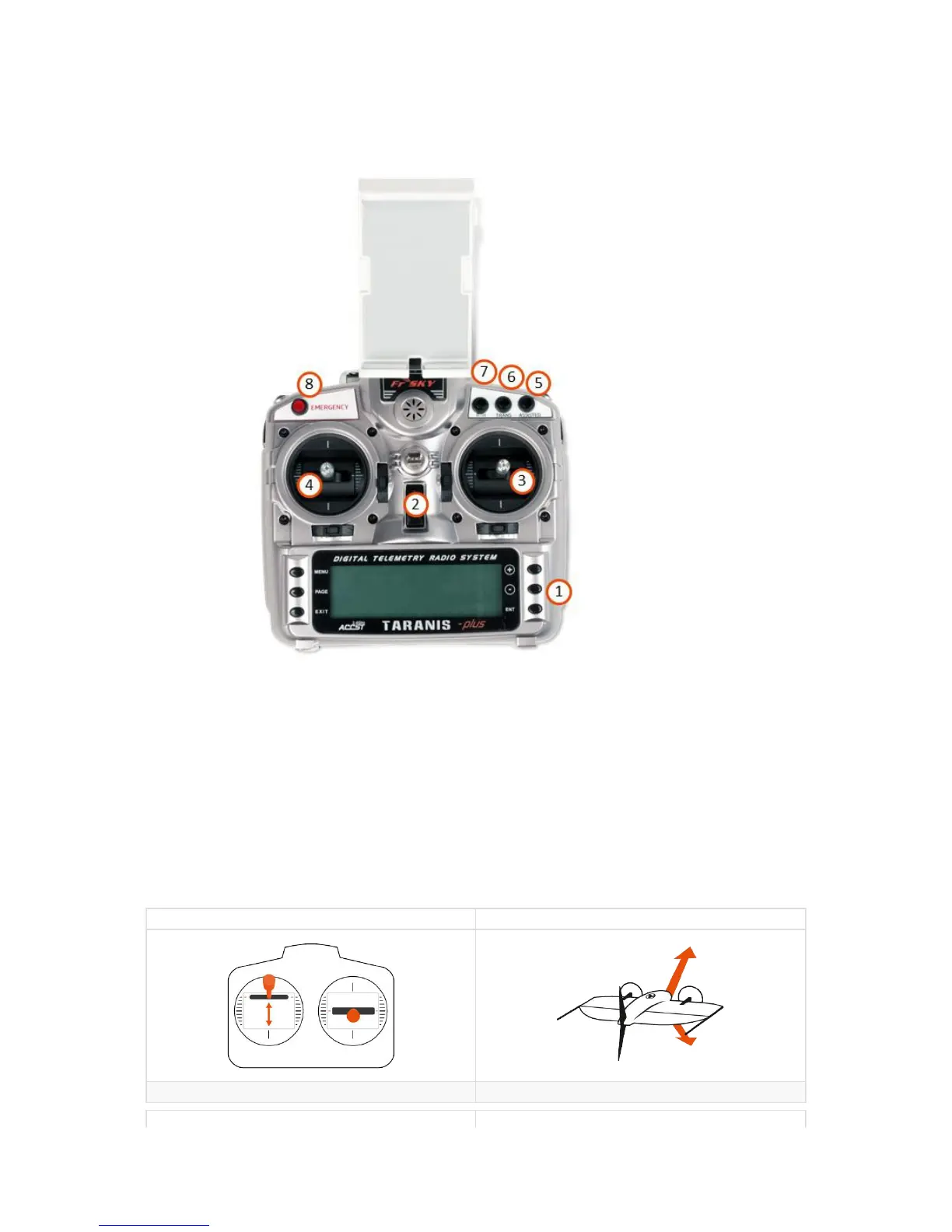
1. Menu navigation buttons, to navigate the RC's settings - don't change them.
2. On / off switch, turns RC on / off
3. Navigation stick right
4. Navigation stick left
5. Engage Assisted Mode: allows you to take manual control of WingtraOne
6. Transition: performs the "transition" maneuver — switching from cruise to hover regime and vice versa (only works when flying in Assisted Mode)
7. Return-to-Home: initiates WingtraOne to autonomously fly home and land
8. Emergency button - when pushed three times within two seconds this will terminate the flight by cutting the power to the engines
Control Sticks
Use the control sticks to fly manually in Assisted Mode. These are carefully tuned and allow you to maneuver easily and safe.
Assisted Mode - Cruise
Input Result
Left Stick: Up & Down gain (stick up) or lose (stick down) altitude
Input Result



 To Next Page