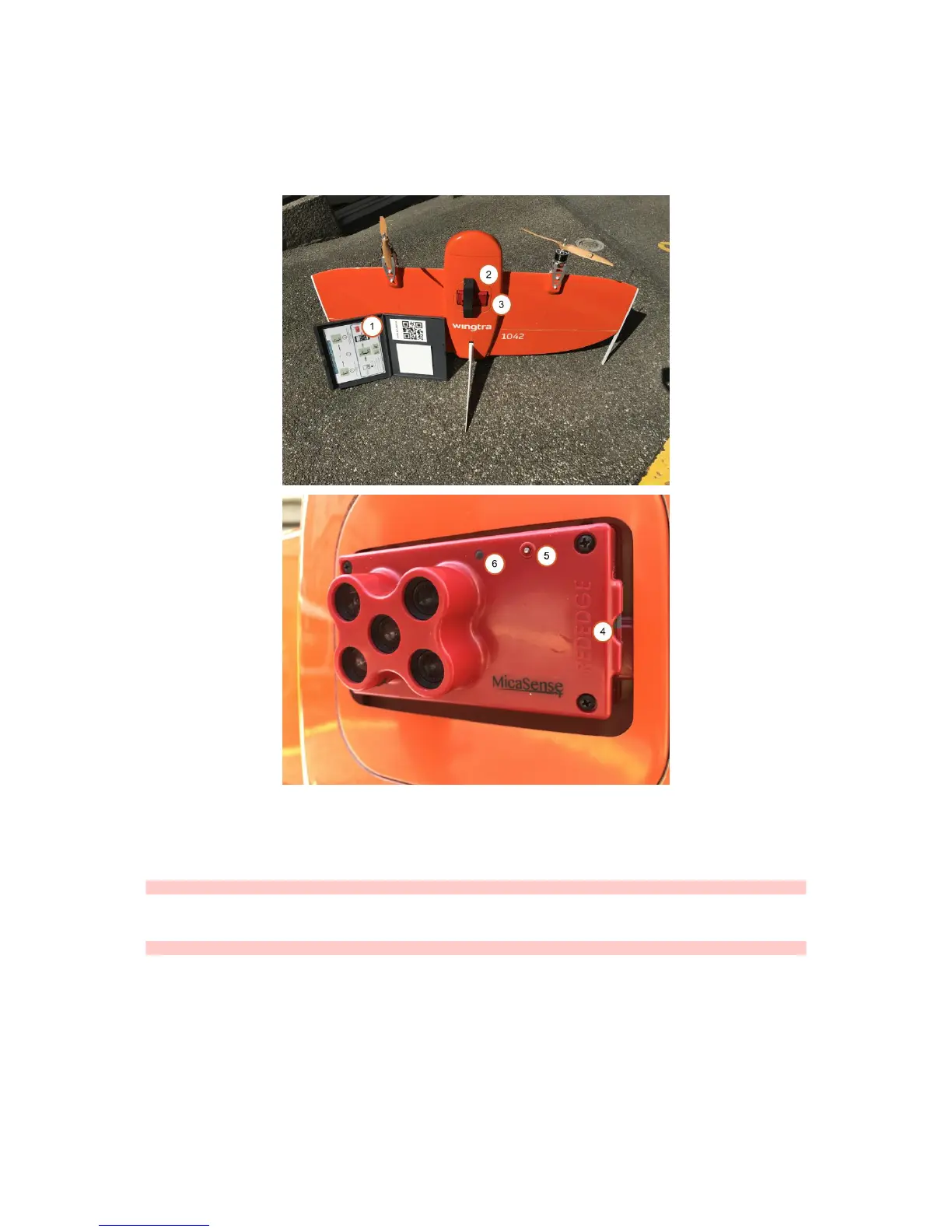
WingtraOne RedEdge
The WingtraOne RedEdge offers a multispectral image acquisition. The camera aquires 5 individual images at the same time in spectral bands of blue, green, red, red
edge and near IR. For camera specifications, technical details and camera related support please refer to the Knowledge base of Micasense
1. Reflectance tag
2. Transportation cover
3. RedEdge camera
4. SD card slot
5. On/Off (pressing >3s) and trigger (press <1s) button
6. Status LED
Caution: Make sure to use the provided 32GB SDHC SD card. SD cards wth high capacity (type SDXC) or lower read/write speeds are not compatible with RedEdge.
How to Use WingtraOne RedEdge
Caution: The camera has to be configured and calibrated before each individual flight.
Configure RedEdge Camera
Operation of WingtraOne RedEdge requires to configure the camera to the desired flight plan parameter in a separate camera user interface. This user interface can be
accessed via Wifi and webbrowser (Chrome).
To configure RedEdge camera:
1. Power on WingtraOne
2. Connect via Wifi to the RedEdge camera (SSID = rededge // passwort = micasense)
3. Open the browser app (Chrome) and access the page http://192.168.10.254
4. Go to status tab (house tab). Check free space on SD card, GPS signal reception and time



 To Next Page