Failsafe Scenarios
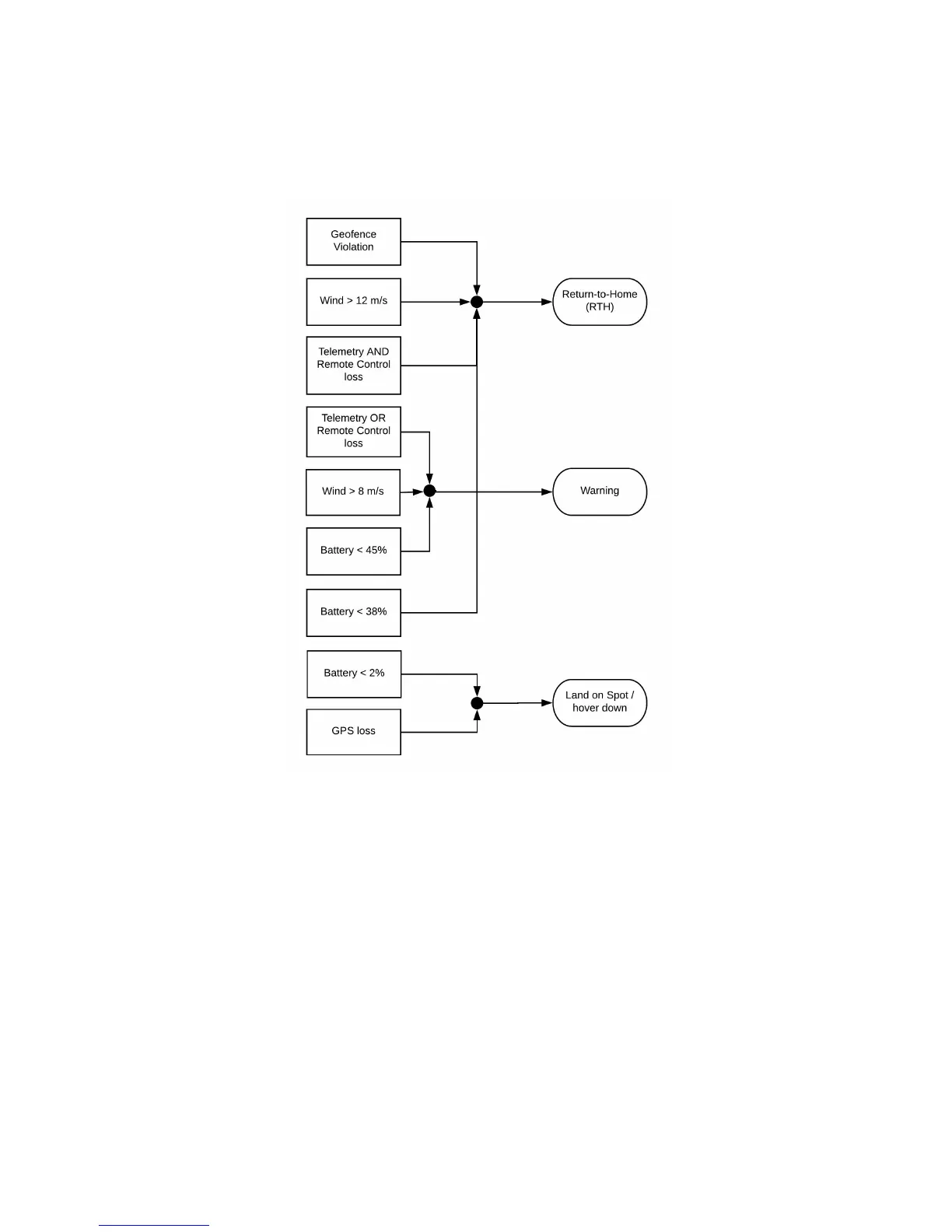
There are several scenarios where WingtraOne will take action by itself and engage a certain failsafe routine. Check out the image below. If your WingtraOne ID ≤ 1135,
you will get a warning at 35% battery charge and RTH is triggered at 25%.
Return-to-Home (RTH)
RTH is triggered when the geofence is violated, when wind speed exceeds 12 m/s, when both telemetry and RC connection are lost, or when battery charge triggers this
failsafe. It can also be triggered manually, see Chapter Flight Modes and In-Flight Interactions. More details about the execution can be found in the Return-to-Home
Chapter.
Warning
Warnings are issued acoustically and visually on the tablet. The mission can still be continued, but caution is advised.
Land on Spot / Hover Down
This is the most extreme failsafe, as it forces WingtraOne to perform a backtransition and land on the spot where it is at currently. It is triggered on GPS loss, or if battery
voltage drops very low. It is only enforced if WingtraOne is in auto or RTH mode and not if you are in assisted mode. If it is triggered by the battery, you can take over
manually by switching to Assisted Mode. However, you cannot take over manually if it is triggered by GPS loss, as Assisted Mode does not work without GPS.
Last known WingtraOne Location
Especially if there is a crash, you can click to check the last known GPS location of WingtraOne.



 To Next Page