EasyManua.ls Logo

Winterhalter UC-L - Timer; Set a regular time; Set a non-recurring date

Winterhalter UC-L
48 pages
Print Icon
To Next Page IconTo Next Page
To Previous Page IconTo Previous Page
Loading...
Chef’s PIN menu
17
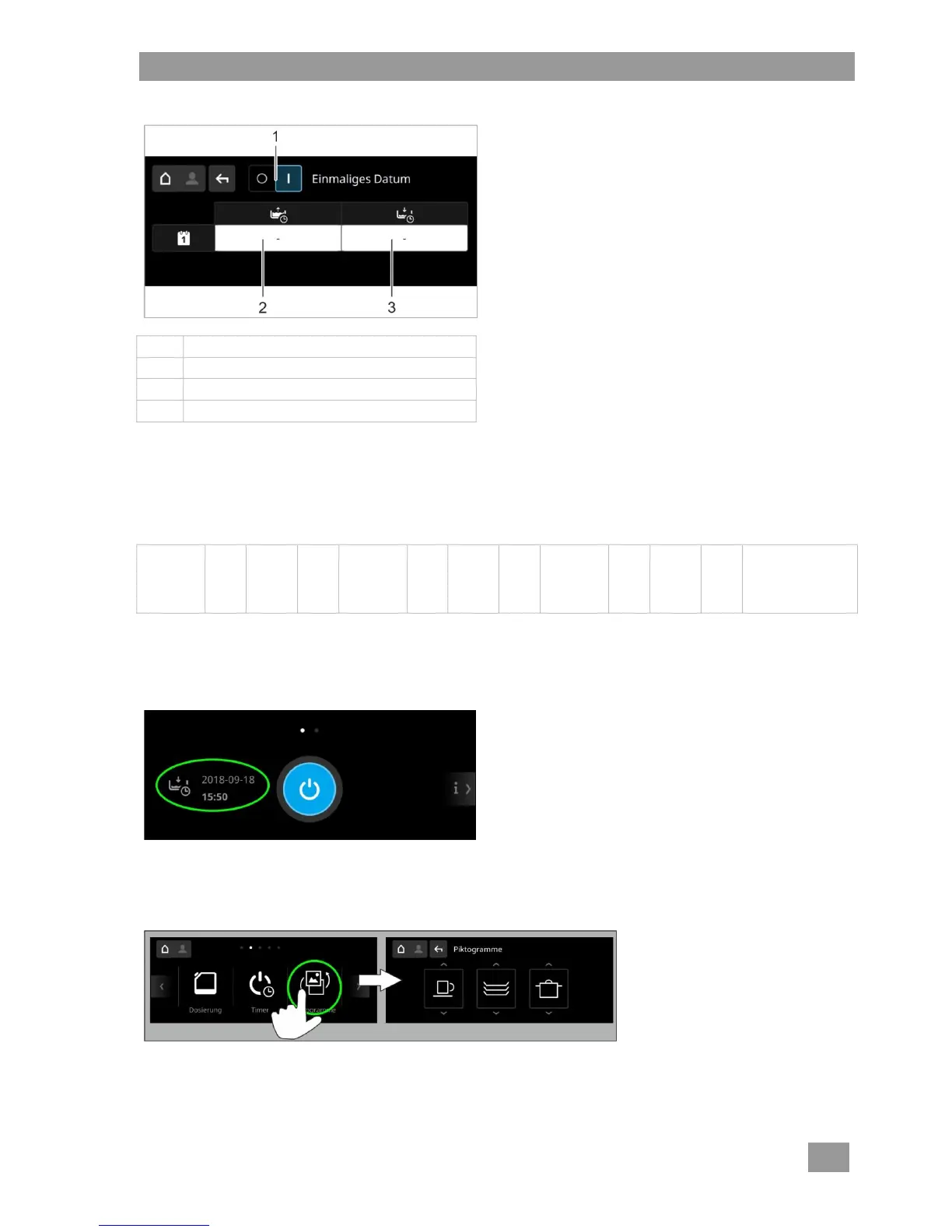
Programming a non-recurring date
Item
Description
1
Sliding switch
2
Date and time for automatic start-up
3
Date and time for automatic switch-off
Tap field (2 or 3).
Set the desired time and date.
Save.
Pushtheslidingswitch(1)to‘I’.
Automatic switch-off sequence
Sequence
of sounds
10 s
pause
Sequence
of sounds
10 s
pause
Sequence
of sounds
10 s
pause
Machine is emp-
tied and switched
off using the self-
cleaning pro-
gramme
INFO If the door is open during the automatic switch-off, the machine is pumped empty and switched off,
but not cleaned inside.
Displaying the programmed time
7.6 Pictograms
This menu allows the specification of pictograms to indicate the three standard programmes.
Calling up the menu
INFO Changing the pictograms has no effect on parameters such as programme length or temperatures.

Table of Contents

Other manuals for Winterhalter UC-L

Related product manuals