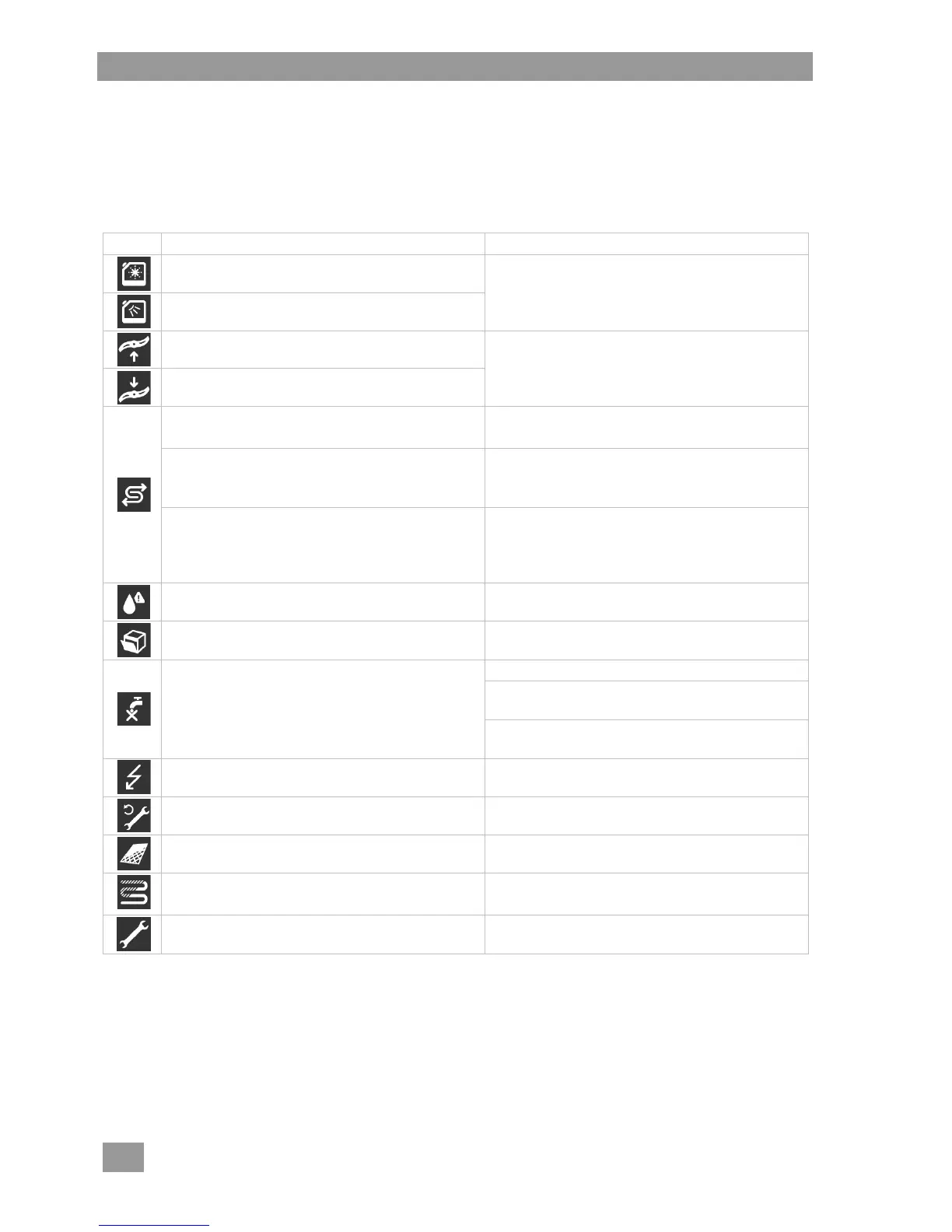
12 Error pictograms
Errors are displayed as pictograms. If many errors occur, washing will still be possible but the end wash re-
sult will be impaired. Please therefore rectify any error as soon as possible.
If you are unable to rectify the error yourself:
Contact an authorised service technician.
Fill the built-in storage tank or replace the con-
tainer. Prime the dosing device ( 6.3.2).
Upper wash field is blocked
Remove the obstruction and restart the pro-
gramme.
Lower wash field is blocked
For machines with an integrated softener:
Lack of salt
Fill the salt container with regeneration salt
( 10.2).
Machine with external partial demineralisation
cartridge:
Partial demineralisation cartridge used up
Replace the partial demineralisation cartridge.
Reset the water back-flow counter (PIN
menu 7.14).
Machine with external full demineralisation car-
tridge:
Full demineralisation cartridges used up
Have the resin of the full demineralisation car-
tridge replaced by an authorised service techni-
cian. Reset the water back-flow counter (PIN
menu 7.14).
Error on external water treatment device
(e.g. AT Excellence-S/-M)
Check the water treatment device.
Door was opened at an inadmissible time
(e.g. during washing)
Close the door and restart the programme.
Open the on-site water supply.
Have the dirt trap cleaned by a service techni-
cian or have a new dirt trap installed.
Have the solenoid valve repaired by an author-
ised service technician.
Energy optimisation active
Wait until the on-site energy optimisation
equipment switches off.
Contact an authorised service technician.
Remove, clean and replace the filter cylinder
and strainer.
Starting the descaling programme (PIN
menu 7.7).
Tap the pictogram and note the error code.
Contact an authorised service technician.
INFO By tapping the pictogram, additional information will appear on the display.






 To Next Page