14
blinking
amber
Setting Up Wren V5US Speakers
After Launching the App
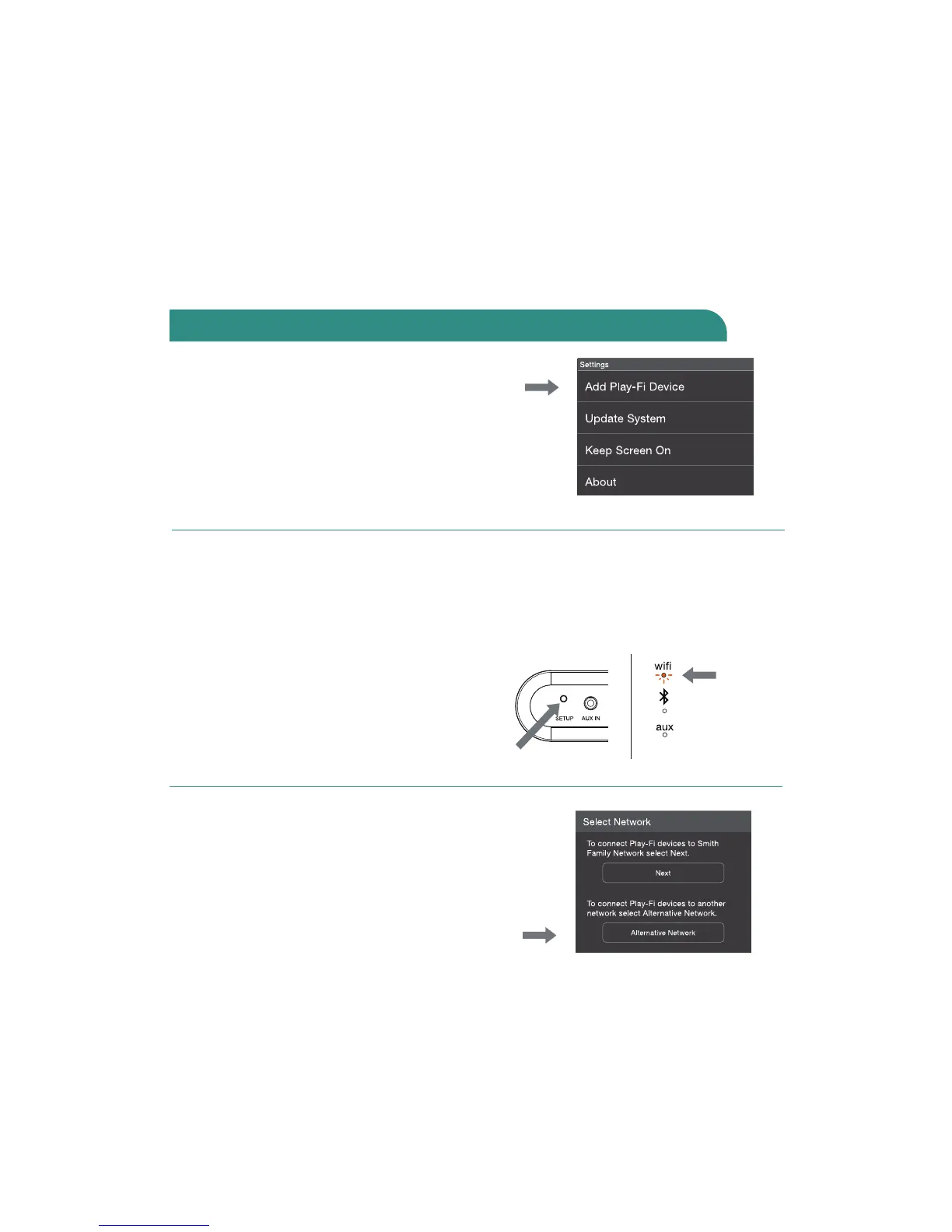
The Wren Play-Fi App looks for devices
in Standard WiFi Setup Mode when it is
launched. If you launch the app before
connecting the speaker to the WiFi network,
go to the app’s home screen, select
“Settings” and then “Add Play-Fi Device.”
Selecting a Dierent WiFi Network
If you want to connect the speaker to a
dierent WiFi network, open the Wren
Play-Fi App and press the “Alternative
Network” button on the “Enter Network
Password” screen.
Manually Enabling WiFi Mode
You may need to manually enable the
speaker’s WiFi Mode if any of the following
conditions apply:
• If this is not your first time setting
up the speaker
• If you’re in a new location with
a dierent WiFi network
• If you want to switch from your current
WiFi network to a dierent one
To manually enable WiFi Mode, hold down
the setup button on the rear of the speaker
for seven seconds. The WiFi light will blink
once per second indicating that WiFi Setup
Mode is active.
Connect to your network using Android devices (cont.)



 To Next Page