20 Buy Online! Wurtec.com
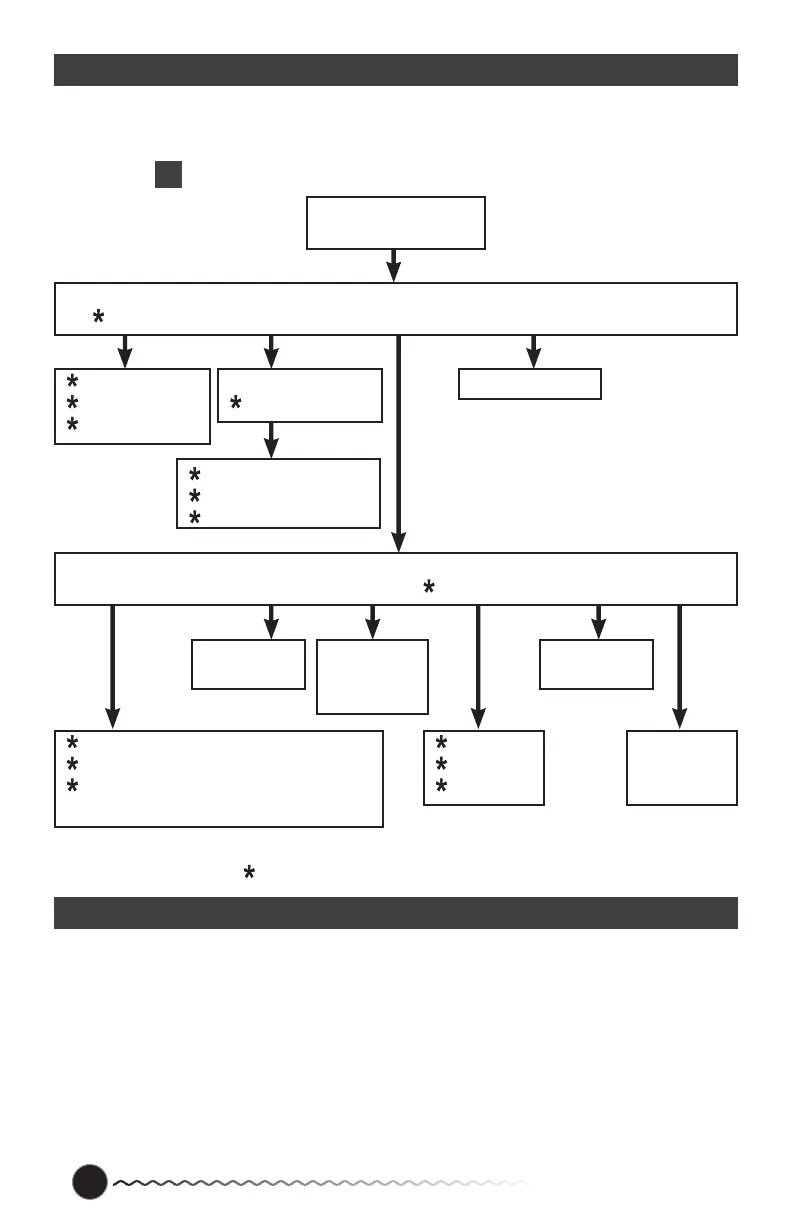
Flowchart
Note: This fl ow chart is for programming the phone with the onboard keypad. When calling
into the phone to program you can use this fl ow chart as well but you will have the added step
of pressing
2
to enter program mode once the phone answers.
Not used for Master Station
Troubleshooting
If you have any questions about the installation or operation of your S3 Communicator, please
call us toll free at (800) 837-1066, 8:00 am—5:00 pm, Monday-Friday. You can also call our
direct Tech Line at 419-930-1066.
Keypad Not Working
If you are programming before you connect the phone in the elevator be sure you have
a fresh 9V battery connected to the phone. The 9V battery energizes the keypad when
programming outside of the elevator. CAUTION when connecting the phone to external
power be sure the 9V battery is rechargeable, otherwise you could damage the phone.
Push Program menu
Button on Keypad
1-First Number
2-Second Number
3-Third Number
1-Announcements On/Off
2-Immediate Two-Way Conversation On/Off
3-Call Cancellation On/Off
4-Maintenance Announcement On/Off
1-To Program
2-To Review
3-To Delete
1-To Program
2-To Review
3-To Delete
1-To Program
2-To Review
3-To Delete
1-To Program
2-To Review
1-To Program
2-To Review
1-Site ID
2-Announcements
1-First Announcement
2-Second Announcement
3-Third Announcement
Program Status
Main Menu
1-Phone Numbers 2-Messages 3-Advanced Options 4-Program Status *0-Disconnect
Advanced Options
1-User Preferences 2-Talk Time 3-Access Code 4-Touch Tone ID 5-Ring Count 6-Unit #



 To Next Page