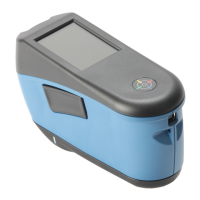
RapidMatch
™
XI Spectrophotometer
15
Important Notes:
• DO NOT use any solvents to the clean the instrument, this will
cause damage to the cover and internal electronic components.
• Compressed air should not be used to clean the instrument.
Cleaning the instrument with blown air can cause dirt on the outside
of the instrument to enter into the device, and contaminate optical
components.
17. Specifications
Environmental
• Operating Temp: 50°F to 104°F (10°C to 40°C)
• Humidity Max: 85% RH max (non condensing)
• Storage Temp: -4°F to 122°F (-20°C to 50°C)
Battery
• Cells: 2, Size: 18650
• Voltage: 7.4V
• Capacity: 2.4AH (2400mAh)
• Max Discharge: 2.4A
• Max Charge: 2.0A
• Package: Hard Plastic Case
• Compliance: UL Listed,PSE,KCC,CE,UN38.3,
• IEC CB 621331-1 2ND Edition
• Contains internal overcurrent & overvoltage protection
18. Troubleshooting
Prior to contacting X-Rite support department for instrument problems, try the
applicable solution(s) described below. If the condition persists, contact us
using one of the methods listed in the Service Information section.



 To Next Page
 Loading...