6-9
GETTING STARTED
Water System - Diagnostics
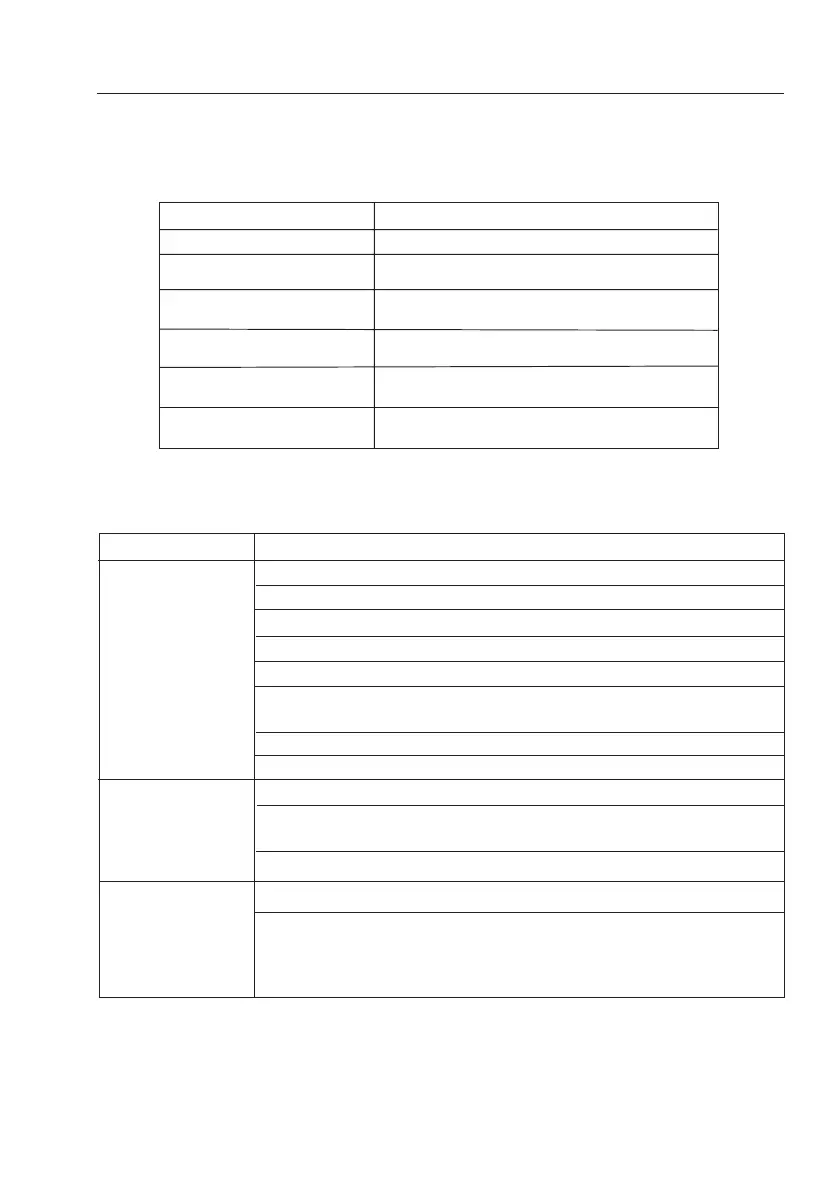
To aid with trouble shooting the green LED on the Intelligent Control
®
unit will flash to indicate
different fault types.
Water System - Troubleshooting
LED Code
On Tap open and pump running
Fast Flash In Calibration Mode
(flash every 1 second or less)
5 Second Flash Calibrated and ready for use
(flash every 5 seconds) Normal operation
10 Second Flash Un-calibrated. Follow calibraton
(flash every 10 seconds) instructions
15 Second Flash Water container is empty.
(flash every 15 seconds) Turn Master Switch ‘off’ then ‘on’ again
20 Second Flash Battery voltage is low. Turn Master Switch
(flash every 20 seconds) ‘off’ then ‘on’ again and charge battery
Problem Solution
Check at least one tap is open
Turn the pump isolator switch ‘off’ then ‘on’ again
Check the battery is fully charged
Check the pump isolatior switch is ‘on’
Check the master switch is ‘on’
Clean the electric contact strips on either side of the plug and ensure
they are making contact with the socket
Check wiring connections
Check fuse (see fuse box)
Check for air or water leaks in taps and piping
Check the non-return valve (fitted in the socket) is free from grit and dirt.
Use a ballpoint pen to dislodge any grit in the non-return valve
Recalibrate the system - follow calibration instructions
Check all connections in the pipework are secure
Recalibrate the system -
follow calibration instructions.
Pump will not run
Pump cycles on
and off with all
taps and showers
are closed
Pump runs for 30
seconds or more
without stopping
when all taps and
showers are closed


 To Next Page