8-6
HOW TO USE YOUR CARAVAN’S EQUIPMENT
Whale Space Heater - User
Operation
For Gas Operation:
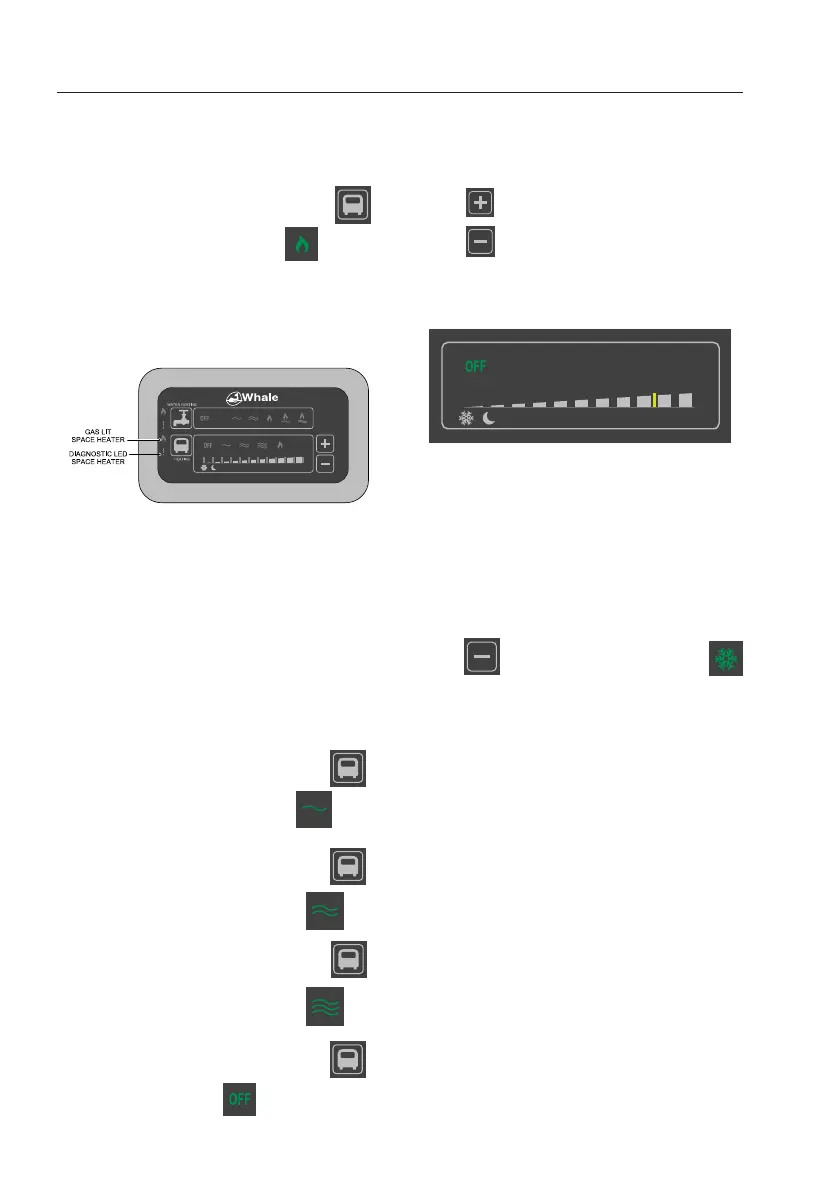
Press the Space Heater Function Key
until the Gas icon is illuminated
There will be a pre-purge pause of approx.
20 seconds to allow any unburnt gas to leave
the flue. The Gas Lit LED will light green
upon successful flame ignition.
Please note: If there is air in the gas supply
line it may take a few attempts for the gas to
ignite. If the ignition is unsatisfactory the
Space Heater Diagnostic LED will light red. If
the Diagnostic LED is lit, please refer to the
Troubleshooting section.
For Electric Operation:
The Space Heater is equipped with 3 electric
power settings; 500W, 1000W and 2000W.
To select 500W:-
Press the Space Heater Function Key
until the 500W icon is illuminated
To select 1000W:-
Press the Space Heater Function Key
until the 1000W icon is illuminated
To select 2000W:-
Press the Space Heater Function Key
until the 2000W icon is illuminated
To turn the Space Heater Off:
Press the Space Heater Function Key
until ‘Off’ is illuminated
To adjust the temperature:
Use the temperature control buttons to adjust
the temperature.
Press to increase the temperature.
Press to decrease the temperature
The temperature setting will be shown on the
temperature gauge.
Please note: The Space Heater will
automatically turn itself on and off to maintain
the desired ambient temperature.
For Frost Protection:
Frost protection maintains a low temperature
in the vehicle during cold temperatures.
Press until the frost protection icon
is illuminated on the temperature gauge.
Please note: The vehicle must be connected
to a suitable 230V a.c. supply in order to
operate.



 To Next Page