8-91
HOW TO USE YOUR CARAVAN’S EQUIPMENT
Mobile Internet (Option)
If this option is applicable, your router has already been installed in the optimum position within
your vehicle. The location of the internal router may vary depending on vehicle layout. The
information below outlines the basic setup and how to get online. For more detailed information,
please refer to the manufacturers operating instructions supplied with your vehicle.
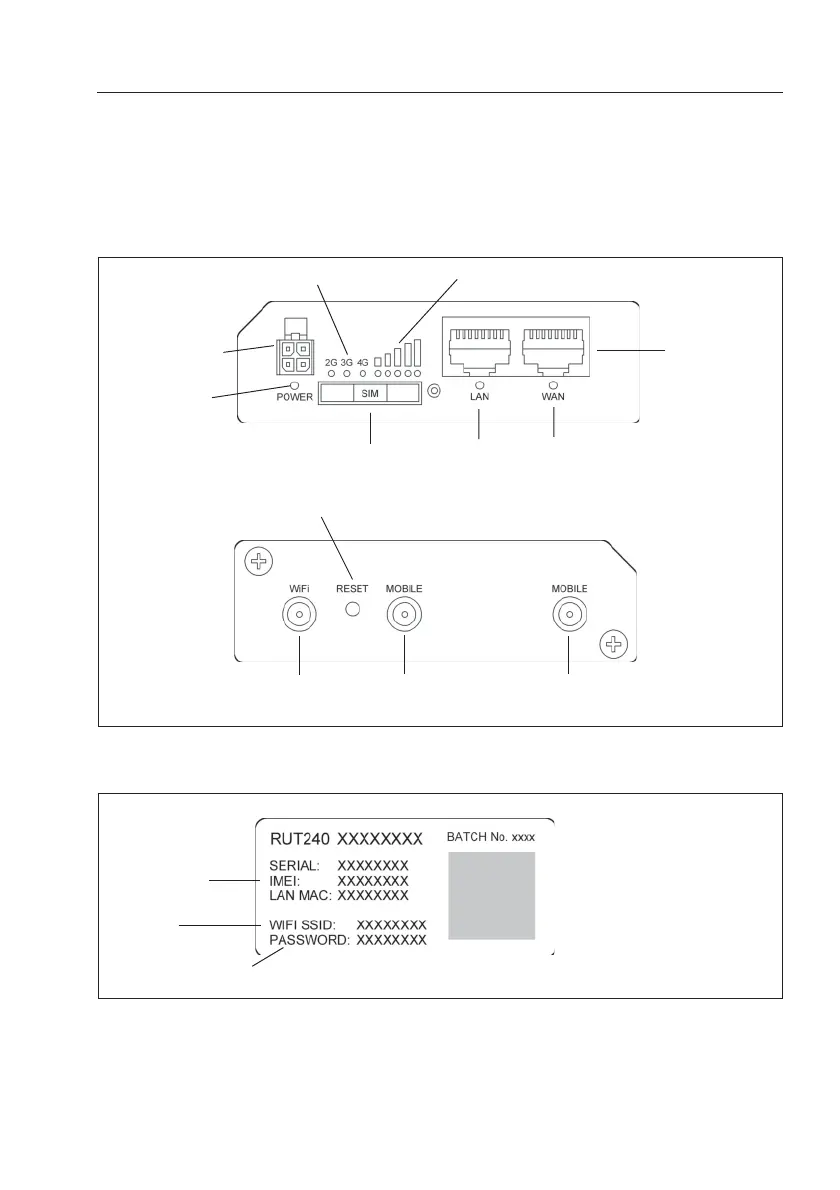
Get to know your Router
Credential Router Sticker (located on the reverse of the Router)
Right View
Left View
Power socket
Power LED
Mobile network type LEDs
Mobile signal strength indication LEDs
Ethernet Ports
WAN LEDLAN LED
SIM Holder
Reset Button
Wi-Fi Antenna
Connector
Roam Antenna
Connector 1
Roam Antenna
Connector 2
Serial Number
Wi-Fi I.D.
Password Code


 To Next Page