8-92
HOW TO USE YOUR CARAVAN’S EQUIPMENT
Getting Online
Now your Roam is installed and you have
inserted the SIM card, its time to get
connected. To do this, you will need to be
using a device which can connect to a Wi-Fi
network such as a smart phone, Smart TV,
tablet or laptop.
1. Turn on router and allow 2 to 3 minutes
for the router to boot.
When ready, the router name will be
visible in your devices Wi-Fi settings.
.
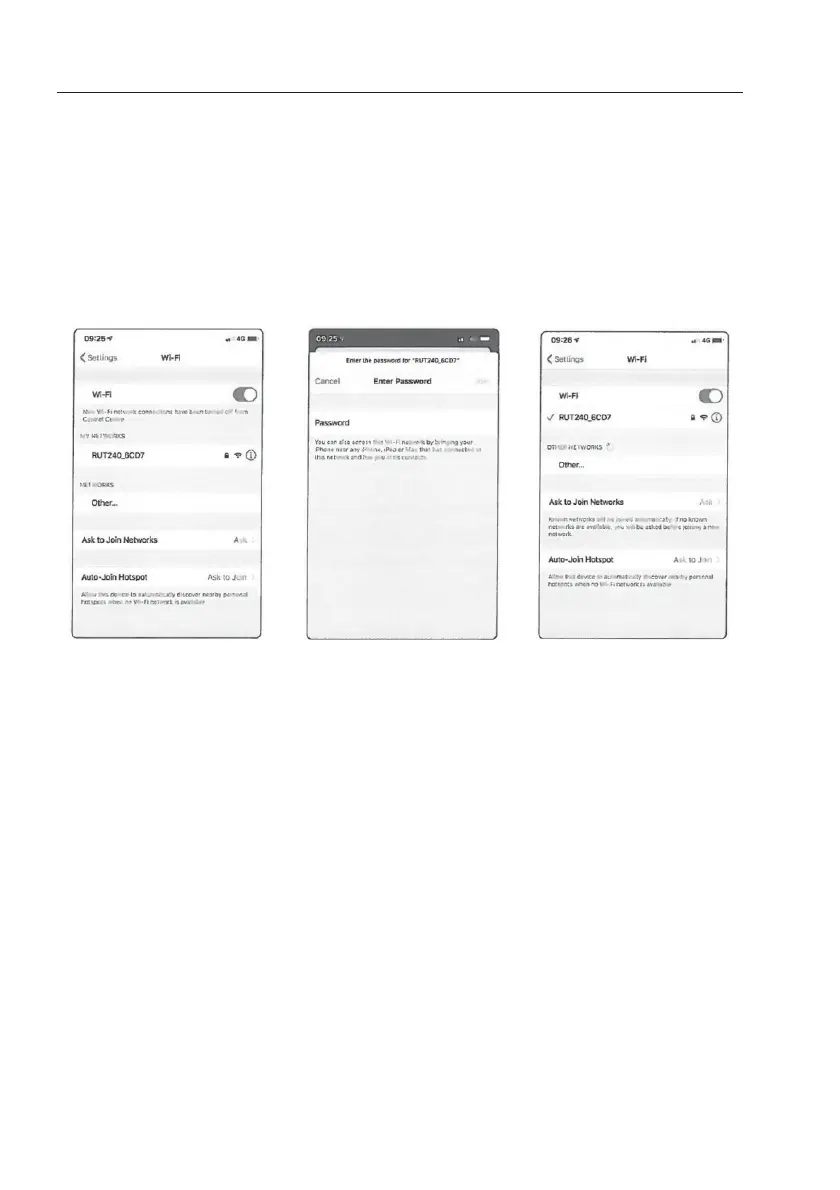
1. Navigate to your devices
Wi-Fi settings and view
available Wi-Fi networks.
2. The Roam router will be
displayed as
RUT240_XXXX. The last 4
characters will be unique
to your Roam router.
If more than one Roam is
being used within close
proximity, the Wi-Fi
network name is displayed
on the back of the router.
3. Once you select this
network, you must enter
the password. This is also
printed on the back of the
router.
Note: Password is case
sensitive
4. You are now connected
and can begin using your
Roam.
Device Settings


 To Next Page