8-93
HOW TO USE YOUR CARAVAN’S EQUIPMENT
Factory Reset
At any time, the Roam router can be reset to
its factory settings using the reset button on
the side of the router. This will restore all
settings on the router, including:
• Router SSID (network name) and
password to those listed on the back of
the router.
• Web User Interface to the username and
password listed on the front of the router.
• All custom settings will be deleted,
including any Wi-Fi connections you may
have added.
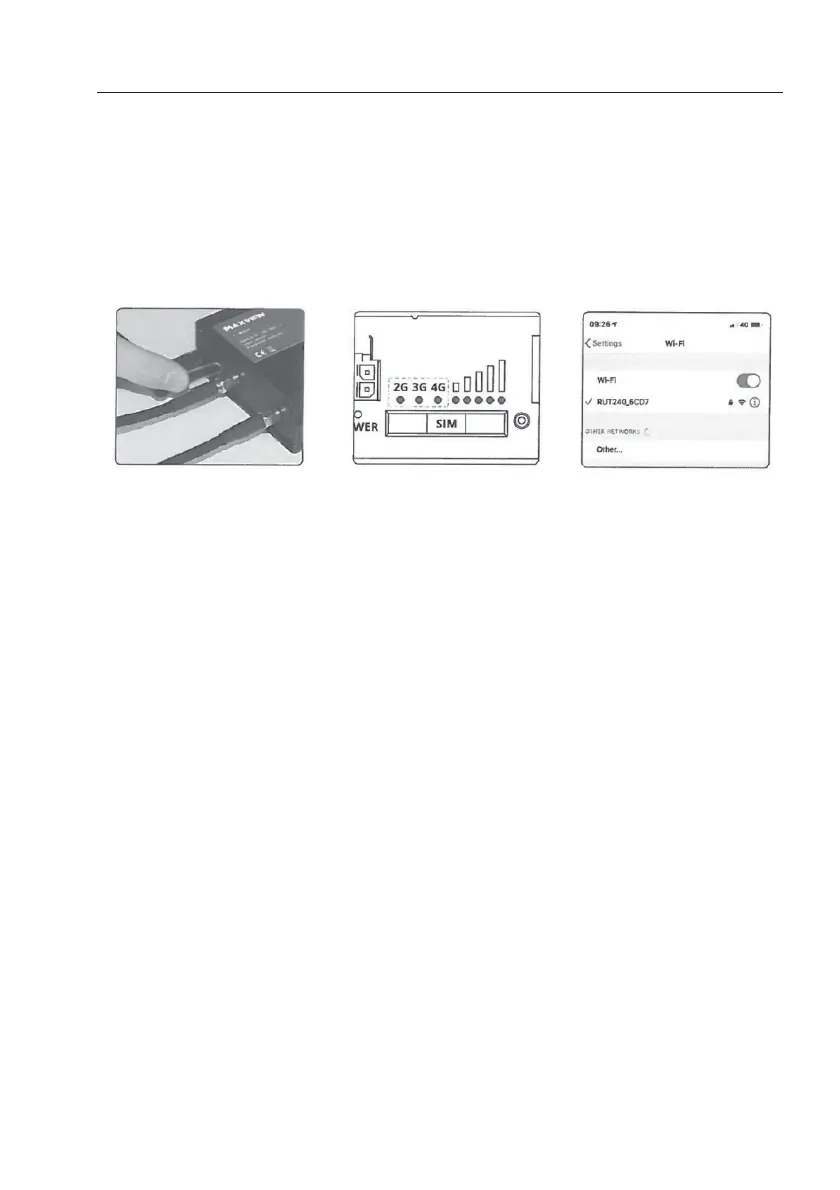
1. To complete the factory
reset, press and hold
down the reset button with
the supplied pin needle.
2. Hold for 6 seconds, until
all of the green LEDs on
the side of the router are
on.
Once released all 5 signal
strength LEDs will flash
together.
This indicates the start of
the reset process.
Note: If you don’t hold
long enough, the router
will restart but not reset.
3. Allow 3 minutes for the
router to reset. Once reset
the Wi-Fi network will be
visible and available to
connect to.


 To Next Page