8-31
HOW TO USE YOUR CARAVAN’S EQUIPMENT
Settings menu
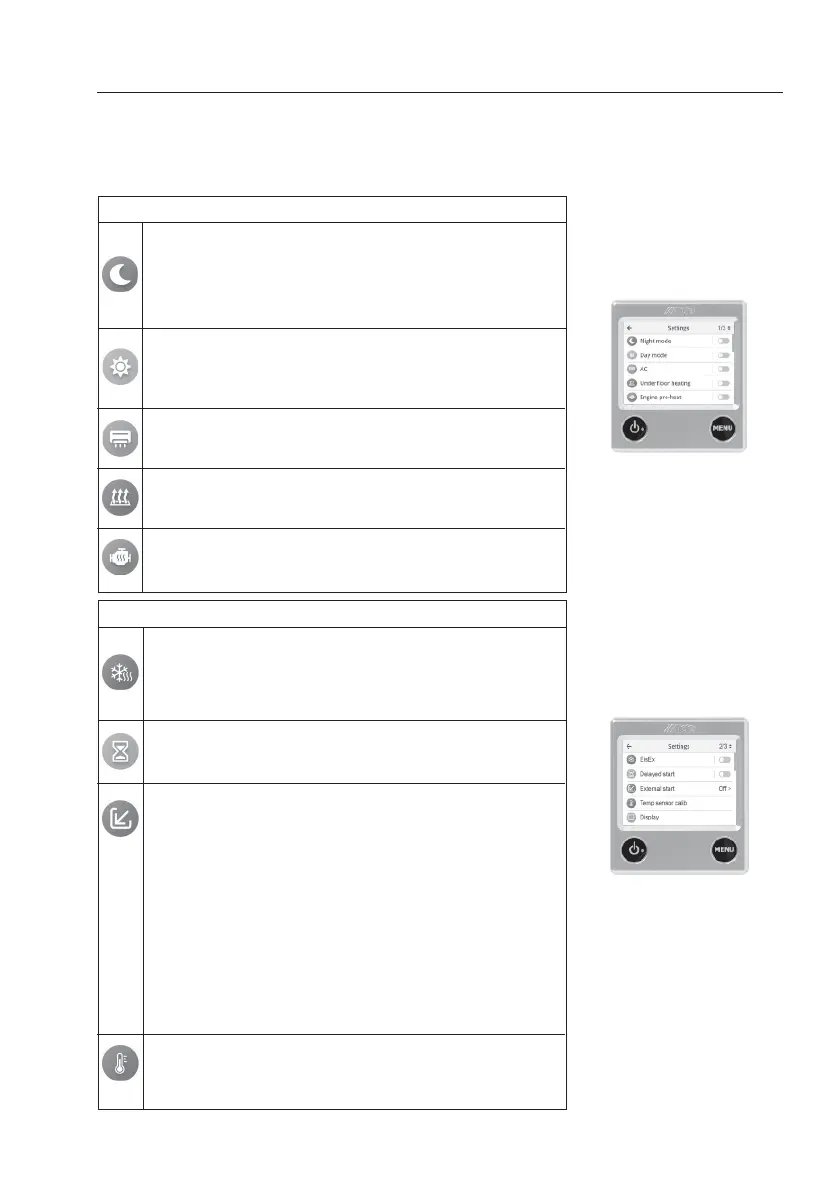
To reach the Settings menu from sleep/standby screen, press the “MENU” button. Features
marked with asterisks(*) are accessories. The Settings menu provides the following features:
Night Mode. Automatically changes select features during the
night. Choose the time interval and whether it should be done
every night or a specific night each week. The following can
be changed: temperature, status screen light, putting AC* into
night operation and changing AC sensors, turning off hot
water production and underfloor heating*.
The Settings menu (Fig. 8)
Fig. 8 Settings menu
Day Mode: Automatically changes select features throughout
the day. Choose the time interval and whether it should be
done every night or a specific night each week. The following
can be changed: temperature and hot water production.
AC* (Truma only). Start or turn off automatic climate setting
(=AC and the heating system work together); for dual-zone
installation, choose which zone the AC should follow.
Underfloor heating*. Underfloor heating. Turn the underfloor
heating on and off. Select continuous operation of the
underfloor heating by activating “Continuous”.
Engine pre-heat*. Heat the engine using the Alde heating
system. Start or turn off the function, select the start time and
the engine heating duration.
EisEx, defroster for gas regulator. Prevents ice formation in
the regulator during winter. Select on or off, and select
whether EisEx should automatically turn on when it is cold.
Automatic switch-on requires an outdoor sensor to be
installed.
The Settings menu (Fig. 9)
Fig. 9 Settings menu
Delayed start, automatic boiler start. Start or turn off the
feature, select start and end time. For the function to work, the
boiler must be switched off.
External start. The function is used when starting the boiler from
outside. When external startup is enabled, the panel should be
turned off. External start has three modes: Off, External start and
230V.
Off. The function is turned off.
External start* The function is used when starting the boiler with
external start, by switching the “Ext Start” connector on the
boiler’s circuit board. When the External Start function is
activated, the control panel should be turned off but 12V is
connected.
230V. The function is used to start the boiler by connecting 230V
to the vehicle. When the 230V function is activated, the control
panel should be switched off but 12V connected. Some vehicles
may be equipped with their own solution (winter coupling).
Temp sensor calib. offset for temperature sensor. If you feel that
the temperature sensor should be slightly adjusted, the
temperature can be adjusted by ± 5°C. Also applies to outdoor
temperature sensor.


 To Next Page