8-4
HOW TO USE YOUR CARAVAN’S EQUIPMENT
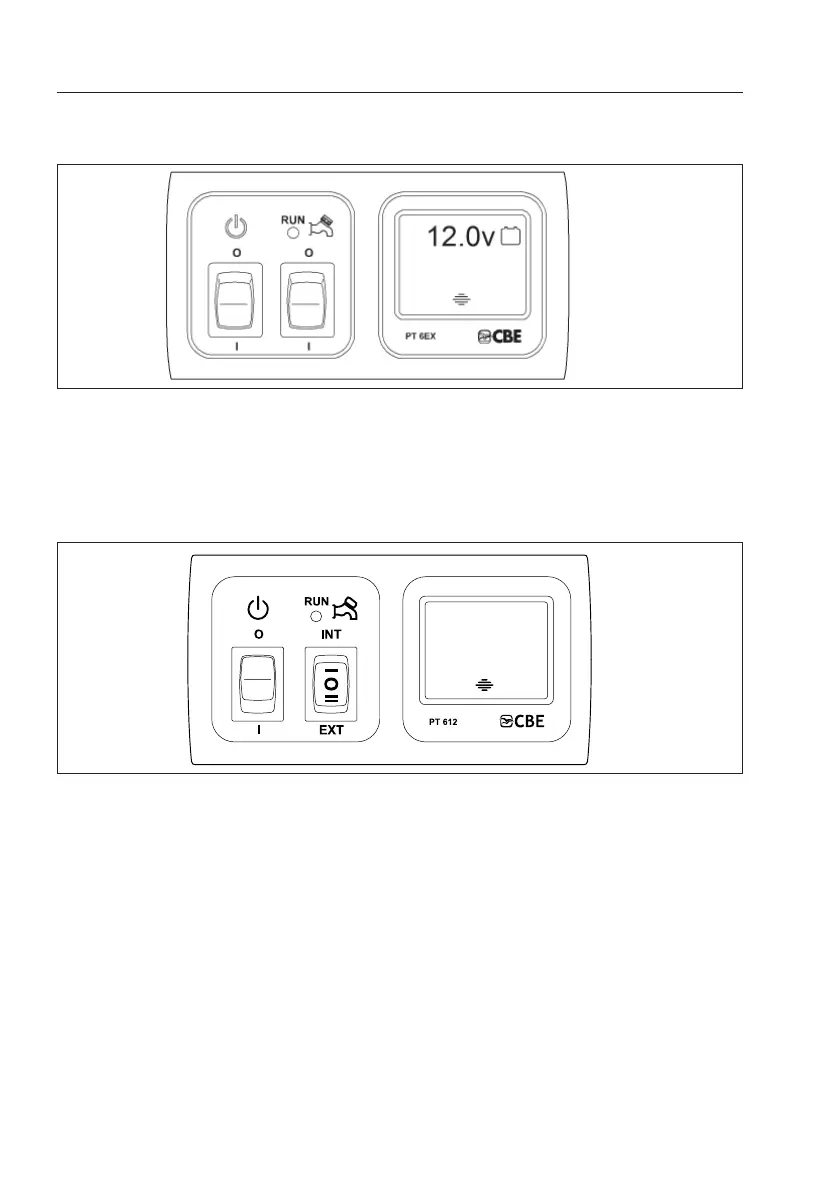
CONTROL PANEL
(AFFINITY/CAPIRO)
`
CONTROL PANEL
(CRUSADER/CAMINO AND BUCCANEER)
(i) To operate the 12V systems for your caravan depress the master switch adjacent to the pump
control switches.
(ii) To operate the pump for your water system depress the left hand rocker switch for operation
from an external water source. (Aqua roll or Water line).
Note: the right hand switch must be in the centre position.
(iii) To fill on the onboard water tank the left hand rocker switch must remain in the on position
then depress the right hand rocker switch to the EXT position. Once the tank is full the pump
will automatically switch off.
(iv) To use water from the on board water tank the left hand switch must remain in the on position
then depress the right hand switch to the INT position.
Digital readout
(v) Displays both battery voltage and onboard tank level (Note: The water level reading should
be used as a guide only. There is a degree of tolerance in the reading depending on water
type and temperature). To illuminate the back light, lightly touch the “touch button” once, the
backlight will remain on for 15 seconds.
(i) To operate the 12V systems for your caravan depress the left rocker switch.
(ii) To operate the pump for your water system depress switch marked with a tap symbol.
(iii) When the pump is running the neon light will illuminate.
(iv) When the left hand button is depressed the available battery Voltage will be displayed.


 To Next Page