EasyManua.ls Logo

Xtreamer media player - Page 87

Xtreamer media player
89 pages
Print Icon
To Next Page IconTo Next Page
To Previous Page IconTo Previous Page
Loading...
Advanced Users Guide
English
10. Firmware upgrade
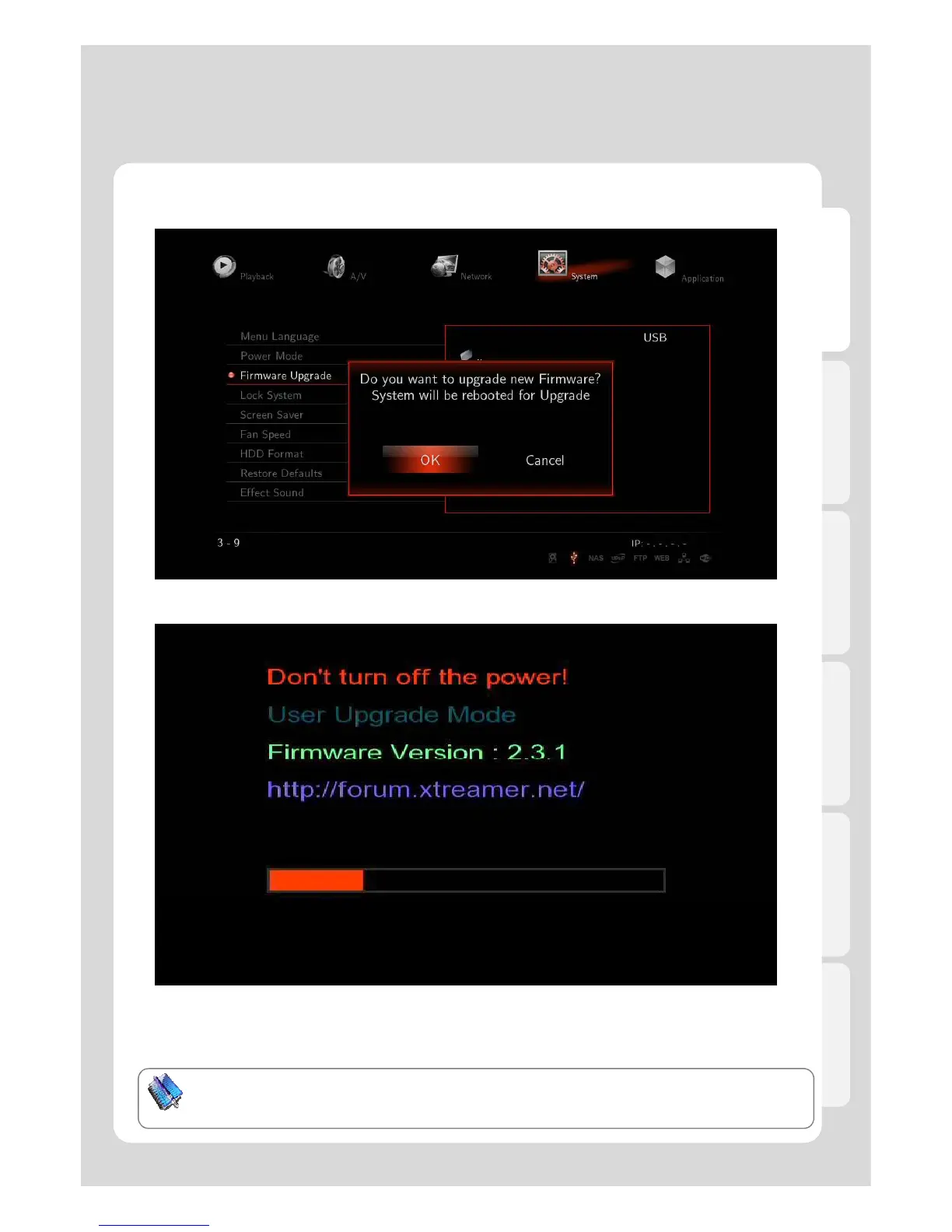
2. After window message appears, Xtreamer will be rebooted, and then Firmware update will start.
3. You will be able to see the progress of firmware upgrade; it normally takes approximately 5 minutes
to be completed
- Depending on firmware, screen setting will be able to be initial set value.
If ’t th t it ft ti it
87
-
If
you can
’t
see
th
e screen,
t
ry
it
a
ft
er reconnec
ti
ng compos
it
e.
Note: Please make sure to use a USB stick\disk-on-key no bigger than 2GB. Format the stick to FAT32.
After the process is finished, you must perform a RESTORE DEFAULT via the SETTINGS menu
This will remove all your saved pre-sets.

Table of Contents

Other manuals for Xtreamer media player

Related product manuals