Xtreme Power Conversion Corporaon
P91, TX91, TX91L, TXVR Service Manual
Page 16
Uninterrupble Power Supply
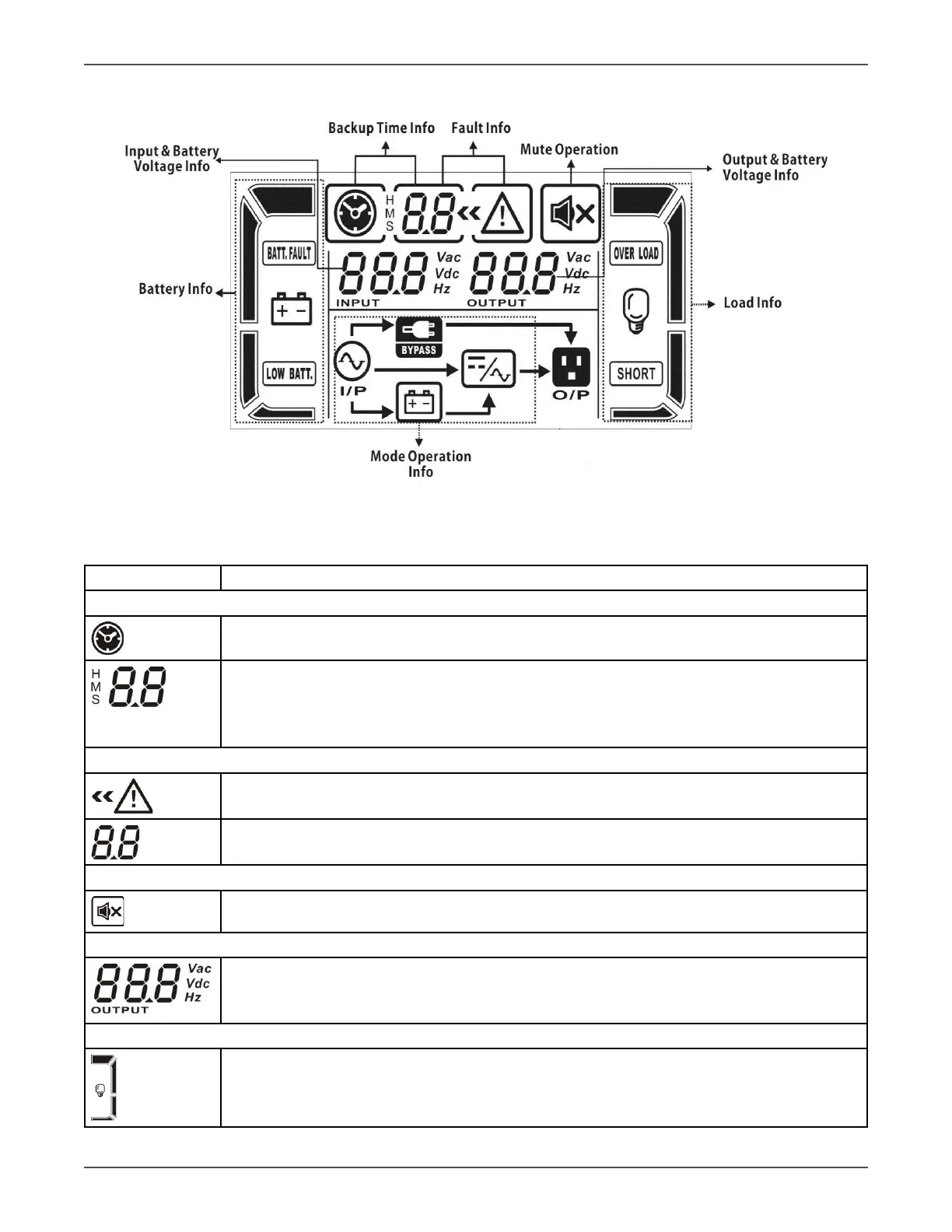
6.2 LCD Display
Figure 6.1 LCD Display
6.3 LCD Display Icon
Display Funcon
Backup me informaon
Indicates the backup me in pie chart.
● Indicates the backup me in numbers.
H: hours, M: minutes, S: seconds
● When UPS is in Bypass mode, these two numbers indicang the power capacity; 06 for 6K
model and 10 for 10K model.
Fault informaon
Indicates that the warning and fault occurs.
Indicates the fault codes, and the codes are listed in details in secon 7-1.
Mute operaon
Indicates that the UPS alarm is disabled.
Output & Baery voltage informaon
Indicates the output voltage, frequency or baery voltage. Vac: output voltage, Vdc: baery
voltage, Hz: frequency
Load informaon
Indicates the load level by 0-25%, 26-50%, 51-75%, and 76-100%


 To Next Page