Xtreme Power Conversion Corporaon
P91, TX91, TX91L, TXVR Service Manual
Page 28
Uninterrupble Power Supply
8. Test Step
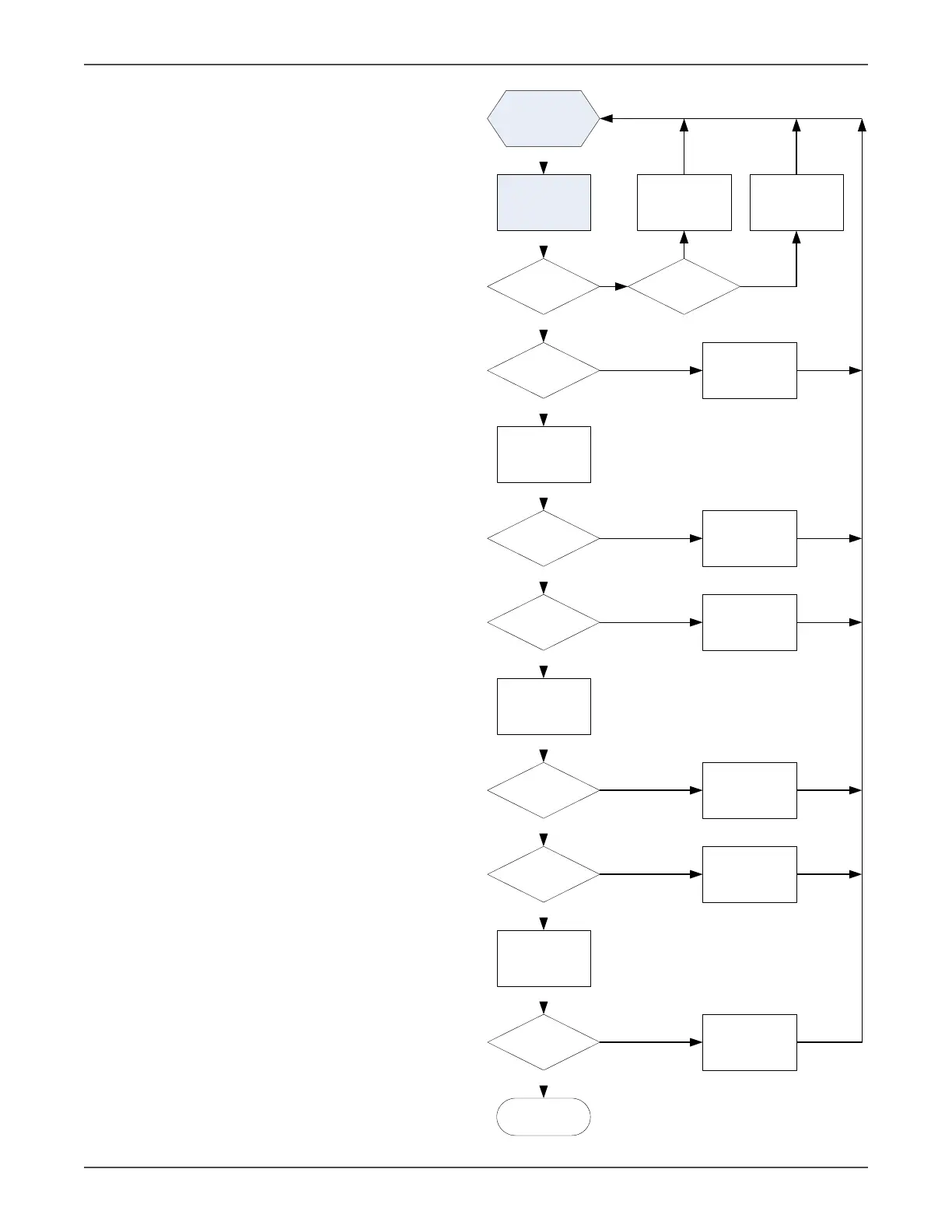
Aer replacing all defected components, follow this ow
chart to verify the repair result and the reliability of the
UPS.
Repair the UPS
according to the
trouble shooting
Connect the DC
source and press ON
button less than 0.5s
LCD light and fan
rotates?
DC voltage on the
SPS is OK?
Information of the
LCD display OK?
.
.
CNTL failure and
repair it
BUS voltage rise to
V?
Press ON button
more than 0.5s
INV voltage rise to
V?
INV/CNTL failure and
repair it
LCD light and fan
rotates?
Shutdown and turn
on the IP breaker
without DC source
and battery
BUS voltage rise to
V?
Rectifier/CNTL
failure and repair it
Press ON button
more than 0.5s
Yes
Yes
Check the wiring and
correct it
No
Yes
Yes
Yes
Yes
Yes
Yes
Yes
No
No
No
No
No
CNTL failure and
repair it
No
No
End
PSDR board failure
and repair it
1. Cable from LCD to
CNTL disconnected.
2. Cable from LCD to
SPS-Charger board disconnected.
3. SPS failure
PFC circuit on the
main board / CNTL
failure and repair it
BUS voltage remains at 360V
and INV voltage ises to the
preset output voltage value


 To Next Page