Enable buzzer alarm when recording error
Enable a relay signal to be sent upon an event occurring
Please see section ‘Video Loss’ (Event setup – page 25) on further details and
Receiver Setup.
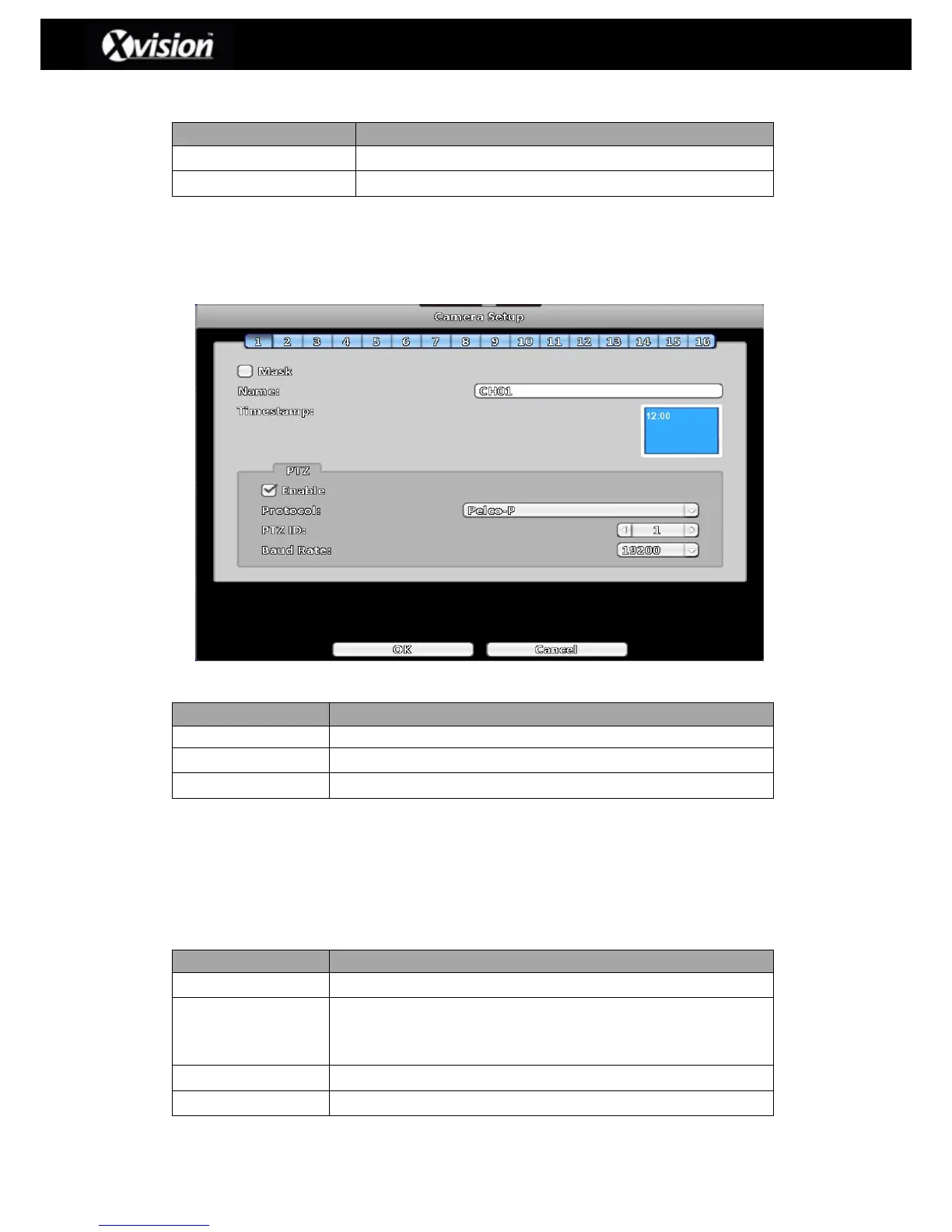
3-3 Camera Setup
Camera Setup Description
Check the box to Enable/Disable mask function for LIVE mode
Set Time Stamp position ( by using adjacent blue box)
3-3.1 PTZ Setup
The DVR allows users to control PTZ functions of your camera (See image above). Please
ensure that the PTZ camera is connected correctly to the RS-485 port of DVR.
PTZ Setup Description
Click the box to Enable/Disable PTZ function.
Set up the protocol of PTZ cam. The supported protocols are:
PELCO-D, PELCO-P, Merit LiLin 1, Merit LiLin 2, SAMSUNG,
LG-MultixE
Select the PTZ ID (values from 0 to 255)
Select Baud Rate for PTZ (2400, 4800, 9600,19200)


 To Next Page
 Loading...

