27
6. To check whether or not other stations are operating within communications range,
press the [GM/X] key to turn the GM (Group Monitor) function ON.
•
The other stations also need to turn the GM (Group Monitor) function ON.
•
Refer to the separate Operating Manual GM Edition for details on how to use the
GM function (download the manual from our YAESU website).
7. Press the [GM/X] key to turn the GM (Group Monitor) function OFF and return to the
normal operation.
• While setting the DG-ID number, pressing and holding the [GM/X] key will set the transmit
and the receive DG-ID numbers to “00”.
• If the receive DG-ID is set to a number other than “00”, only signals with that DG-ID will be
received. Normally, set the receive DG-ID number to “00” except when communication is
desired only with group members.
• The transmit and receive DG-ID default number is set to “00”.
Communicating only with the specific members by setting the DG-ID number
except for “00”
Example: Set the DG-ID number of to “50”
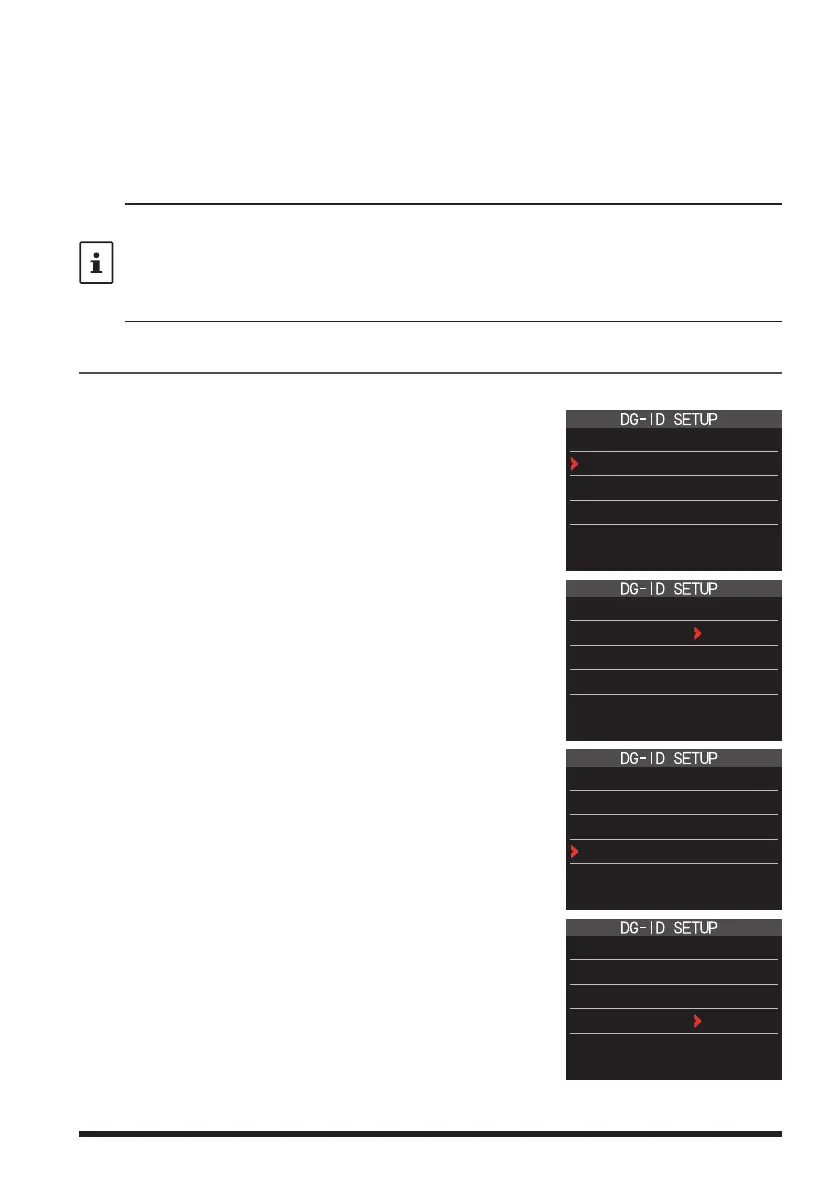
1. Press the [F ] key, and touch [DG-ID].
If [DG-ID] is not displayed, touch [BACK
] to display
[DG-ID] and then touch it.
The DG-ID number setting screen will be displayed.
DG-ID TX : 00
DG-ID RX : 00
2. Press the [F ] key, then rotate the DIAL knob to
set the transmit DG-ID (DG-ID TX) to “50”.
DG-ID TX : 50
DG-ID RX : 00
3. Press the [F ] key again, then rotate the DIAL
knob to select the receive DG-ID (DG-ID RX).
DG-ID TX : 50
DG-ID RX : 00
4. Press the [F ] key, then rotate the DIAL knob to
set the receive DG-ID (DG-ID RX) to “50”.
DG-ID TX : 50
DG-ID RX : 50


 To Next Page