40 Chapter 4—Input Channels
03D—Owner’s Manual
Channel Delay
The Delay function can be used to compensate for microphone placement, or simply
as a delay effect. Three types of delay are available: Delay, Slap, and Echo. Delay can be
applied to input channels 1 to 24 and the stereo input channel.
When channels are configured as a stereo pair using the Pair function (Stereo Pairs on
page 114), the channel delays of the two channels work together, and parameter adjust-
ments can be made with either channel selected. You cannot set different parameters for
the odd and even channels.
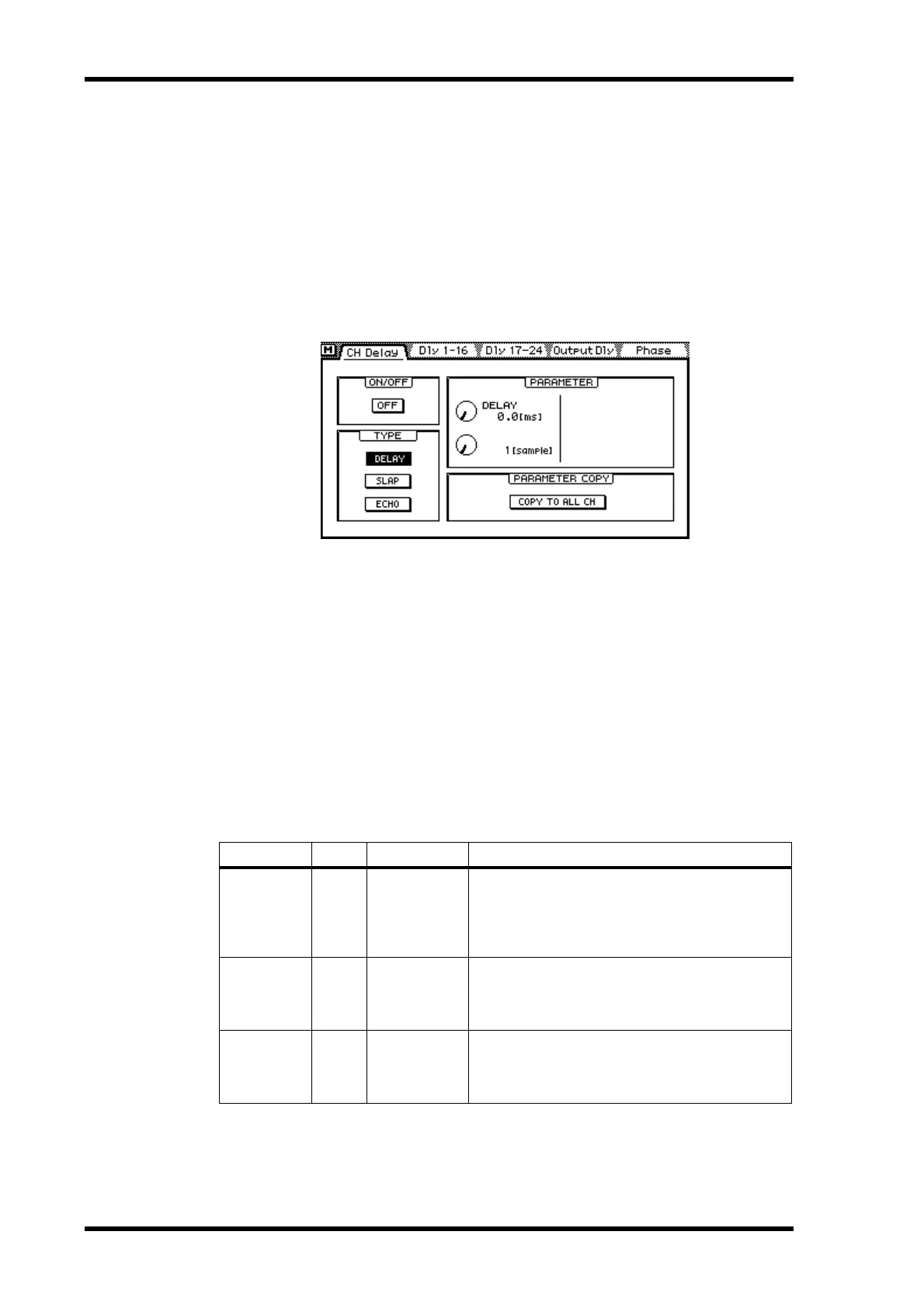
1. Use the [DELAY/∅] button to locate the CH Delay page shown below.
2. Use the [SEL] and [MIXING LAYER] buttons to select a channel. See Mix-
ing Layer on page 31 for more information.
3. Use the cursor buttons to select the delay parameters and the [ENTER]
button and PARAMETER wheel to set them.
If you are using a mouse, simply click the switches and drag the rotary controls.
ON/OFF—This switch is used to turn on and off the delay. When the cursor is located
within the PARAMETER window, the [ENTER] button can be used to turn on and off
the delay without having to select the ON/OFF switch.
TYPE—These switches are used to select the type of delay: DELAY, SLAP, or ECHO.
The echo parameters are reset when the type of delay is changed.
PARAMETER—The controls in this window are delay parameter controls. The num-
ber of controls available depends on type of delay selected.
When the type of delay is changed from Delay to either Slap or Echo, the parameters
are set as follows: Delay = 172 ms, Mix = 50%, Feedback = 18%. When the type is
changed from Slap or Echo to Delay, the parameters are set as follows: Delay = 0 ms,
Mix = 0%, Feedback = 0%.
Parameter Type Range Description
DELAY
DELAY
SLAP
ECHO
9,600 samples
Delay can be specified in either seconds or sam-
ples. The actual delay in seconds depends on the
sampling rate. The maximum delay is 217.7 milli-
seconds at a sampling rate of 44.1 kHz, and 200.0
milliseconds at a sampling rate of 48 kHz.
MIX LEVEL
SLAP
ECHO
–100 to +100
Determines the level of delayed signal. 0 is no
delay. +50 is a 50:100 mix of delayed and dry sig-
nals. +100 is a 100:100 mix. Negative values are
the same except the delayed signal is inverted.
FB. GAIN
ECHO –99 to +99
Determines how much of the delayed signal is fed
back into the delay. 0 is no feedback. +99 is maxi-
mum feedback. Negative values are the same
except the feedback signal is inverted.



 To Next Page