Using Surround Pan 69
03D—Owner’s Manual
Stereo Link
For input channels configured as a stereo pair you can select a pattern and trajectory
and move both signals simultaneously.
1. Configure two input channels as a stereo pair.
See Stereo Pairs on page 114 for more information.
2. Use the cursor buttons to select the ST LINK switch, and
then press the [ENTER] button to turn on the Stereo Link
function.
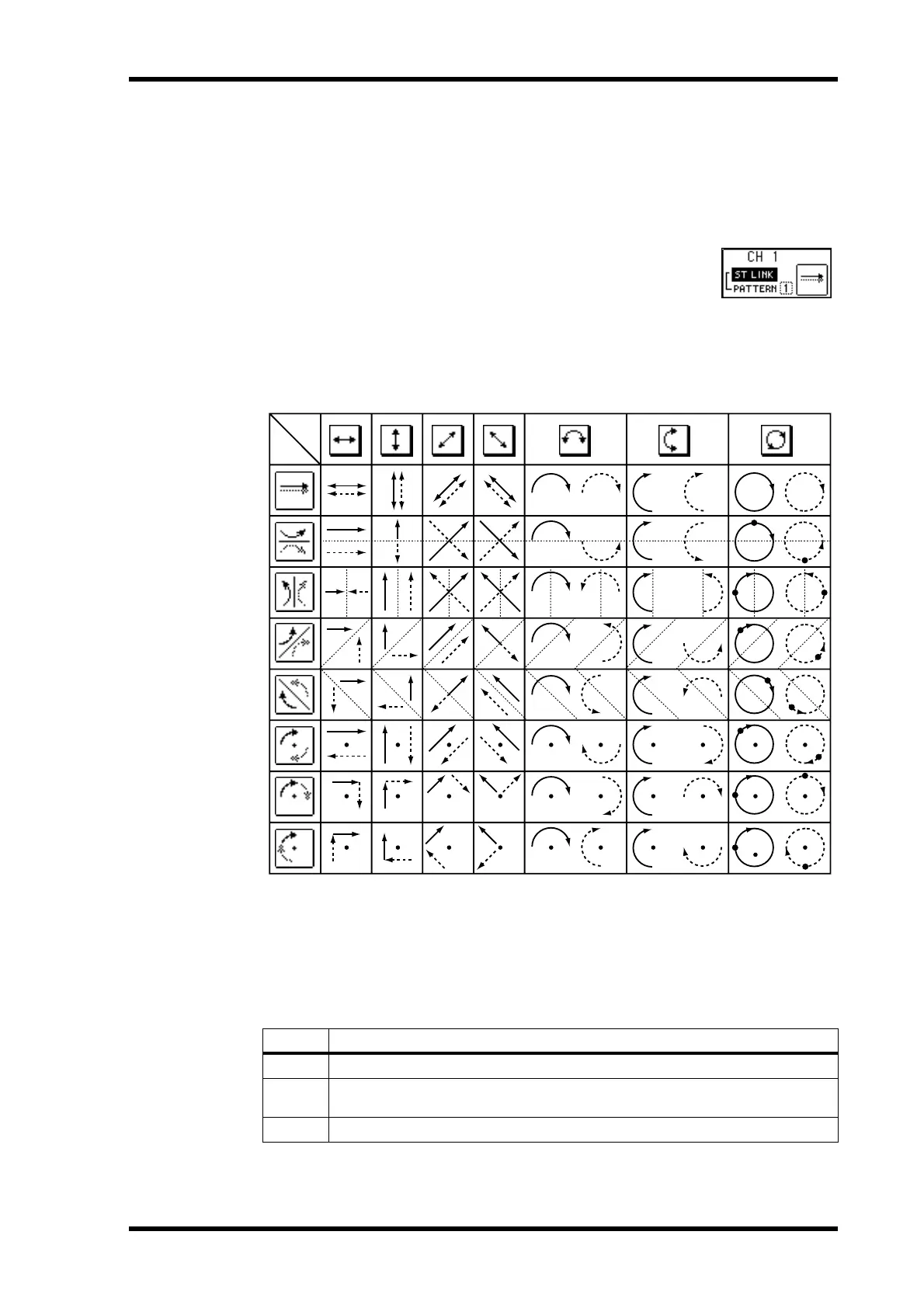
3. Use the cursor buttons to select the PATTERN parameter and the PARAM-
ETER wheel to select a pattern.
The following illustration shows how the two channels are panned in each pattern for
each of the available trajectories.
CSR (Center:Side Ratio)
For the 3+1 and 3+2+1 surround modes that use a center speaker, the CSR (Center:Side
Ratio) control can be used to set the amount of front-center sound heard through the
center and left and right front speakers.
CSR Description
0
The front-center sound appears only in the left and right speakers.
0.5
The front-center sound appears in the center and left and right speakers at the
same level.
1.0
The front-center sound appears only in the center speaker.
Pattern
Trajectory



 To Next Page