En 23
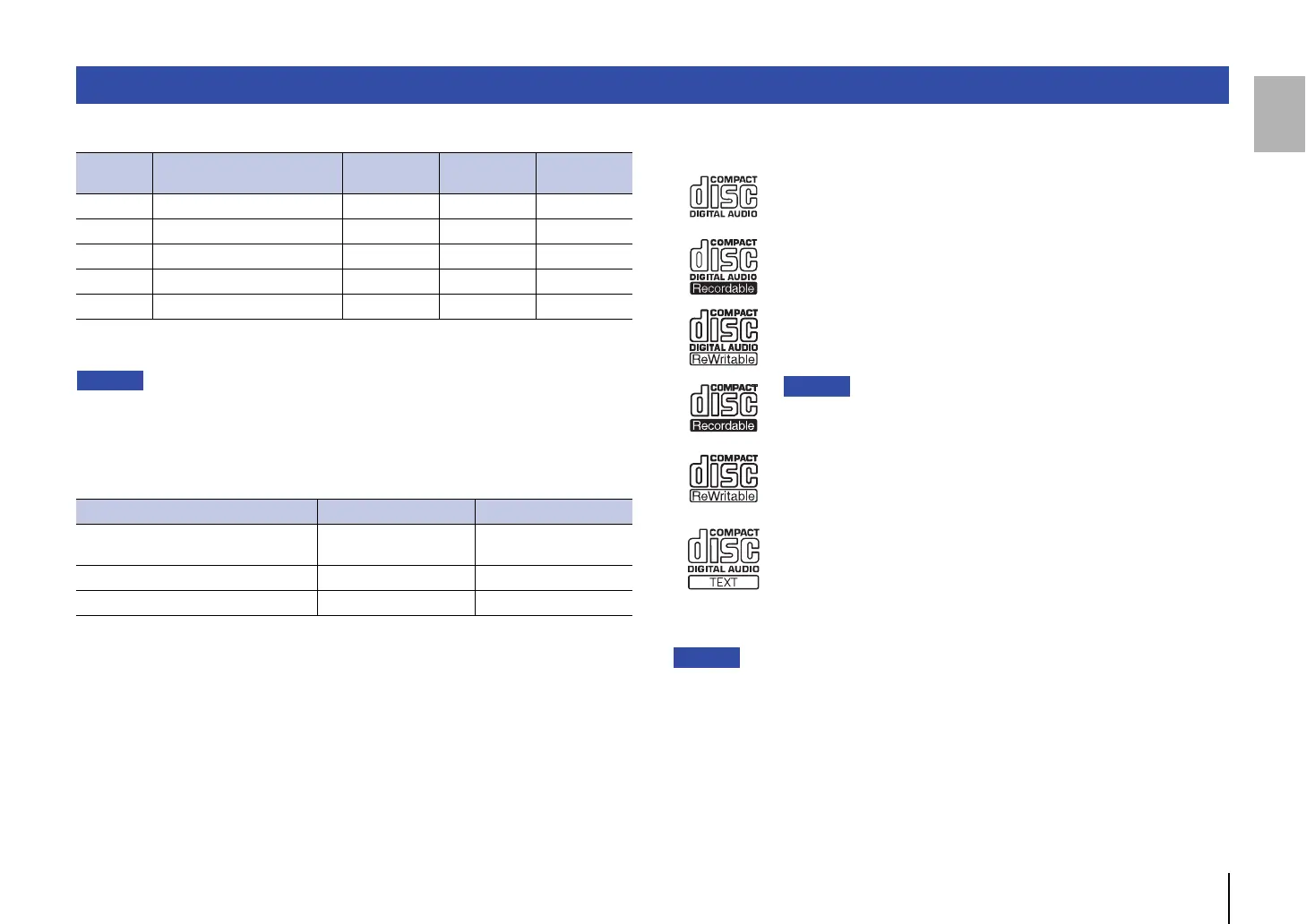
❑ Supported file formats
* Linear PCM format only.
• Files on a data CD or USB flash drive will be played in chronological order based on date of
creation.
• This unit supports ISO9660 format discs.
• If the unit is playing a VBR (variable bitrate) file, an accurate elapsed time might not be displayed.
• Digital Rights Management (DRM) encoded content cannot be played back.
❑ Supported discs
Please use discs with the following logos.
• Do not use odd-shaped discs or discs with tape or a decal attached. Otherwise, malfunction of the
unit may occur.
• This unit might not play some CD-RW discs or discs that were improperly recorded.
• To play an 80 mm mini CD, place it in the inner circular indentation of a disc slot on the disc tray. Do
not place a regular 120 mm CD on top of an 80 mm mini CD.
Supported file formats/discs/USB flash drives
File Sampling frequency (kHz) Bit depth (bit) Bitrate (kbps)
Number of
channels
MP3 32/44.1/48 — 32-320 2
WMA 32/44.1/48 — 48-192 2
AAC 32/44.1/48 — 8-320 2
WAV * 32/44.1/48/64/88.2/96 16/24 — 2
FLAC 32/44.1/48/64/88.2/96 16/24 — 2
Data CD USB flash drive
Number of folder hierarchies (including
the root folder)
99
Number of folders 999 999
Number of files 1100 65535
Compact discs (audio CDs)
CD-R and CD-RW discs
• Discs with one of the following descriptions:
FOR CONSUMER
FOR CONSUMER USE
FOR MUSIC USE ONLY
• For CD-R or CD-RW discs, the unit plays only finalized discs.
• This unit might not play some CD-R/CD-RW discs or discs that were
improperly recorded.
CD-TEXT discs
These discs contain embedded text information, such as album
titles, song names, and artist names. This information (alphanumeric
characters and some symbols only) along with the elapsed time will
be displayed.


 To Next Page